View Products


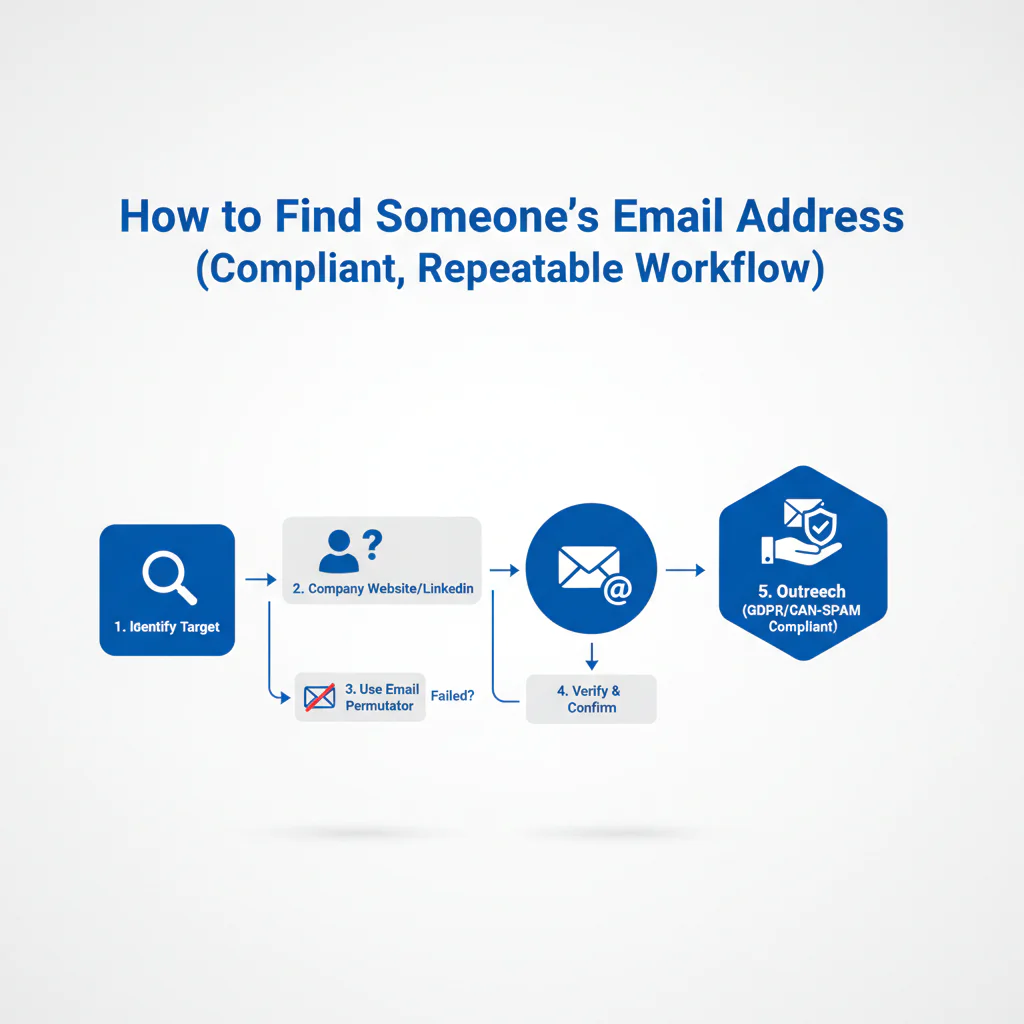
Table of Content
Byline: Swordfish.ai RevOps Team
Who this is for
- SDRs/AEs who need a repeatable way to find a work email using domain patterns and verification, not guesswork.
- Recruiters and talent teams who need to contact candidates without risky scraping behavior.
- RevOps leaders who want a governed enrichment workflow that protects cold email deliverability.
- Founders doing targeted outreach who need accuracy and clear opt-out handling.
Quick Answer
- Core Answer
- To learn how to find someone’s email, confirm the person and company domain, generate 2–3 domain patterns, run email verification, then use an email finder to confirm identity. Send compliant outreach that’s role-relevant, includes opt-out, and suppresses future sends.
- Key Insight
- Most misses come from wrong person, wrong domain, or unverified guesses. Use LinkedIn context to confirm employer and role, then verify before you ever sequence.
- Best For
- B2B outreach and recruiting where you can explain relevance, honor opt-out requests, and keep a defensible record of data source and verification status.
Compliance & Safety
This method is for legitimate business outreach only. Always respect Do Not Call (DNC) registries and opt-out requests.
Do not scrape in ways that violate site terms. Use for legitimate outreach with opt-out and applicable consent.
The fastest reliable method is: identify the person and company domain, generate likely formats, verify the email, and enrich with a reputable provider—then keep outreach relevant and easy to opt out of.
Step-by-step method
Framework: The Email Finding Ladder: Guess → Verify → Enrich → Outreach
Use this workflow because it’s auditable and it protects sender reputation.
Step 1: Confirm identity and role using LinkedIn context
- Confirm the person is at the company today (not last year).
- Confirm the role/team so you don’t email the wrong function.
- Capture the LinkedIn profile URL in your CRM so you can audit later.
- If you don’t know the person yet, identify the role owner on LinkedIn before you guess any address.
If you’re standardizing this across a team, start with the ultimate contact finder workflow so email, mobile, and CRM fields stay consistent.
Step 2: Identify the correct company domain (and don’t assume)
- Pull the domain from the company website, not a search snippet.
- Watch for parent vs subsidiary domains and product domains.
- For multi-region orgs, confirm whether email uses a regional domain.
When reps prospect from LinkedIn, a governed browser workflow matters. The Swordfish chrome extension flow helps capture the domain + LinkedIn URL + verification status in one motion and reduces copy/paste errors.
Step 3: Generate likely domain patterns (with examples you can reuse)
Most companies use a small set of domain patterns. Generate a short list based on what you can observe publicly.
- Example A: first.last@company.com
- Example B: first@company.com
- Example C: f.last@company.com
Industry variance is real. Some SaaS teams skew toward shorter formats (first@), while more regulated orgs sometimes add initials or regional domains. Test a small set and let verification guide you.
Filter out generic inboxes (info@, support@, sales@) when you’re inferring patterns. They don’t help you reach a specific person, and they muddy attribution.
Step 3a: Confirm domain patterns using public pages (without scraping abuse)
If you’re stuck, you can often infer domain patterns from public pages and documents. Keep it targeted and avoid automation that violates terms.
- Company site locations to check: Press, Team, About, Investor Relations, Support, and downloadable PDFs.
- site:company.com “@company.com” to find how emails appear on that site
- site:company.com “press” “@company.com” to find press contact patterns
- site:company.com filetype:pdf “@company.com” to catch emails in PDFs
- “First Last” “@company.com” to find a named mailbox example
- “@company.com” “email” to find pages that explicitly list contact details
If you find jane.doe@company.com in a PDF, test john.smith@company.com before you expand the pattern list.
Step 4: Run email verification before you add anything to a sequence
Email verification is the gate. Pattern guessing without verification is how sender reputation gets burned.
Variance explainer: verification results differ because domains vary in how they respond to mailbox checks, some orgs use catch-all routing, and some block probes. Treat verification as signal validation, not certainty.
No verification, no sequence.
If you need capture plus validation in one workflow, a chrome email extractor style process reduces missed steps.
Step 5: Enrich from reputable sources and store provenance
Once you have a likely email, contact enrichment helps confirm the match and fill missing fields (department, location, LinkedIn URL). Use enrichment to reduce wrong-recipient risk and keep an audit trail.
Standardize governance with contact data compliance rules: record the data source, timestamp, and verification status. That’s how you debug deliverability and handle opt-out consistently.
Step 6: Send compliant outreach (relevant, minimal, opt-out included)
- Lead with why this is relevant to their role.
- Make one ask.
- Include a clear opt-out and honor it fast.
- Don’t mass-send low-confidence addresses.
Two-line outreach example: “Hi [Name] — I’m reaching out because you own [area] at [Company]. If [problem] is on your 2026 list, I can share what we’re seeing across similar teams. If this isn’t relevant, reply ‘no’ and I won’t follow up.”
Common Mistake
Are you sequencing guessed emails before email verification and then blaming the tool when bounces spike?
Checklist: Weighted Checklist
Use this to prioritize effort. The weighting is based on standard failure points in outbound: wrong identity, wrong domain, and skipped verification.
- High impact, low effort: Confirm current employer and title on LinkedIn before guessing domain patterns.
- High impact, low effort: Run email verification before the first send and before sequencing.
- High impact, medium effort: Validate the correct company domain (subsidiary vs parent) before generating formats.
- Medium impact, low effort: Use role/team context to avoid wrong-recipient outreach.
- Medium impact, medium effort: Use an email finder for contact enrichment and store provenance (source + timestamp + verification status) in CRM.
- Lower impact, higher effort: Manual hunting across random directories when you don’t have domain + LinkedIn context.
Primary CTA: Get the Chrome Extension
Decision Tree: Conditional Decision Tree
- If you have full name + company domain, then generate 2–3 domain patterns and run email verification.
- If verification is valid and enrichment matches the same person, then add to CRM with source + timestamp and send compliant outreach with opt-out.
- If verification returns catch-all or risky, then do not sequence; use 1:1 only, request an intro, or use the company contact form.
- If you only have a name (no company), then use LinkedIn to confirm current employer before you generate any domain patterns.
- Stop Condition: If you cannot confirm employer or domain, stop. Anything else increases wrong-recipient risk and compliance exposure.
Troubleshooting Table: Diagnostic Table
| Symptom | Root Cause | Fix |
|---|---|---|
| Bounces spike after adding a new source | Unverified addresses entering sequences | Gate all new emails through email verification before sequencing |
| “Not the right person” replies | Identity mismatch or stale LinkedIn employment | Reconfirm on LinkedIn; store the LinkedIn URL and role at time of capture |
| Low replies even with low bounces | Targeting mismatch (wrong role/team) or generic messaging | Use role context; rewrite the first line to explain relevance in one sentence |
| Verification shows deliverable but mail routes to a shared inbox | Alias/shared mailbox captured instead of a named mailbox | Filter out generic inboxes; regenerate domain patterns for named mailboxes |
| Complaints or opt-out failures | No suppression workflow or unclear data provenance | Implement suppression + audit trail; honor opt-out requests across systems |
How to improve results
Standardize inputs so enrichment and verification are repeatable
- Require: full name, company, company domain, LinkedIn URL.
- Store: data source, timestamp, verification outcome, opt-out status.
Protect cold email deliverability with workflow gates
- Never sequence unverified emails.
- Quarantine risky/catch-all results for 1:1 only or drop them.
- Monitor sender health using your mailbox provider tools.
Practical references: Email sender guidelines and Google Postmaster Tools.
Use multi-channel thoughtfully (don’t turn it into a compliance problem)
Combining email plus mobile can improve contact rates in real pipelines, but treat mobile as higher-sensitivity data. If you use it, keep it targeted, relevant, and opt-out aware.
Legal and ethical use
- Consent and lawful basis: requirements depend on jurisdiction and message type. When you’re unsure, default to conservative targeting and get counsel.
- Opt-out and suppression: include an opt-out in outreach, honor opt-out requests fast, and suppress across systems.
- Not for sensitive decisions: contact data is for communication, not for employment, housing, credit, insurance, or eligibility decisions.
- Avoid scraping abuse: do not automate collection in ways that violate site terms or create privacy risk.
- Compliance frameworks vary: teams commonly reference CAN-SPAM and GDPR, but your obligations depend on jurisdiction and use case.
- Prefer work emails for work outreach: avoid personal emails unless you have a clear, legitimate reason and consent where required.
When you use LinkedIn for identity confirmation, respect platform terms and constraints in the User Agreement.
Suppression must be cross-system (CRM, sequencer, enrichment tool), or it won’t hold.
If you need a governance baseline across teams, use contact data compliance as the standard for training, sourcing, and auditability.
Evidence and trust notes
Last updated: Jan 2026
- This workflow targets the highest-frequency outbound failure points: wrong person, wrong domain, and skipping email verification.
- Verification is described as signal validation because catch-all domains and blocked probes create uncertainty.
- Compliance boundaries are explicit: legitimate business outreach, opt-out handling, and no scraping that violates site terms.
- Deliverability references are mailbox-provider guidance rather than vendor claims.
- Process is designed for auditability: source, timestamp, verification status, and opt-out status are first-class fields.
Implementation Notes
- Visuals to add
- Email Finding Ladder graphic (Guess → Verify → Enrich → Outreach)
- Decision-tree diagram that matches the Stop Condition logic
- Annotated example showing how to infer domain patterns from one public named email mention
- Schema notes
- FAQPage and Article JSON-LD are included in the WP bundle.
- Tracking
- Primary conversion event: Extension install
- Secondary conversion event: enrichment click
Next steps
- Day 1: Standardize required inputs (name, company, domain, LinkedIn URL) and align your process to the contact finder pillar.
- Day 3: Implement the capture workflow using the Swordfish chrome extension and require email verification before sequences.
- Day 7: Add contact enrichment governance using the ultimate contact finder flow and document suppression and opt-out handling in your CRM.
Secondary CTA: Try Contact Enrichment
FAQ
How do I find a work email address?
Confirm the company domain, generate a short list of domain patterns for the person’s name, then run email verification. Use LinkedIn to confirm they’re currently employed there so you don’t email the wrong person.
What’s the best email pattern?
There isn’t one standard. The most common are first.last@domain and first@domain, but companies vary. Generate 2–3 likely domain patterns and rely on email verification and enrichment to confirm the match.
How do I verify an email?
Email verification checks format, domain mail routing, and mailbox-level signals when available. Treat it as signal validation because some domains are catch-all or restrict verification responses.
Is it legal to find someone’s email?
It can be legal for legitimate business outreach when you follow applicable laws and platform terms. Keep messages relevant, include opt-out, honor suppression, and maintain a record of source and verification status.
Should I scrape emails?
No, not in ways that violate site terms or create privacy risk. Use a controlled process: domain patterns, email verification, and an email finder for contact enrichment, then compliant outreach with opt-out.
What is email verification?
Email verification is a process used to assess whether an email address is likely deliverable by checking format, domain configuration, and mailbox signals where supported.
How to avoid spam traps?
Avoid random lists and bulk guessing. Verify before sending, suppress bounces and opt-outs, and keep list hygiene tight so you don’t repeatedly hit dead or risky addresses.
How to stay compliant?
Use contact data for legitimate outreach, provide a clear opt-out, honor opt-out requests quickly, and avoid sourcing methods that violate site terms. Keep an audit trail: source, timestamp, and suppression status.
About the Author
Ben Argeband is the Founder and CEO of Swordfish.ai and Heartbeat.ai. With deep expertise in data and SaaS, he has built two successful platforms trusted by over 50,000 sales and recruitment professionals. Ben’s mission is to help teams find direct contact information for hard-to-reach professionals and decision-makers, providing the shortest route to their next win. Connect with Ben on LinkedIn.