View Products


- Core Concept
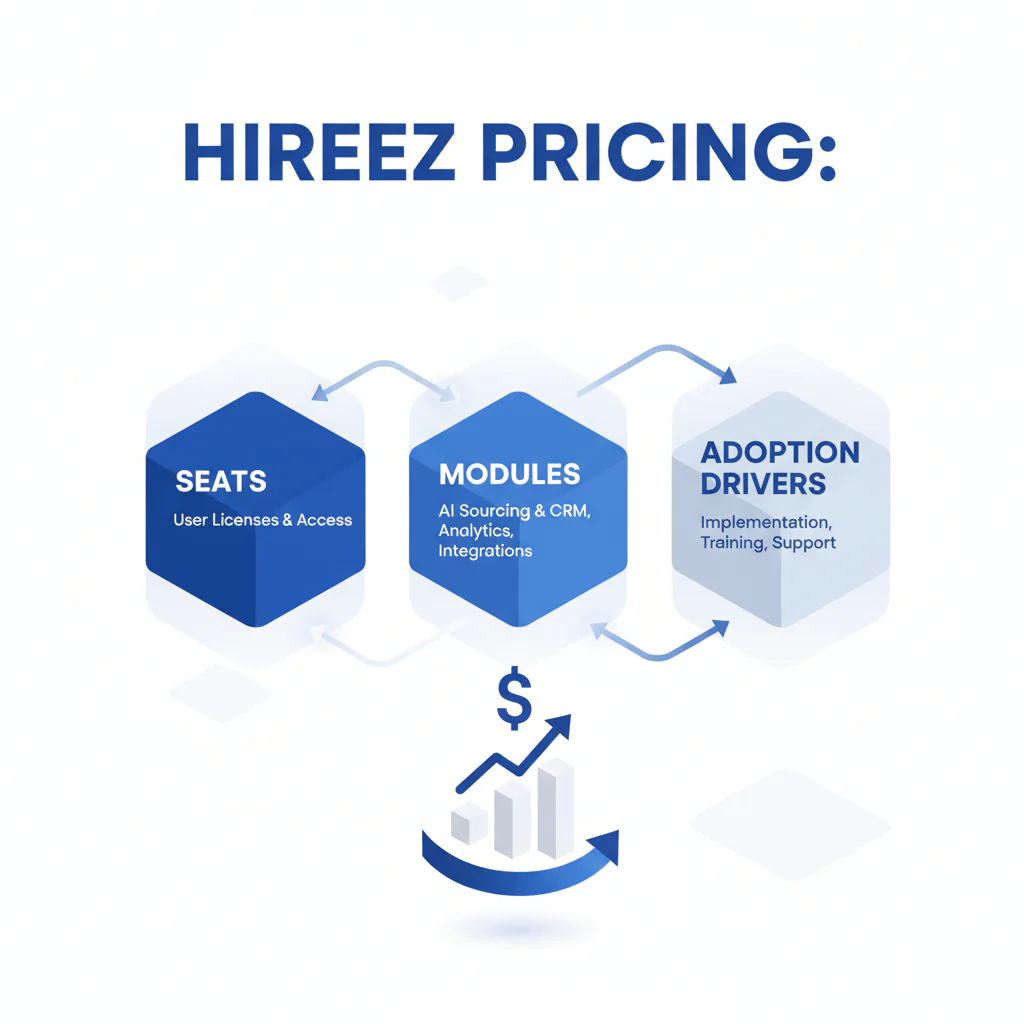
- hireez pricing is typically quote-based and driven by pricing drivers like seats (licensed users) and seats modules (seat count plus add-on modules), then shaped by usage limits (such as credits) and whether the team adopts the workflow day-to-day.
- Key Insight
- Pricing only works when daily users adopt the tool; otherwise you pay for seats and modules that don’t change hiring throughput.
- Ideal Candidate Profile
- Recruiting leaders buying or renewing HireEZ (formerly Hiretual) who need predictable placement speed, measurable booked screens per recruiter, and clean opt-out handling.
HireEZ Pricing: Seats, Modules, and Adoption Drivers
By: Head of Talent, Swordfish.ai
Who this is for
- Heads of Talent and TA Ops leads who need a clear cost story based on seats, modules, and adoption.
- Recruiting teams scaling outbound hiring across the US and EMEA who need faster contact-to-screen without degrading candidate experience.
- Teams renewing and trying to cut shelfware by tying spend to daily usage.
Quick Answer
HireEZ pricing is typically quote-based and easiest to evaluate when you separate (1) how many people will use it weekly (seats), (2) which workflows require paid modules, and (3) what adoption looks like in measurable activity. Confirm the quote in writing by seat and module so you can compare renewals and alternatives cleanly.
| What to confirm on a HireEZ quote | Why it affects cost | How I validate before signing |
|---|---|---|
| Seats (licensed users) | Base spend scales with headcount using the tool | List named users and require the ability to reassign seats as teams change. |
| Modules (add-ons) | Modules expand workflows and raise total contract value | Map each module to one outcome (time-to-shortlist, screens booked, or reduced manual work). |
| Usage limits (e.g., credits) | Caps can throttle outreach or create overage risk | Pilot against one hard role and measure contacts attempted versus screens booked. |
| Integrations (ATS/CRM) | Integration packaging can change price and adoption | Test field mapping, dedupe rules, and sync failures before rollout. |
| Support and enablement | Training and SLAs affect ramp time | Assign an enablement owner and run a weekly usage review for the first month. |
| Contract term and scaling terms | Terms determine flexibility at renewal | Put seat reassignment and a definition of “active user” into the order form. |
Compliance & Safety
This method is for legitimate recruiting outreach only. Always respect candidate privacy and opt-out requests.
Confirm vendor pricing; comply with opt-out/consent.
Step-by-step method
- Start with the workflow, then buy seats. I only license people who will source weekly. If someone can do their job through the ATS view, they do not need a seat.
- Separate needs into seats vs modules. Seats are who uses it; modules are what they can do. Don’t buy modules until you can name the workflow they enable.
- Apply the Daily users audit framework. For 10 business days, track per user: searches run, leads exported/synced, outreach sent, replies, and screens booked.
- Enforce seat hygiene fast. If a seat is inactive for two weeks, I reassign it before I buy another seat.
- Define “active user” for renewal. I treat an active user as someone who runs sourcing actions weekly and generates downstream outcomes (replies or booked screens). That definition should drive seat count at renewal.
- Validate contactability for call-heavy roles. If your team books interviews by phone, confirm the workflow can consistently reach candidates. In call-first motions, I compare contact strategies and prioritize sources that deliver ranked mobile numbers by answer probability.
Checklist: Diagnostic Table
| Symptom | Likely root cause | Fix (what I do next) |
|---|---|---|
| Reply rates drop after rollout | Adoption is uneven; only a few power users drive output | Run the Daily users audit and reassign seats to the people doing outbound weekly. |
| Recruiters export lists but don’t message consistently | Workflow is split across tools; no shared standards | Pick one engagement path (platform or CRM) and standardize templates and tracking. |
| Hiring managers reject shortlists | Search inputs are too broad or misaligned | Do a 30-minute intake calibration and rebuild search criteria by must-haves and dealbreakers. |
| Time-to-first-contact is slow | Manual steps block outreach | Set a 24-hour service level from identification to first message; enrich only what the first touch needs. |
| EMEA outreach gets delayed by compliance questions | No documented notice/opt-out process | Create region-specific outreach language and enforce suppression lists across every tool. |
How to improve response rates
- Segment by seniority and region. A senior engineer in Austin and a mid-level analyst in London should not get the same ask or follow-up cadence.
- Keep the first message to one ask. I ask for a 10-minute screen or permission to send details, not both.
- Make follow-ups additive. If I follow up, I add one decision detail (remote policy, interview steps, or team scope).
- Protect candidate experience. If someone opts out or says no, I stop and suppress to prevent repeated touches from multiple recruiters.
Decision Tree: Weighted Checklist
Weighting rule: because adoption failure is a standard cause of overspending on seats and modules, prioritize High Impact / Low Effort items first. Then address High Impact / High Effort items that remove workflow friction.
| Item | Impact | Effort | What to measure |
|---|---|---|---|
| 10-day Daily users audit by role | High | Low | Weekly active users, outreach sent, replies, screens booked |
| Reassign or reduce seats based on audit | High | Low | Cost per active user; unused seats removed |
| Module-to-outcome mapping (one outcome per module) | High | Medium | Time-to-shortlist, shortlist acceptance rate, recruiter hours saved |
| Standard templates + follow-up cadence | Medium | Low | Reply rate by persona and channel |
| ATS/CRM integration QA (mapping + dedupe + sync health) | High | High | Sync failure rate; time lost fixing records; duplicate outreach incidents |
CTA: Compare to Swordfish for Contact Data
Legal and ethical use
- Consent and opt-out: Give a clear opt-out path and honor it quickly across all systems (platform, email tooling, ATS/CRM).
- Suppression: Enforce suppression lists so a candidate who opts out isn’t contacted again by another recruiter on your team.
- Data minimization: Store only what you need to recruit and schedule, and remove data when a candidate requests it.
- Purpose limitation: Use contact data for recruiting conversations tied to roles, not unrelated outreach.
Evidence and trust notes
- Updated Jan 2026. Packaging and contracts change; confirm current terms directly with the vendor.
- Pricing reality: Pricing depends on seats/modules; adoption matters.
- Verification approach: Treat third-party numbers as directional and use the written quote as your source of truth.
- Source: Confirm current packaging against HireEZ public documentation and your order form.
Implementation Notes
- Visuals to add: a pricing drivers diagram showing seats → modules → adoption → measurable outcomes.
- Visuals to add: a Daily users audit dashboard mock (WAU by role, outreach sent, replies, screens booked).
- Visuals to add: a one-slide procurement brief example showing seat assignment rules and module-to-outcome mapping.
Next steps
- Week 1: Run the Daily users audit for 10 business days, and document friction points (integration gaps, template gaps, unclear ownership).
- Week 2: Right-size seats based on active usage, and remove modules that aren’t tied to a measurable outcome.
- Weeks 3–4: Pilot one hard-to-fill role and measure booked screens per recruiter before expanding seats.
Use the Pricing checklist lead magnet/tool embed to capture your quote requirements and log your conversion event (booked screens) before you scale licenses.
CTA: Download the Pricing Checklist
Troubleshooting Table: Outreach Templates
Scenario: Senior engineer (direct, fast screen ask)
Subject: [Role] on [team/problem] — 10 minutes?
Hi [Name] — I’m hiring a [Level] [Role] to work on [specific problem]. Your experience with [skill/stack] is why I’m reaching out.
Open to a 10-minute call this week to decide if it’s relevant? If not, reply “no” and I’ll close the loop.
— [Your Name], Talent
Scenario: EMEA candidate (opt-out explicit)
Subject: Quick question about a [Role] opening
Hi [Name] — I’m contacting you about a [Role] role at [Company]. If you’d rather not receive recruiting messages from me, reply “opt out” and I’ll stop and suppress your details.
If you’re open to it, is a 10-minute call this week reasonable?
— [Your Name]
Scenario: No reply after 3 days (add one new decision detail)
Hi [Name] — following up with one detail that may help you decide quickly: the role is [remote/hybrid] and the interview process is [X steps over Y days].
If it’s not a fit, reply “no” and I’ll close the loop. If it is, what’s a good time for 10 minutes?
FAQs
How much is HireEZ?
HireEZ is commonly sold via quote-based pricing, so cost depends on seats, modules, and contract terms. Ask for a written breakdown by seat and module so you can compare options cleanly.
Is HireEZ priced per seat?
In most procurement motions, yes: budgeting starts with seats/users, and modules and usage limits affect the total. Control cost by keeping seats aligned to weekly active users.
What modules are extra?
Packaging varies, but the pattern is base access plus add-ons tied to workflows (sourcing, engagement, analytics, integrations). Treat modules as optional until you can tie each to one measurable outcome.
Is HireEZ worth it?
It’s worth it when the team uses it weekly and it produces measurable downstream outcomes like replies and booked screens. If usage is uneven, fix adoption and workflow friction before you buy more seats.
What are alternatives?
If your constraint is contactability for call-first outreach, compare approaches that deliver ranked mobile numbers by answer probability. If your constraint is sourcing breadth or analytics, evaluate tools by the workflow you need and the adoption you can sustain.
About the Author
Ben Argeband is the Founder and CEO of Swordfish.ai and Heartbeat.ai. With deep expertise in data and SaaS, he has built two successful platforms trusted by over 50,000 sales and recruitment professionals. Ben’s mission is to help teams find direct contact information for hard-to-reach professionals and decision-makers, providing the shortest route to their next win. Connect with Ben on LinkedIn.