


 View Products


Key takeaways
- Start with public company pages and professional profiles, then use targeted web searches to look for contact details.
- Email formats can offer clues, but a guessed address is not confirmed until you verify it.
- Use publicly available professional contact details where possible and consider privacy and marketing rules before outreach.
- A polite request to a general inbox may help identify the right contact or secure an introduction.
- Keep contact lists relevant and personalize messages rather than relying on volume.
Last updated: September 3, 2026
TL;DR — Find an Email Address for Free (60 Seconds)
For a quick start, check the person’s public profile and company website, then try a targeted search. Verify any address before contacting them.
Best methods:
- Professional tools: Swordfish AI (billions of profiles, real-time verification) — Start here
- LinkedIn: Check the “Contact info” section directly on profiles
- Google search: Use site:company.com “firstname lastname” email
- Company websites: Check /contact, /about-us, and /team pages
- Social media: Twitter bios, Instagram business accounts, YouTube “About” sections
Key success factors:
- Combine three or four methods — don’t rely on just one
- Always verify an email before sending; it protects your sender reputation
- Personalize outreach whenever possible
- Plan for several follow-ups rather than a single send
Legal requirements: Comply with GDPR and CAN-SPAM, favor business emails over personal ones, and include an unsubscribe option in every send.
Bottom line: The most reliable approach pairs a database tool like Swordfish AI with LinkedIn research and targeted Google searches. Reply rates on cold email have been trending down industry-wide, so precision in who you contact matters more than volume.
Email addresses are unique identifiers in the online world — codes that let you reach someone’s inbox directly. They’re more than a way to chat; they’re a bridge to new relationships, job opportunities, and business deals. Finding a professional email address doesn’t have to cost anything. Whether you’re in sales, recruiting, or simply trying to connect with an industry peer, there are proven, free ways to track one down.
Cold email reply rates have been sliding for a few years as inboxes get more crowded and spam filters get tighter. Industry benchmarks have historically hovered around 5% for cold email responses, though more recent platform data suggests that figure has continued to compress. That makes getting the right contact information from the start more important than ever — a wasted send to a bad address hurts deliverability for every email that follows.
Why Finding the Right Email Address Matters More Than Ever
Precision matters because inboxes are noisy. About 61% of decision-makers prefer email as their primary outreach channel, but 37% of decision-makers receive more than 10 emails per week, and a meaningful share say most of what lands in their inbox isn’t relevant to them.
An accurate, verified address can help you reach the right person, especially when contacting someone for the first time. In larger organizations, a general inbox may be screened before a message reaches a particular team member.
Understanding Email Address Structure Before You Start
Before turning to a tool like a free email lookup or a personal email finder, it helps to understand how most business emails are structured. Once you know a company’s format, you can often deduce the email address of almost anyone on staff.
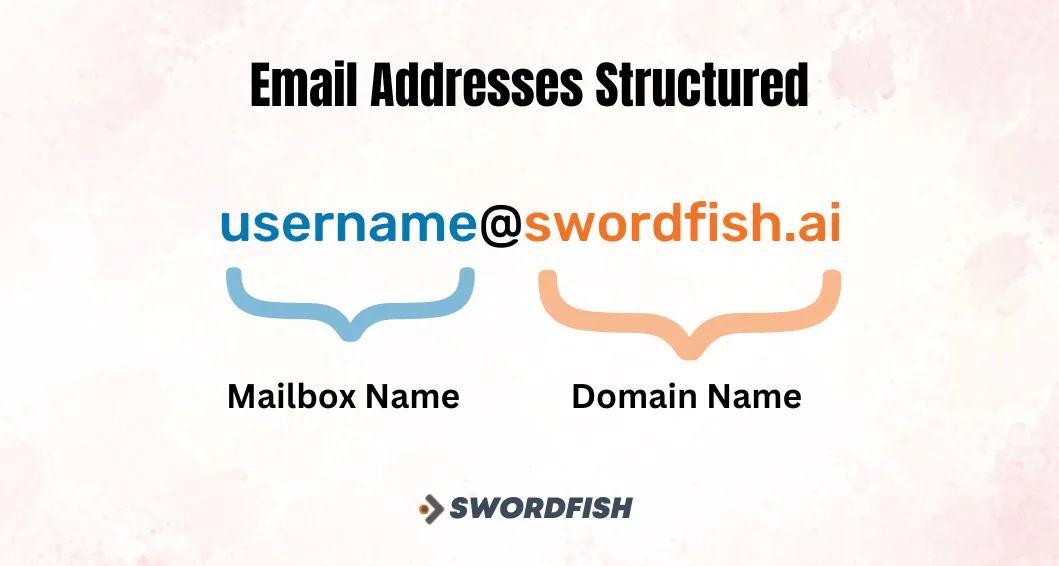
Most business emails follow predictable patterns that combine an employee’s name with the company domain:
Common email formats include:
- firstname.lastname@company.com
- firstname@company.com
- firstnamelastname@company.com
- f.lastname@company.com
- firstname_lastname@company.com
Important note: Use professional email addresses for outreach and target professional addresses in return. Personal addresses raise privacy concerns and can hurt deliverability and sender reputation.
Not every organization follows this pattern. If a company’s format doesn’t match the usual conventions, the strategies below can help you track down the actual address.
9 Proven Methods to Find an Email Address for Free
Here are nine practical, no-cost ways to find the email address you’re after.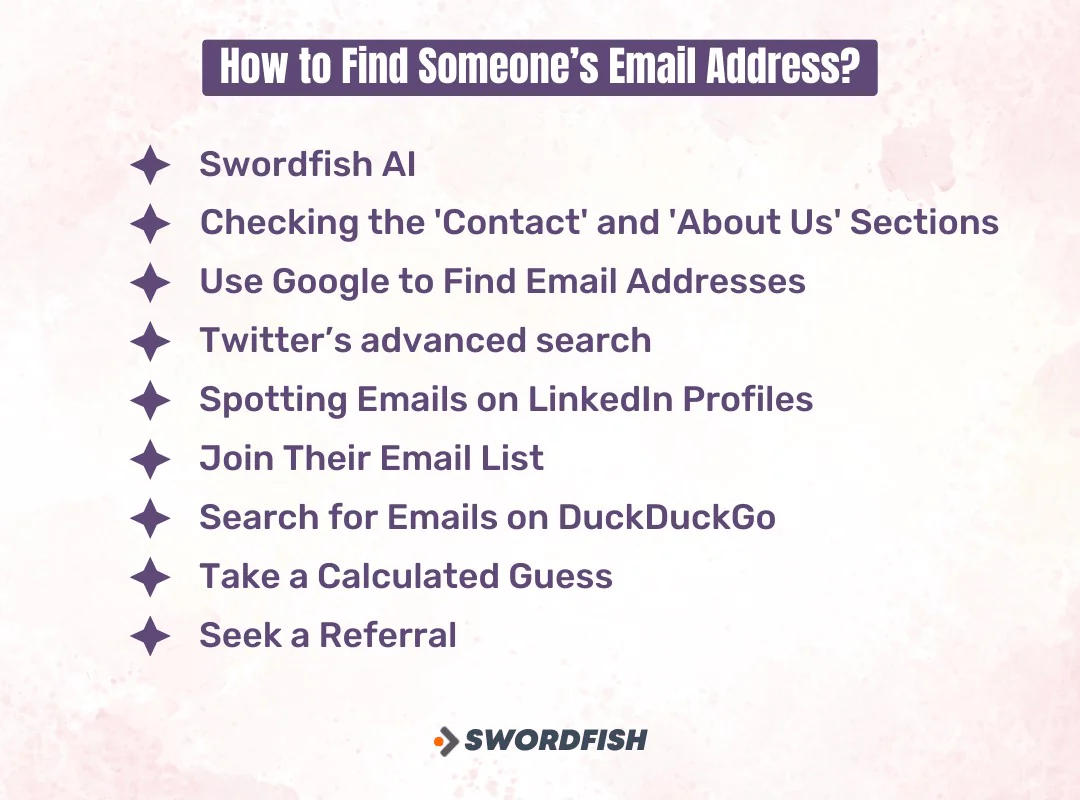
1. Use Swordfish AI
Swordfish AI is a contact-finding platform with a generous free tier. Enter basic contact information into Swordfish AI’s deep search feature and it will surface available contact details, including verified emails and phone numbers, without requiring you to pay upfront.
The platform says it searches across social and professional networks, including LinkedIn, Facebook, GitHub, and Stack Overflow. This may help when a target’s contact information isn’t listed in obvious places.
Key advantages:
- Access to a large, continuously updated contact database
- Phone number verification alongside email data
- Real-time email validation
- Chrome extension for browser-based lookups
- Deep search across LinkedIn, Facebook, GitHub, and Stack Overflow
Verification matters because an unverified email that bounces doesn’t just fail to reach the recipient — repeated bounces can damage your sender reputation and hurt deliverability on future campaigns.
2. Check the ‘Contact’ and ‘About Us’ Sections
Many websites still list direct contact information in predictable locations. This works especially well for smaller companies, practices, and individual professionals who want to be easy to reach.
Where to check:
- /contact
- /about-us or /about
- /team or /our-team
- /meet-the-team
- /contact-me (for personal sites)
- Footer sections
- Staff directories
Pro tip: Once you spot one employee’s email format, you can often apply the same pattern to find others at the same organization.
3. Advanced Google Search Techniques

Google remains one of the most effective free tools for finding email addresses when you use the right search operators and query combinations.
Basic search queries:
“[First Name] [Last Name]” + email
“[First Name] [Last Name]” + contact
“[Last Name]” + “@[company].com”
[First Name] [Last Name] + site:[companywebsite.com]
Effective search patterns:
site:companywebsite.com “email” OR “contact”
site:companywebsite.com “firstname lastname”
“firstname.lastname@companyname.com”
“contact firstname” site:companyname.com
Industry-specific searches:
“sales director” site:companyname.com
“head of marketing” email site:companyname.com
Pro tips for Google searches:
- Use quotation marks for exact phrase matching
- Combine multiple search operators for better results
- Try variations of name spellings and formats
- Search recent press releases or news articles that feature the person
4. Twitter Advanced Search for Contact Discovery
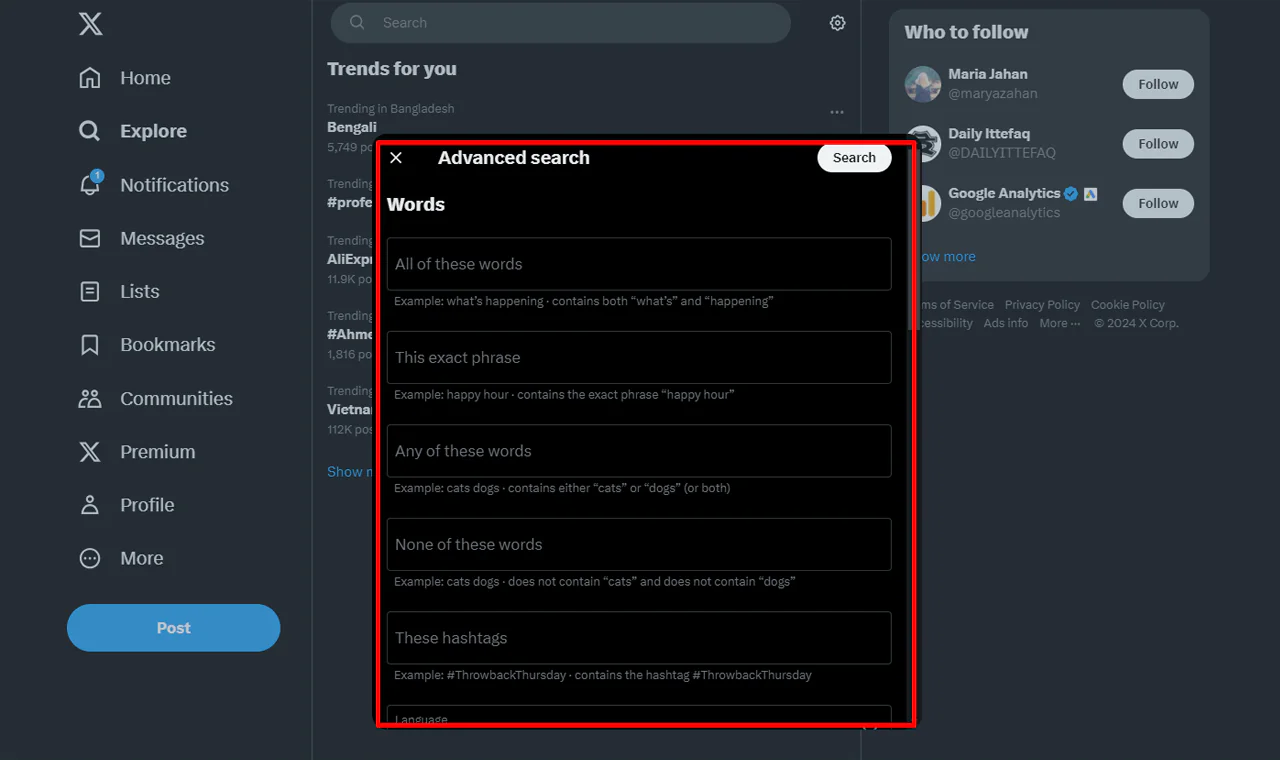
Some professionals share contact information publicly on social platforms. Twitter’s advanced search may help surface those public mentions in a person’s post history.
Search strategy:
- Use Twitter’s Advanced Search
- Search for “at” and “dot” in tweets from your target person
- Include terms like “email,” “contact,” “reach me,” or “DM for”
- Look for bio links that lead to contact pages
5. Spotting Emails on LinkedIn Profiles
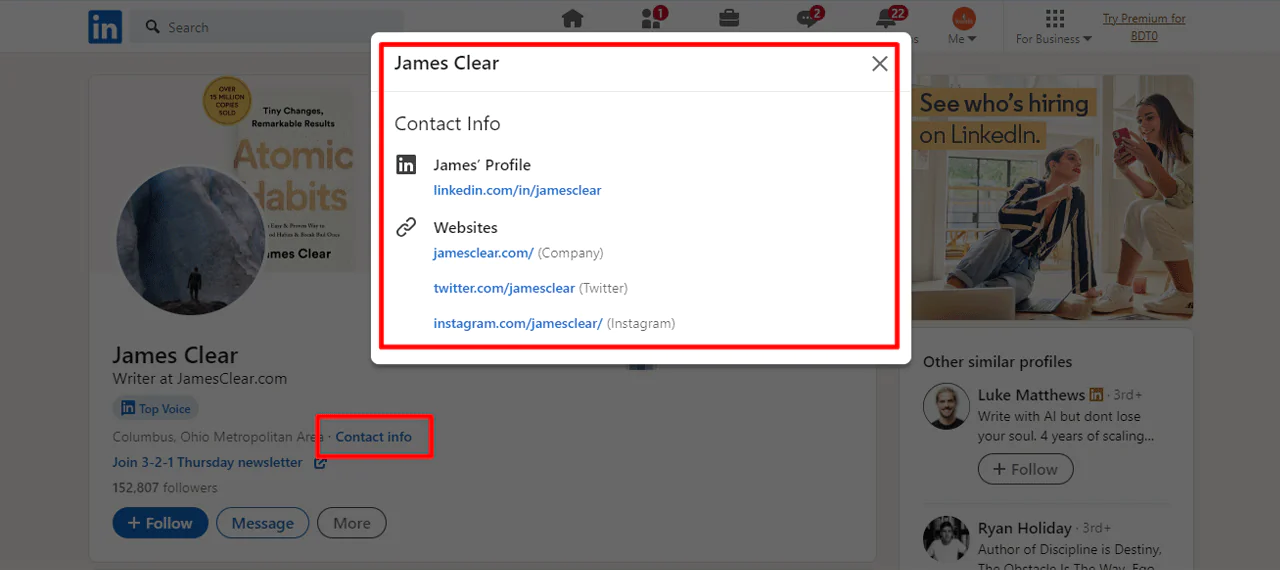
Some LinkedIn profiles include direct contact information, particularly when professionals choose to make it available to prospects.
Plenty of professionals list an email address directly on their profile to simplify outreach. If you’re targeting someone specific, here’s how to find someone’s email on LinkedIn effectively.
Direct contact information:
- Visit the person’s LinkedIn profile
- Click “Contact info” near their profile picture
- Look for listed email addresses and phone numbers
- Note company email patterns for future reference
LinkedIn Sales Navigator:
- Advanced search filters for targeted prospecting
- Export contact lists with available email information
- Integration with email finder tools for enhanced results
LinkedIn connection strategy:
- Connect with mutual contacts who can provide introductions
- Export your existing connections to find email addresses
- Use LinkedIn messaging as an alternative contact method
Additional LinkedIn strategy:
Some professionals include an email address in their profile summary or public posts, such as when announcing a job change or promoting a service.
6. Newsletter Subscription Method
Many websites run an email list. If your target has a blog or company newsletter, subscribing can reveal a real address behind the send. Newsletters frequently come from a personal email, so subscribing puts you a step closer to the address you’re after.
If a newsletter comes from a general address like info@, you can reply with a relevant question or comment and ask to be directed to the appropriate contact. A reply may come from an individual address, but don’t assume it will.
Process:
- Subscribe to newsletters from your target’s company or personal blog
- Look at the “From” address when newsletters arrive
- Reply with a thoughtful question or comment
- Watch for responses coming from a personal address
Benefits:
- Provides insight into communication style
- Helps build rapport before direct outreach
- May reveal personal email addresses of key personnel
7. DuckDuckGo Domain Search Technique
A DuckDuckGo search for "@domainname.com" may surface public mentions of email addresses associated with that domain.
Search format:
“@companyname.com” firstname lastname
“@domain.com”
Add a name if you’re targeting a specific person. Search results and the way search engines interpret symbols can vary, so try more than one query or search engine.
8. Strategic Email Pattern Guessing
Many companies use a consistent email format across staff. Once you know someone’s name and the company domain, you can make an educated guess, but verify the address before sending anything.
Testing approach:
- Identify the most likely formats based on company size and industry
- Start with the most common patterns
- Use a free email verification tool to test validity
- Document successful patterns for future use with the same company
Most common patterns by company size:
If you’ve already seen a publicly listed email from the company, it may suggest the format. Otherwise, try:
- firstname@company.com
- firstnamelastname@company.com
- firstname.lastname@company.com
- f.lastname@company.com or firstinitiallastname@company.com
9. Strategic Referral Requests
If you haven’t found the address, ask for help directly. You may have found a general company contact, such as sales@ or support@.
A polite, clear request to a general inbox may help you reach the right person or get an introduction. Explain why you want to connect and ask to be directed to the appropriate contact rather than assuming the recipient can share someone’s direct address.
Effective approach:
- Contact general company emails (info@, hello@, support@)
- Explain your legitimate business reason for connecting
- Ask for an introduction rather than just an email address
- Offer something of value in exchange for the connection
Sample request: “I’m working on [specific project/initiative] that could benefit [company]. Could you help me connect with the right person on your [department] team?”
Tip: Try connecting on social media too. A social media manager may not hand over an executive’s email right away, but a friendly, low-pressure approach can open the door.
Advanced Tips for Email Outreach Success
Build Genuine Connections First
Personalizing outreach can make it more relevant to the recipient. Before making a request, consider building context by:
- Mentioning mutual connections or shared interests
- Asking thoughtful questions about their industry
- Sharing relevant, useful information
- Acknowledging their recent work or content
Apply the Reciprocity Principle
Leading with relevant information or a useful resource can make an outreach message more helpful before you ask for anything.
Value-first examples:
- Industry insights or trend analysis
- Useful tool recommendations
- Relevant networking introductions
- Free resources or templates
Follow Up Strategically
Most reps stop after one unanswered email, but several follow-ups over a couple of weeks tend to perform better than a single send. When a reply does come, it usually arrives quickly rather than days later. After your first message, don’t skip the follow-up — learn how to write a follow-up email after a meeting so your message doesn’t get lost in the inbox.
Email Verification and Quality Control
These nine methods only pay off if the addresses you find are actually deliverable. Always verify email addresses before adding them to an outreach campaign — it protects your sender reputation and keeps deliverability rates healthy.
Free verification methods:
- Use built-in verification in tools like Swordfish AI
- Test with a small sample send before a full campaign
- Monitor bounce rates and clean lists regularly
- Remove non-responsive addresses after multiple attempts
Legal and Compliance Considerations
When collecting or using email addresses, consider the privacy and marketing rules that apply to your situation and the recipient’s location:
GDPR compliance: Avoid collecting data from EU-based individuals without a proper legal basis for doing so.
CAN-SPAM compliance: Always include an unsubscribe option and accurate sender information.
Professional context: Favor business email addresses over personal ones, and if you’re contacting clinicians or administrative staff at healthcare organizations, be mindful of internal policies around unsolicited vendor outreach.
Start building your contact list with Swordfish AI’s 7-Day Risk-Free Trial
Conclusion
Cold email results can vary with the audience, message, and sending practices. As inboxes become more crowded, careful targeting remains important.
A practical approach combines public-source research, careful verification, and personalized outreach. Focus on whether each contact is relevant rather than maximizing list size.
Try these nine methods, verify addresses before outreach, and keep your list focused on relevant contacts. Finding professional email addresses can then become a repeatable part of networking or business development.
Frequently Asked Questions
How can I verify if an email address is valid without sending an email?
Use an email verification tool — Swordfish AI’s built-in verification, Hunter.io’s free verifier, or NeverBounce’s free tier are common options. These services check syntax, domain validity, and mailbox existence without actually sending a message.
What’s the difference between free and paid email finder tools?
Free tools typically cap you at a limited number of searches per month, offer basic verification, and pull from fewer data sources. Paid tools generally add unlimited or higher-volume searches, deeper verification, phone numbers, social profiles, bulk processing, and API access.
Can I find any email address for free?
In many cases, yes — using a combination of tools, social media, and website searches. Some addresses stay private or protected, though, so combining several methods and always verifying what you find is the safest way to build an accurate, deliverable list.
How many email addresses should I collect before starting outreach?
Favor quality over quantity. A smaller, tightly targeted, verified list tends to outperform a massive, loosely qualified one. Start with 50 to 100 well-researched contacts rather than trying to scale a list before you’ve confirmed it works.
What’s the best time to send cold emails for maximum response?
Weekday mornings, particularly Tuesday through Thursday, tend to outperform Fridays and weekends for professional outreach, though exact peak times vary by source and audience. Testing your own send times against your specific list is more reliable than following a single rule.
About the Author
Drew Clark is Co-Founder and CRO at Swordfish.ai and Heartbeat.ai, where he’s spearheaded sales operations since 2019. Drew works with sales, recruiting, and marketing teams to develop outbound strategies, leading to 25+ new business demonstrations per week. Based in England, Drew brings over 6 years of B2B sales leadership experience. Connect with Drew on LinkedIn.

