


 View Products


Key takeaways
- A phone-number search may not return a profile if the number is not linked to the account or the person’s settings limit discovery.
- Contact syncing and Facebook search are possible methods, but neither guarantees a match.
- An area code is not a reliable indicator of someone’s current location.
- Incognito mode affects browser history; it does not hide activity from Facebook when you are logged in.
- Treat profile matches and third-party lookup results as leads, not proof of identity.
- Respect privacy settings and contact people only through channels they have made available.
Last updated: September 3, 2026
Most people have hit this wall at some point: you have a phone number for someone, but no last name, no mutual friends to ask, and no easy way to confirm you’ve found the right profile on Facebook.
To find someone on Facebook using their phone number, link your contacts in the Facebook app, or use the search feature. If you face difficulties, try searching by area code or use a web browser for a more focused search.
This guide walks through several practical ways to search Facebook by phone number, what to do when the obvious methods don’t work, and how to stay on the right side of privacy expectations while you look.
Why Should You Search Facebook Account by Phone Number?
There are several reasons why you might want to search for a Facebook account by phone.
Reconnect
Searching Facebook with a phone number may help you reconnect with people you haven’t seen in a while, if they have linked that number to an account and their settings allow it to be found.
It may help you look for old friends, classmates, or colleagues, particularly if you’ve lost touch by other means.
This method offers a straightforward approach to renewing connections and catching up with individuals from your past.
Verification
Verification is another reason to search for a Facebook account by phone number. If you get a phone number from someone, you might want to check that it really belongs to the person you believe it’s from.
A profile associated with the number may offer clues, but it does not confirm someone’s identity. If verification matters, confirm through a trusted channel and avoid relying on a social media match alone.
Networking
Networking often involves meeting new people and exchanging phone numbers.
Using someone’s phone number to search for their Facebook account can help you connect on another platform, making it simpler to stay in touch, collaborate, or maintain a professional network.
This approach can facilitate building and strengthening relationships, as it allows for more versatile and convenient communication between individuals in both professional and social contexts.
Location
An area code may offer a broad clue about a number’s origin, but it does not reliably show where someone lives. If you search, use only information the person has made available and respect their privacy settings.
This approach can prove useful, especially when you’ve had a brief encounter with someone and wish to reconnect with them, as it provides a means to bridge the gap and reestablish contact.
How to Find Someone on Facebook with a Phone Number: 4 Easy Ways
Here are several straightforward methods to guide you on how to find someone on FB using their phone number. Whether you’ve recently met someone or lost touch, these steps will assist you in reconnecting effortlessly.
1. Link Your Phone Contacts with Facebook Mobile Application
Linking your phone contacts with the Facebook mobile app may surface possible connections, depending on the app’s current features, your settings, and whether people have linked their numbers. Here’s how to look for the option:
Access Contact Sync Feature
- Open the Facebook app on your smartphone or tablet and log in.
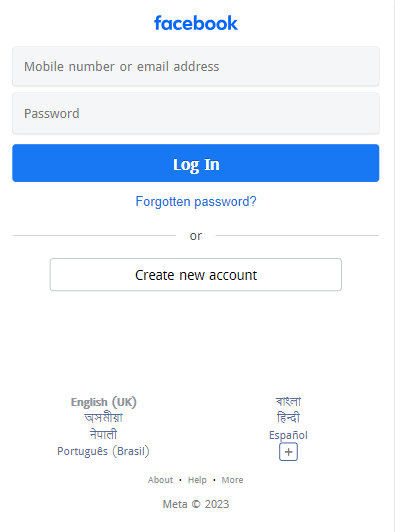
- Tap the three horizontal lines at the bottom right to open the main menu.
- Scroll down, select “Settings & Privacy,” then choose “Settings.”
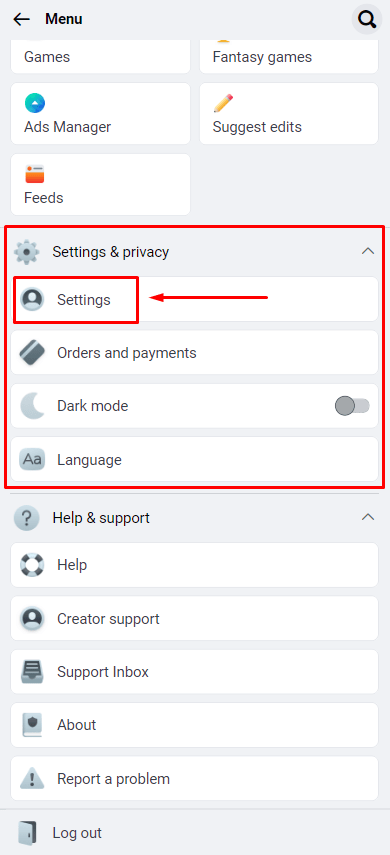
- Find the option “Sync Contacts” or “Find Contacts” in the settings or menu.
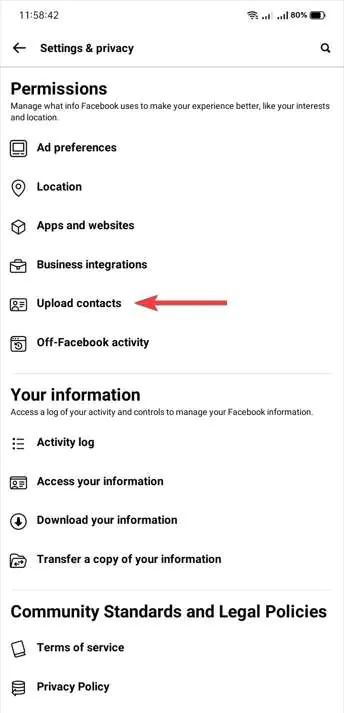
Enable Contact Sync
- Tap on “Sync Contacts” to activate this feature.
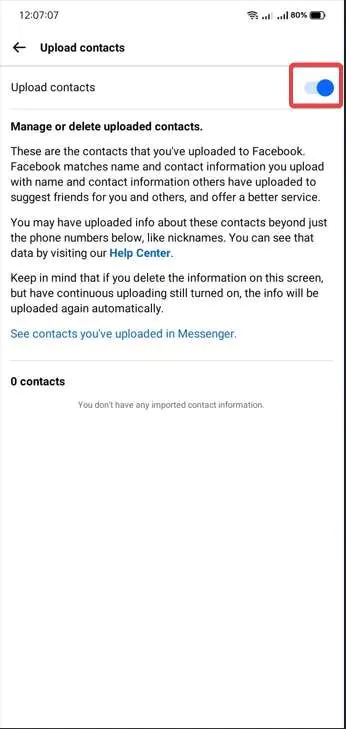

- Allow the app permission to access your contacts.

Review Synced Contacts
- Wait for the app to finish syncing, which varies depending on the number of contacts.
- Once done, visit the Friends or Contacts section in the app.
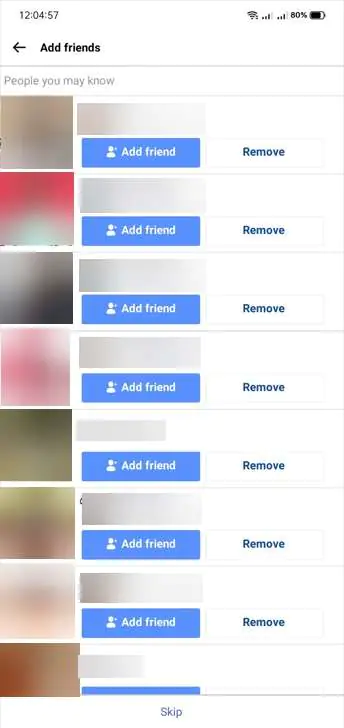
Find Matches
- Facebook will show potential matches from your synced contacts, indicating people in your phone’s contact list who have Facebook accounts linked to their numbers.
- Review these suggestions and connect with those you want to add to your Facebook network for an easy way to find and connect with friends.
2. Mobile App Strategies for Finding Facebook Accounts
Here’s how to use the Facebook mobile app to search directly by phone number:
- Launch the FB app on your mobile device and ensure you are logged in.
- Look for the search icon, usually at the top of the screen, and tap on it.
- Type in the phone number you’re investigating. Be sure to enter it correctly.
- Facebook will display search results related to the entered phone number.
- Look through the results to see if any profiles are linked to the phone number.
- Browse the profiles from the search results. Pay attention to profile details and mutual connections to confirm if you’ve found the correct person.
3. Finding Friends on Facebook Using Name and Area Code
If you’re having trouble finding someone on Facebook by phone number, the number may not be linked to their account, or their settings may limit whether it can be found. You can also search using information they have made public:
- Go to Google and search using the area code to find out the general location linked to the phone number.
- Use the information about the area code to guess where your friend might be located.
- Enter your friend’s name along with the identified location in the Facebook search bar.
- Look through the search results to see if you can find the person you’re searching for.
4. Search for Someone on Facebook with a Phone Number and Name
If you have both a phone number and a name for someone you’re trying to find, follow these steps:
- Enter the phone number and name together into Facebook’s search bar to start. The name narrows it down.
- Use filters like Groups and Locations related to the person to refine results. This further homes in on the correct profile.
- Review all details in the profiles that surface to confirm you found the right individual based on mutual connections, photos, etc. Don’t assume it’s them before verifying.
5. Search for Someone on Facebook with a Phone Number and No Name
Trying to find a Facebook friend by phone number with no name attached is harder, but not impossible. Try this sequence:
- Start with only inputting the phone number in a Facebook search as your first attempt. Scan all results.
- Try adding a location filter if you know where they might live. This significantly narrows options.
- Check profile photos and bios across all search results for familiar faces or details pointing to the person.
- Message mutual connections to ask if they recognize the number and can confirm the name for you. Don’t randomly contact strangers.
- Use the number in tools like Truecaller that access extensive databases to retrieve an associated name. Cross-check findings on Facebook.
6. Finding Facebook Accounts by Phone Number in Incognito Mode
Incognito mode can keep a search from appearing in your regular browser history, but it does not make your activity invisible to Facebook when you log in. Here’s how to search in a private browser window:
- Open your preferred web browser and launch a new incognito window. This prevents activities in this window from being saved in your browser history.
- Go to Facebook in the incognito window and log into your FB account.
- In the search bar at the top, enter the full phone number you want to look up, including the country code.
- Facebook will display search results related to that phone number. Look through the list of profiles carefully.
- Click “See More” next to the search bar and apply filters like “People” to narrow results to individual people associated with the number.
- Review filtered profiles in search results to identify the person linked to the phone number, using an incognito window for privacy.
- If needed, refine the search with additional filters like location, workplace, or school, alongside the phone number, to pinpoint the correct individual.
- After searching, log out of Facebook and close the incognito window to clear session data and maintain search privacy.
Overcome Challenges in Finding Someone on Facebook by Phone Number
Looking up a phone number on Facebook is usually simple, but a few obstacles come up often enough to plan around. Here’s how to handle them:

Dealing with Inactive or Hidden Profiles
If a profile or information is not visible to you, respect that choice. Rather than asking someone to reveal hidden profile details, consider contacting the person directly through a channel they have shared.
Working together can give you more information without breaking privacy rules. Remember, it’s important to respect the person’s privacy and not try to get into hidden profiles without permission.
Handling Phone Number Changes and Account Updates
People often change their phone numbers, which can be a challenge. To deal with this, look for email addresses linked to the Facebook profile, as many people add different ways to contact them.
Public profile updates may provide context, but they do not reliably establish someone’s current contact details.
Considering Legal and Ethical Aspects
It’s worth thinking through the legal and ethical sides of searching for someone before you start. Always follow the law and platform rules.
Breaking privacy laws or Facebook’s rules can lead to serious problems, so make sure your search stays legal and ethical.
Privacy Settings and Friend List Visibility
Facebook’s privacy settings can be tricky. Some users limit who can see their friends list or certain parts of their profile.
If you share a group with the person, you may be able to contact them through that group if its rules allow it. Don’t use groups or mutual friends to bypass someone’s privacy settings.
Using Professional Investigative Services
If the situation is complex, consider getting advice from a qualified professional. Before using an investigative service, check its methods, privacy practices, and applicable legal requirements; don’t assume every service meets the same standards.
Trying Direct Communication
If other ways don’t work, just talking to the person directly can be a good option.
Reach out politely through email or other messaging apps. This is a more open and respectful way to get the information you want.
How to Protect Your Privacy on Facebook
If you’d rather not be found this way yourself, here’s how to lock things down.
General Privacy Settings
- Limit Who Can See Your Posts: Adjust post visibility to “Friends,” “Friends except acquaintances,” or “Only me” for more privacy.
- Review Tags: Enable review options for tags and mentions in your posts to control what appears on your timeline.
- Manage Friend Requests: Choose who can send you friend requests, such as “Everyone” or “Friends of friends.”
- Control Who Can Follow You: Decide if everyone or just friends can follow your public updates.
- Restrict Profile Information: Limit the audience for sensitive profile details like your birthdate or contact information.
Hide Your Facebook Number
- Prevent Search by Phone Number: Go to Facebook settings and privacy. Choose “Settings” > “Privacy” > “How People Find and Contact You.”
- Edit Privacy Options: Edit “Who can look you up using the phone number you provided?” Set it to “Friends” or “Only me” to prevent others from finding your account using your phone number.
What Privacy Experts and Regulators Have Said About Lookup Features
Facebook’s contact-search tools and privacy settings may change over time. Check the platform’s current settings and policies rather than assuming that older descriptions of its features still apply.
Mark Zuckerberg, CEO of Facebook
In a 2018 post addressing data collection concerns, Zuckerberg emphasized the company’s commitment to reducing data access by third-party apps and improving user data control, stating, “We’re requiring apps to respect your information more and reducing the data they can access.” This reflects Facebook’s broader efforts to tighten how contact information, including phone numbers, gets shared through the platform.
Box CEO Aaron Levie
In a CBS News interview, Aaron Levie argued that “There are so many examples where we don’t have modern ways of either regulating, controlling, or putting the right protections in place.” His point underscores why users shouldn’t assume old privacy defaults still apply the same way today.
Austrian Privacy Campaigner Max Schrems
Max Schrems, an Austrian privacy campaigner and longtime critic of Facebook, has raised concerns about how companies handle personal data. The GDPR provides for fines of up to 4 percent of annual global turnover for certain infringements; that general maximum does not establish what penalty would have applied in a particular case.
Enhancing Your Facebook Phone Number Search with Swordfish AI

While exploring methods to find someone using a phone number lookup, you’ll run into limits tied to privacy settings, inactive profiles, or outdated contact details baked into a profile. That’s where a dedicated lookup tool like Swordfish AI comes in as a complement to manual Facebook searching.
A third-party lookup tool, such as Swordfish AI, may be another option when Facebook search does not surface a match. Check the service’s methods and privacy practices, and treat any results as leads rather than confirmed facts.
A third-party lookup may return information when Facebook search does not, but it cannot guarantee a match or confirm who is behind a number.
Here’s how Swordfish AI can assist in solving these issues:
- Extensive Database Access: Swordfish AI draws on a large phone number database, cross-referencing it with social profiles and other public records. This broad reach increases the likelihood of finding accurate and current information.
- Real-Time Updates: The platform refreshes records regularly, which matters when you’re dealing with numbers or profiles that change frequently.
- Privacy-Compliant Approach: Swordfish AI is designed to work within legal and platform boundaries rather than scraping or bypassing privacy settings.
Those features make it a reasonable option to pair with manual Facebook searches, and it also applies to finding someone’s phone number in the first place, before you ever get to the Facebook step.
 Try Swordfish Ai
Conclusion
There isn’t one guaranteed way to find someone on Facebook with just a phone number. Contact syncing or direct search may surface a match if the number is linked to an account and the person’s settings allow it. Incognito browsing only affects what is saved in your browser history; it does not change Facebook’s search results or hide activity from Facebook when you’re logged in.
Third-party lookup services may return additional information, but results can be incomplete or outdated and should not be treated as confirmation of someone’s identity.
Whatever method you use, keep the search legal and respectful of the other person’s privacy settings. Contact information exists to connect people, not to bypass their choices about who can find them.
FAQs
Does Facebook notify someone when I search for them using their phone number?
No, Facebook does not directly notify users when someone searches for them using their phone number. However, they can see a list of devices that have recently accessed their account, which might indirectly give them a clue if they suspect someone might be searching for them.
Can I find deleted Facebook accounts using a phone number?
No, Facebook permanently deletes user data, including phone numbers, when an account is deactivated or deleted. Therefore, searching for a deleted account using a phone number is impossible.
Can I use a landline number to find someone on Facebook?
Facebook primarily focuses on mobile phone numbers for account creation and verification. While some users might have linked their landline number, it’s not a reliable method for searching for them on the platform.
Is it safe to search for someone on Facebook using their phone number?
Yes, it’s generally safe to search for someone on Facebook using their phone number. However, be mindful of privacy concerns and only use this information for legitimate purposes, such as reconnecting with friends or verifying identities. Respect privacy settings and avoid any misuse of personal information.
Is it possible to find someone on FB with their phone number if it’s not on their profile?
No, you cannot find someone on Facebook using their phone number if it’s not associated with their profile. Facebook’s search function relies on information users have provided on their profiles. If the phone number is not listed or connected to their account, it won’t yield search results.
Can I enable two-factor authentication on Facebook while keeping my phone number hidden from the search?
Yes, you can enable two-factor authentication (2FA) on Facebook while keeping your phone number hidden from search. Facebook allows you to control the visibility of your phone number separately from 2FA settings. You can adjust your privacy settings to limit who can see your phone number while still using it for 2FA for added security.

