


 View Products


Key takeaways
- Facebook Lead Ads can collect contact information through an on-platform Instant Form.
- A click or page visit can indicate interest, but it is not necessarily a lead.
- Keep forms focused on information your team needs, and explain how submitted information will be used.
- Lead delivery speed depends on how you access leads and whether you have a CRM or other integration configured.
- Review campaign settings, targeting, tracking, and form details in Ads Manager before publishing.
- Measure campaign results and follow up clearly, promptly, and in line with people’s preferences.
Last updated: September 3, 2026
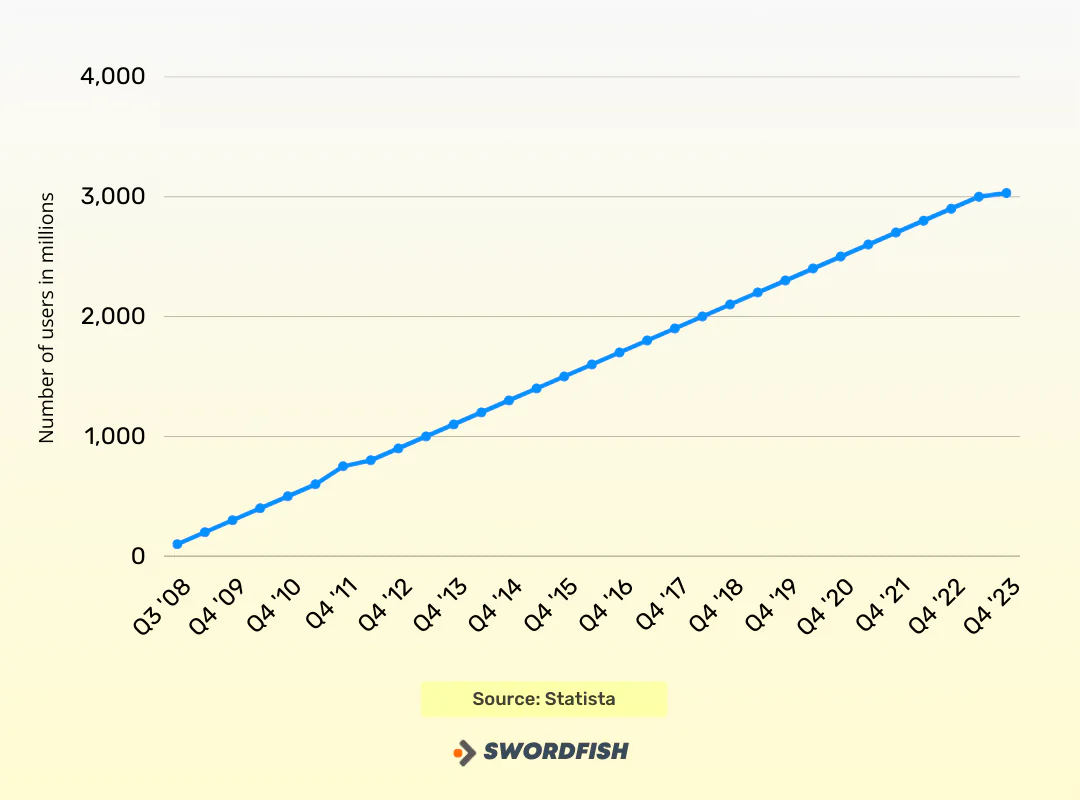
Roughly 1.6 billion people worldwide say they’re connected to a small business on Facebook. With 3 billion monthly active users, the platform remains one of the largest pools of potential buyers any marketer can reach, healthcare organizations included. If your audience is already spending time there, it makes sense to meet them on their terms rather than waiting for them to find you elsewhere.
The practical question is how to turn that audience into actual leads. That’s what Facebook Lead Generation is built for.
This guide walks through how Facebook leads work, how to set up lead ads step by step, and which tactics and examples tend to hold up in practice.
What are Facebook Leads?
A Facebook lead is someone who shares contact information or otherwise makes a clear inquiry about a product, service, or organization through Facebook.
That might mean submitting a lead form or sending a message. Actions such as clicking an ad, visiting a business page, or entering a contest can signal interest, but do not necessarily mean someone has become a lead.
How Do Facebook Lead Ads Work?
Facebook Lead Ads can collect contact information through an on-platform form, without requiring someone to visit an external landing page. You create the ad in Ads Manager, where you set campaign options, design the creative, and define a budget.
When someone taps a Lead Ad that uses an Instant Form, they can see a form within Facebook. Depending on the form and available profile information, some fields may be prefilled; the form can also include custom questions.
Example Scenario of How Facebook Lead Ads Work
Here’s the general flow, from ad to follow-up:
Step 1:
Build a Lead Ad that spells out your value proposition clearly enough that someone scrolling past will stop and pay attention.
Step 2:
When a user taps the ad, an Instant Form may show some information prefilled from their profile, such as their name or email address. The user can review and submit the form.
Step 3:
Add custom fields where you need more detail, such as multiple-choice questions or dropdowns, to help qualify the lead. Available form features can vary.
Step 4:
After submission, lead details and custom answers are available through the form’s lead access options. A CRM integration or other configured connection can help route them to your team for follow-up.
Step 5:
Use the information the person chose to share to personalize follow-up, in line with your privacy notices, consent, and applicable requirements.
Benefits of Facebook Lead Generation
Meta’s full-year 2023 revenue reached $134.90 billion, up from roughly $116.6 billion in 2022 — a 16% increase year over year. Family of Apps advertising revenue for 2023 came in at $131.9 billion, underscoring how much of Meta’s business still runs through ad spend on platforms like Facebook.
Given that scale, investing time in Facebook lead generation can pay off in several concrete ways.
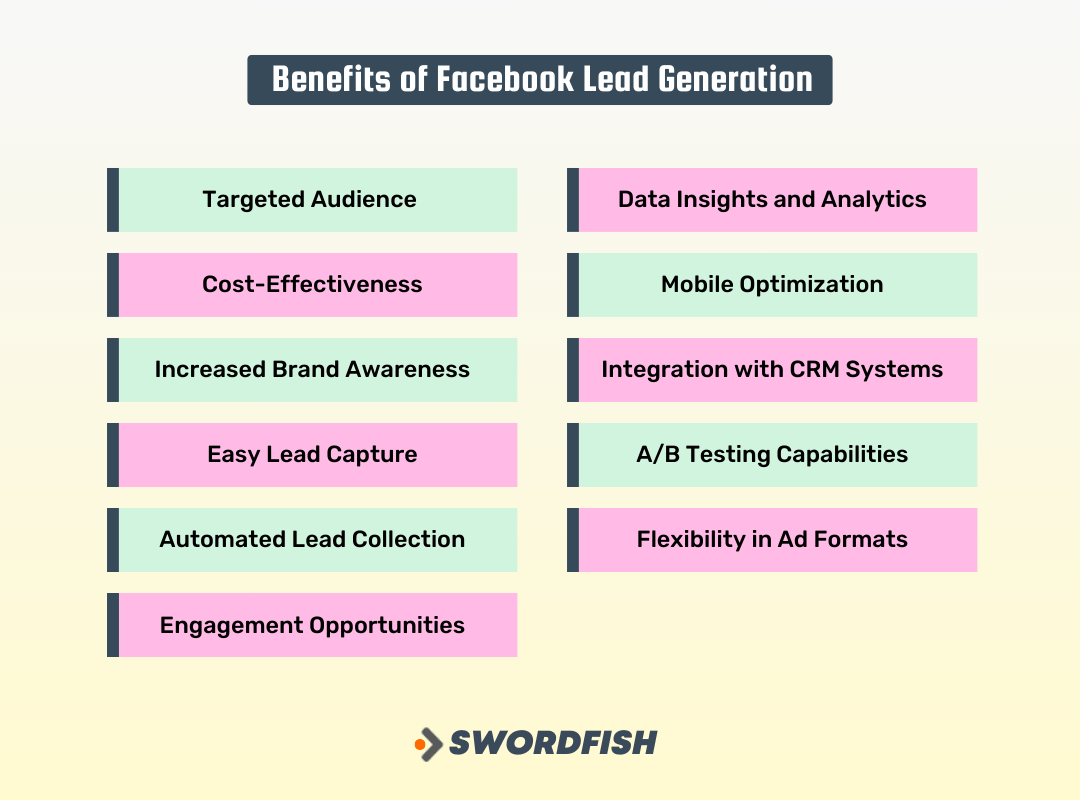
Targeted Audience
Audience options can include location, demographics, interests, and other permitted signals. Available targeting options depend on the campaign and Meta’s current policies.
Cost-Effectiveness
You set a campaign budget and choose campaign settings that affect delivery and cost. Billing and optimization options vary by objective and setup, so review the options Ads Manager presents for your campaign.
Increased Brand Awareness
Even users who don’t convert right away are exposed to your brand, which can pay off later when they’re ready to act.
Easy Lead Capture
Keeping a form on Facebook can reduce the steps someone needs to take compared with an external landing page. Whether that improves completion rates depends on the audience, offer, and form.
Automated Lead Collection
Sales pitches never come with guarantees, but leads captured through Facebook are stored automatically, which makes it easier for your team to follow up systematically instead of chasing down scattered contacts.
Engagement Opportunities
Comments, likes, shares, and messages give you more ways to build rapport with a lead before you ever make a formal pitch.
Data Insights and Analytics
Facebook’s built-in analytics let you see what’s working in a campaign and adjust before wasting more budget on something that isn’t converting.
Mobile Optimization
Most Facebook usage happens on phones and tablets, which matters given how much decision-making now happens on mobile.
Integration with CRM Systems
You can route lead data straight into your CRM, cutting down on manual entry and the delays that come with it.
A/B Testing Capabilities
Testing different copy, images, headlines, and forms against each other gives you a data-backed way to improve results over time rather than guessing.
Flexibility in Ad Formats
Images, video, carousels, and slideshows all give you room to match the format to the campaign instead of forcing every message into the same mold.
How to Set Up Facebook Lead Generation Ads: A Step-by-Step Guide
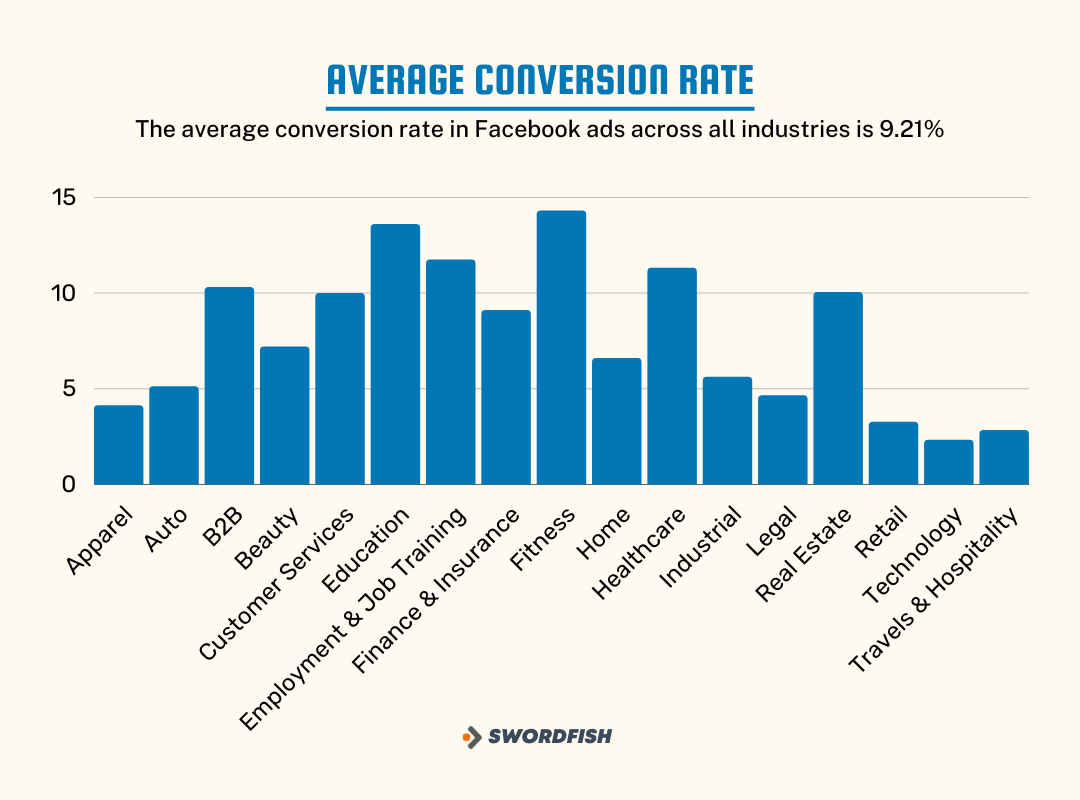
One industry survey found that more than half of small and mid-sized businesses spend between $1,001 and $2,500 a month on Facebook lead generation, while only about 19% of agencies work in that same range — agencies typically manage larger budgets per client.
The cited survey also reported that roughly 50% of agencies handled more than $5,000 per client each month on Facebook, compared with 69.1% of SMBs whose budgets stayed under $5,000.
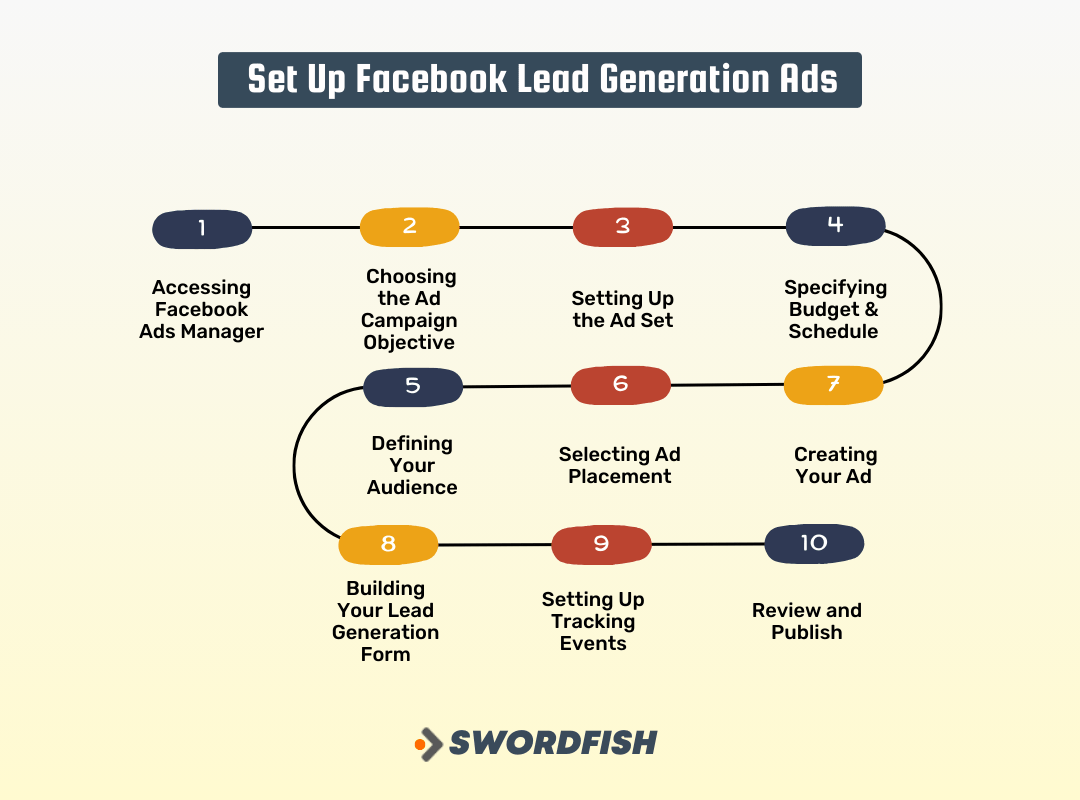
Budget size aside, here’s how to build a lead generation campaign step by step.
Step 1: Accessing Facebook Ads Manager
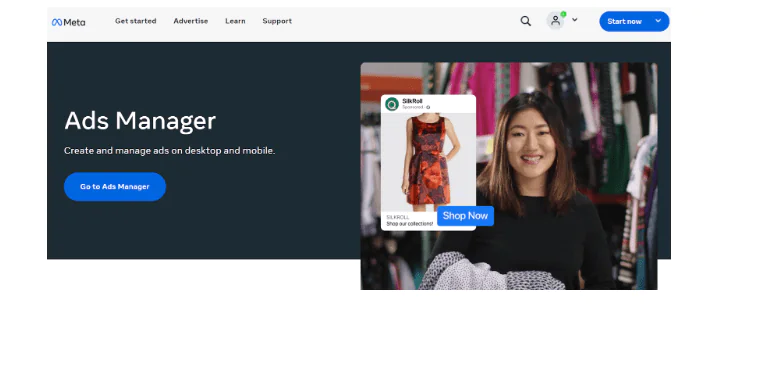
Start at Ads Manager and log in, or set up an account if you don’t already have one. This is your home base for building the campaign.
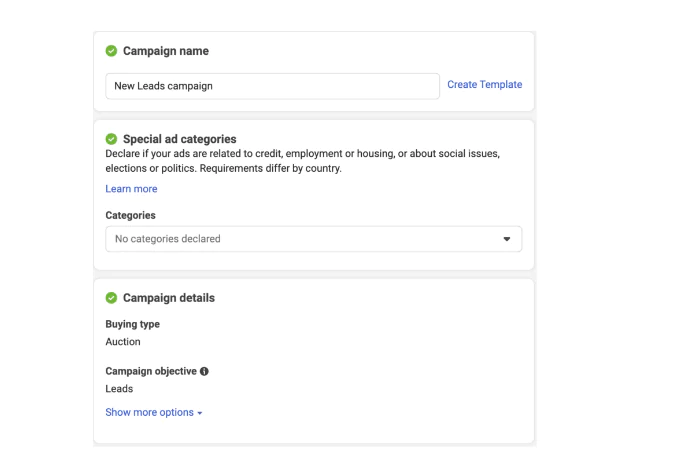
Step 2: Choosing the Ad Campaign Objective
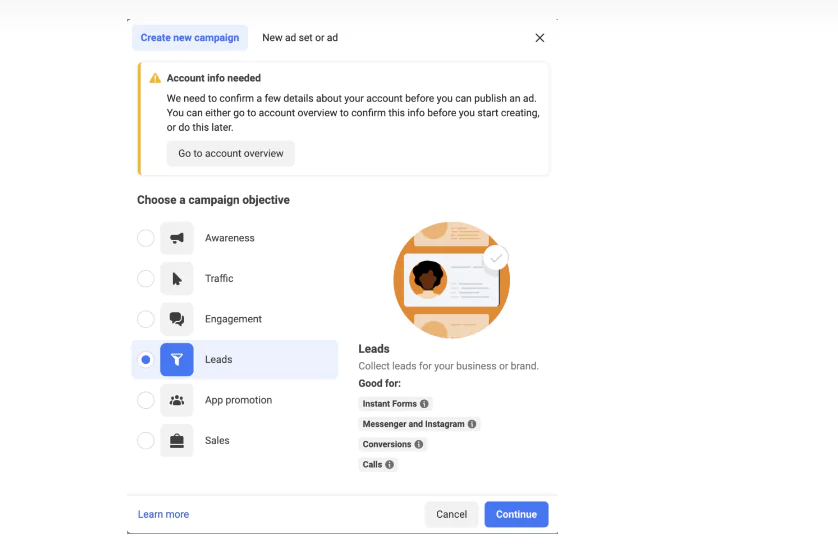
Click “Create” and choose the campaign objective that matches your goal. For lead generation, look for the Leads objective. Meta may change interface labels or campaign setup options, so check the current Ads Manager guidance.
Step 3: Setting Up the Ad Set
Name the ad set, then choose a conversion location, such as Instant Forms, Messenger, or Calls, if those options are available for your campaign. Select the performance goal that best matches your aim, such as generating leads or conversion leads.
Step 4: Specifying Budget & Schedule
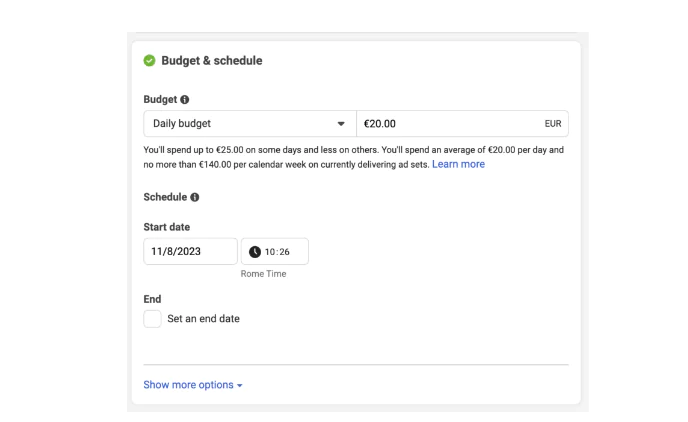
Decide between a daily or lifetime budget and set the amount you’re comfortable spending. Ads Manager gives you estimated reach at different budget levels, which is worth checking before you commit. You can also schedule ads to run continuously or only during specific windows.
Step 5: Defining Your Audience
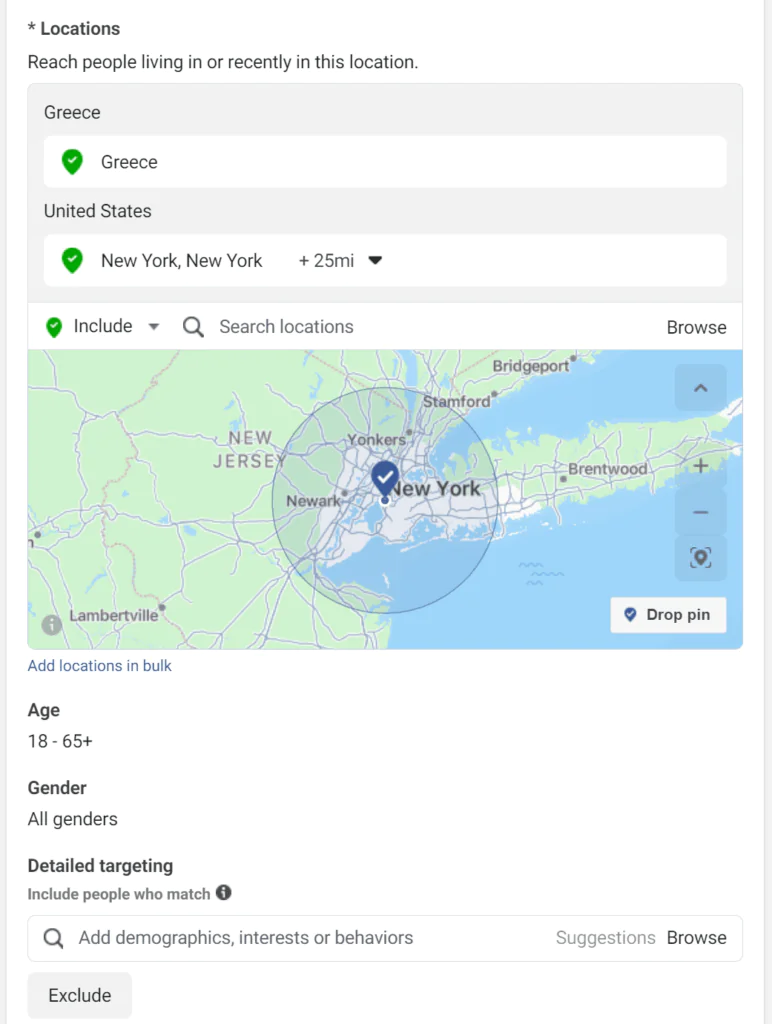
Set the audience using the location and other options available for your campaign. Targeting options and Advantage features can vary; review the current controls in Ads Manager before launch.
Step 6: Selecting Ad Placement
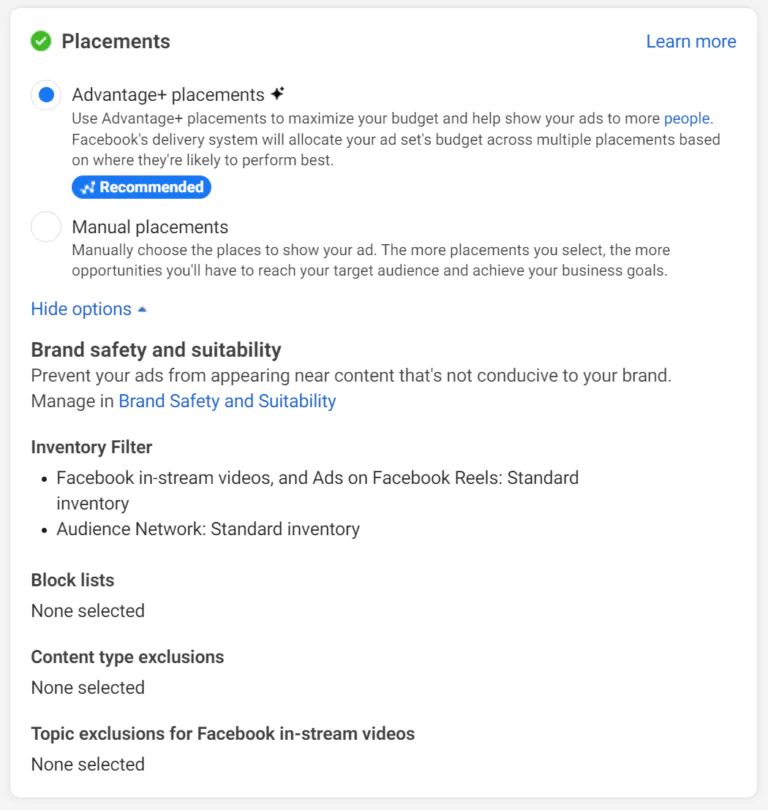
Choose Advantage+ placements or manual placements if available. Review the placement and brand-safety controls offered for your campaign, especially if your organization needs to avoid particular contexts.
Step 7: Creating Your Ad
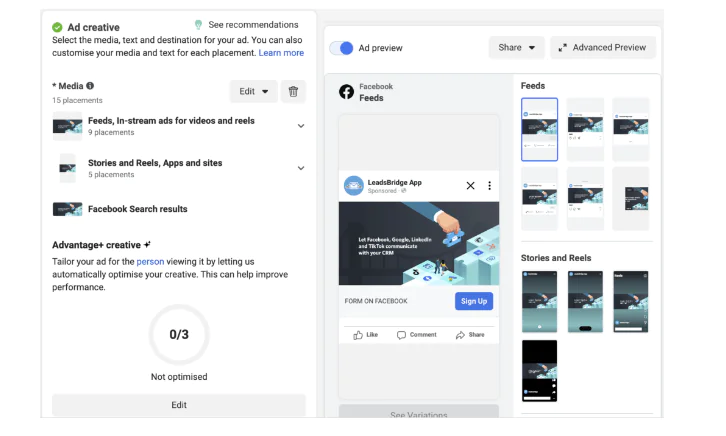
Decide whether to run it as a partnership ad, then pick a format — single image, video, or carousel. Write copy that’s direct about the value, add strong visuals, and finish with a clear call-to-action button.
Step 8: Building Your Lead Generation Form
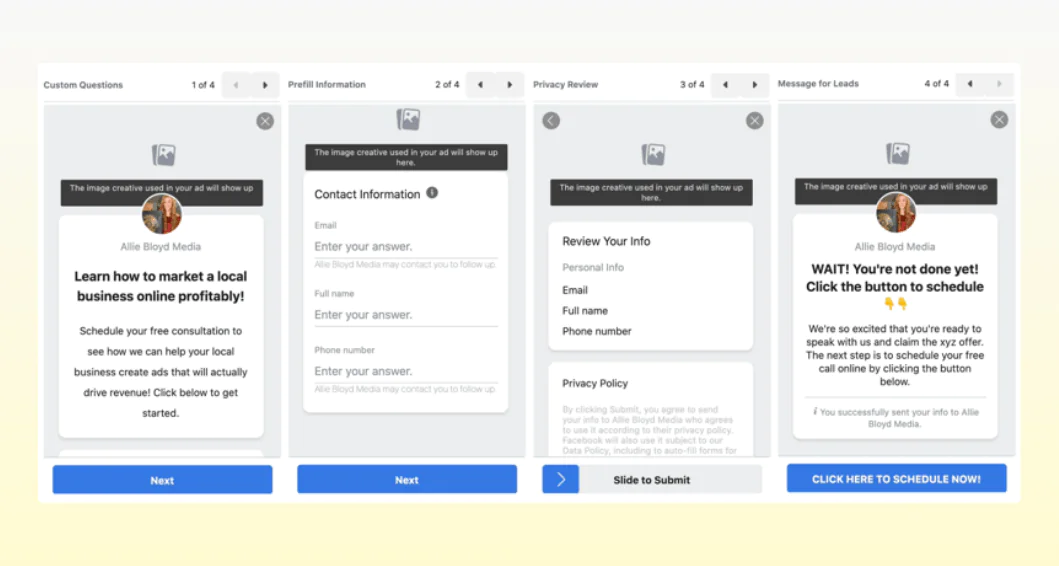
Create a form and choose the form settings available for your campaign. Add an introduction, the questions you need, the required privacy information, and a thank-you message. Labels and options may change.
Step 9: Setting Up Tracking Events
Configure the tracking and data sources relevant to your campaign, such as your website, app, CRM, or offline activity, where supported.
Step 10: Review and Publish
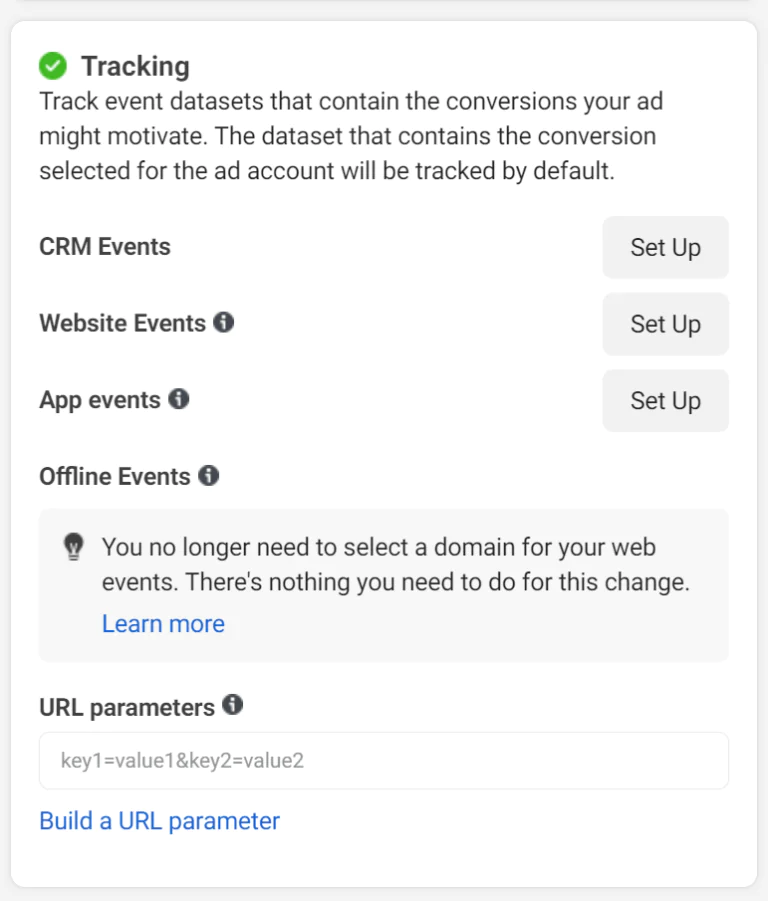
Double-check every setting, confirm tracking is live, then publish. From there, check performance regularly rather than letting the campaign run unattended — small adjustments early on tend to matter more than big overhauls later.
Strategies to Generate Leads on Facebook: 7 Best Techniques
These seven approaches cover the basics of building visibility and turning it into leads.
1. Creating a Facebook Business Page
Your Business Page functions as a storefront. Set one up at facebook.com/pages/create, add your logo, and write a short, clear description of what you do.
2. Optimizing Your Facebook Business Page
Fill in your business name, location, offerings, and contact details, and link back to your website so visitors have somewhere to go for more depth.
3. Rewarding Facebook Page Likes
Offering an incentive — a discount, an offer wall promotion — gives people a reason to follow your page rather than scroll past it.
4. Joining Industry-Related Facebook Groups
Participate in groups relevant to your field. Answering questions and joining conversations builds visibility and positions you as someone worth paying attention to.
5. Regular Posting and Interaction
Consistency matters more than volume. Post a mix of video, photos, and links, ask questions in captions, and respond when people comment — that back-and-forth is often where leads actually start.
6. Using Paid Advertising on Facebook
Paid ads extend your reach well past your existing followers. Define your target market first, then decide whether you’re promoting a product directly or asking people to register interest.
7. Analyzing Results and Making Adjustments
Once ads are running, dig into the data in Ads Manager — click-through rates, conversion rates, engagement — and use it to adjust rather than letting underperforming ads run on autopilot.
Worth noting: nearly 2 in 3 people visit the page of a local business or event at least once a week, which is a reminder of how central the platform still is for local discovery — and why regularly reviewing performance matters.
Facebook Instant Experience Forms for Lead Generation
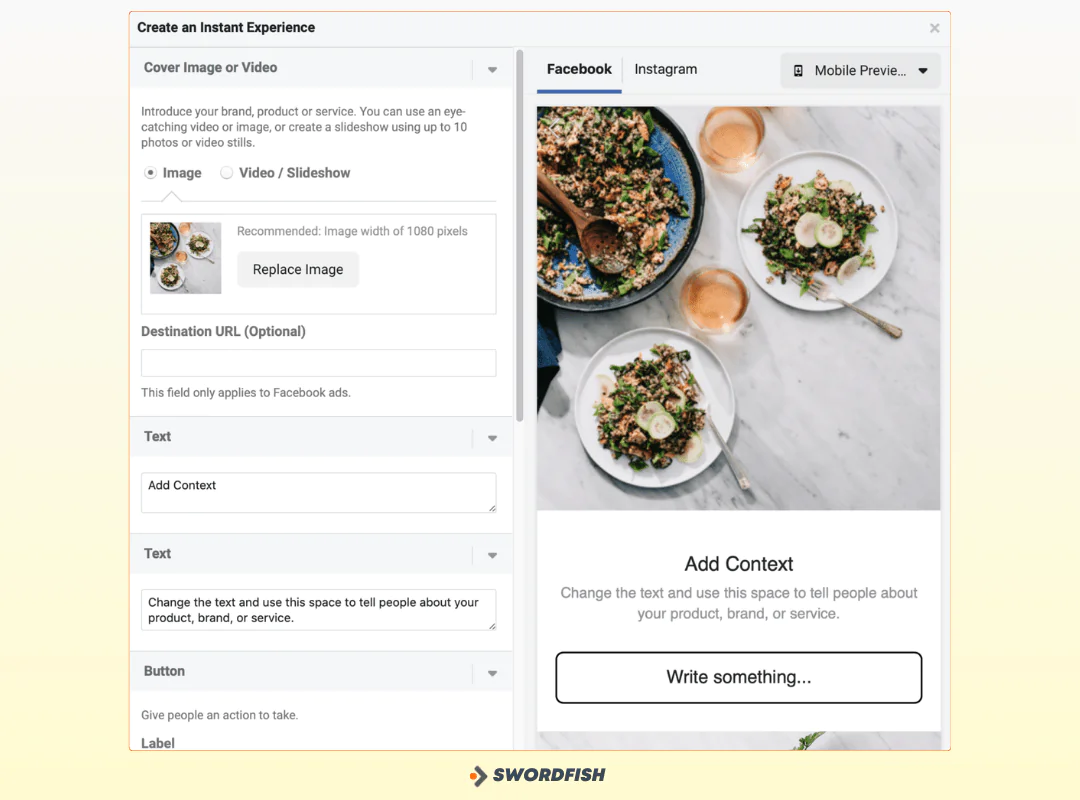
Meta Instant Forms let people submit lead information within Facebook rather than going to an external page. Instant Experience is a separate mobile ad format; the two terms do not refer to the same feature.
How Instant Experience Forms Enhance Lead Generation
Higher Conversion Rates
An on-platform form can reduce the number of steps compared with an external signup page, though completion rates depend on the offer, audience, and form.
Improved User Engagement
A form experience that is clear and relevant may help keep users engaged, but it does not guarantee more qualified leads.
Faster Lead Capture
An on-platform submission avoids sending the user to an external page. How quickly your team receives a lead depends on your lead access setup and any CRM or other integration.
Increased Ad Relevance
Keep the ad and form consistent in message and offer so users know what to expect when they submit.
Detailed Analytics
Ads Manager reporting can include measures such as form completions, click-through rates, and cost per lead, depending on campaign setup.
How to Use Facebook Instant Experience Forms For Lead Generation
Here’s the setup process in more detail:
Accessing Instant Experience Forms
In Ads Manager, create a campaign and choose the Leads objective if it is available for your goal. The setup flow and labels may change, so follow the current prompts.
Creating Your Instant Experience
Choose the lead method and form option offered in your campaign setup. Instant Forms are lead forms; Instant Experience is a separate ad format. Check the current Ads Manager flow, as the options may vary.
Customizing Your Instant Form
Give the form a descriptive name, then choose which fields to collect — name, email, phone number, and so on. Ask only for what you actually need; every extra field is a chance for someone to abandon the form.
Add custom questions relevant to your business if needed — a real estate company might ask about budget or preferred location, for example.
Add the privacy policy link and any other disclosures or consent language required for your campaign and the laws that apply to your organization.
Adding Content and Call-to-Action
Write a headline that states the value plainly, then a short description explaining what the person gets by submitting the form. Choose a CTA button that matches the action — “Sign Up,” “Download Now,” “Get Started.”
Configuring the Contact Form
Decide which fields are essential — name, email, phone, and any custom questions — and keep the list short. Asking for too much tends to cost you completions.
Implementing the Thank You Screen
Use the thank-you screen to confirm next steps and thank the person for their interest. A secondary CTA here — inviting them to your website or a specific offer — can extend the interaction a bit further.
Advanced Settings and Language Customization
Review submission and tracking settings, and use language that is clear and consistent with your brand.
Worth keeping in mind: the largest age group on Facebook is 25-34, making up close to 30% of users, and the platform skews slightly male at 56% versus 44% female.
Finalizing and Reviewing the Ad
Review the ad, form, budget, audience, and tracking settings against your goals before launch.
Accessing Leads and Integration Options
Depending on your Page permissions and setup, you may be able to access leads manually, connect a CRM, or use an API-based workflow.
Tips for Effective Facebook Lead Generation
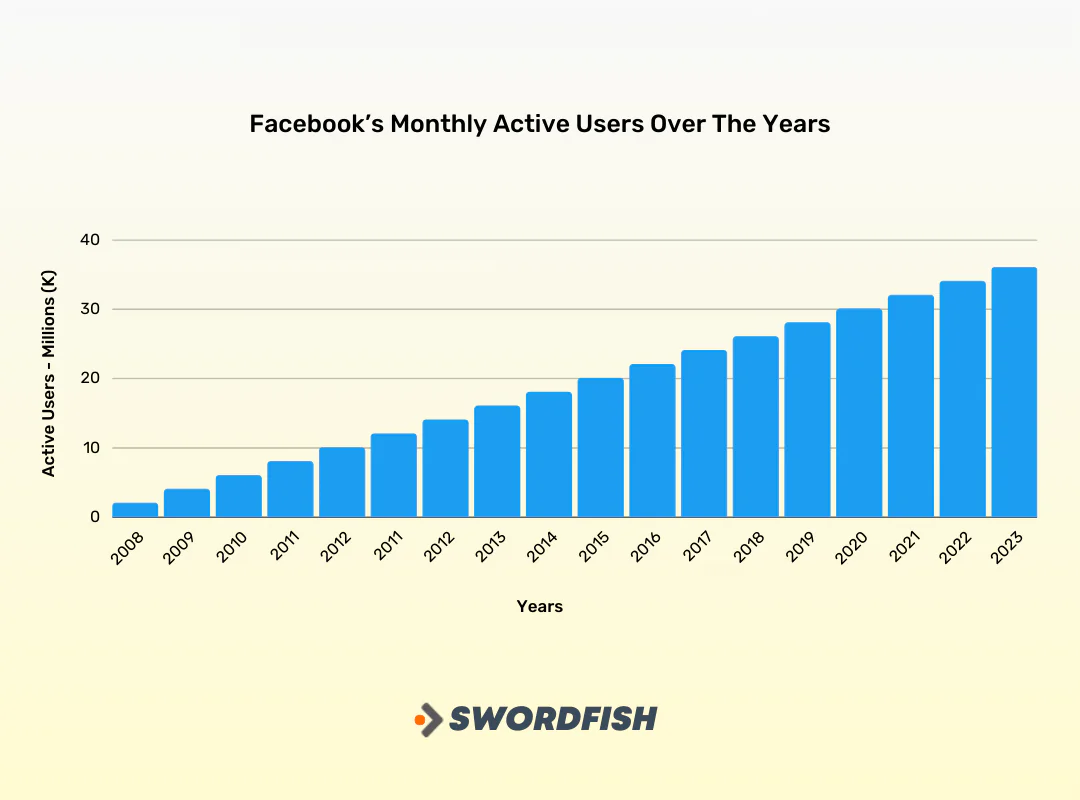
Facebook still accounts for a majority share of Meta’s overall ad revenue, per industry estimates, reinforcing that it remains the primary platform for both consumers and marketers within Meta’s family of apps.
Before launching any campaign, get specific about who you’re targeting — demographics, interests, behaviors — then apply these practices.
Utilize Lead Magnets
People spend an average of at least 30 minutes a day on Facebook, which gives you room to offer something worth their attention — an eBook, a webinar, a discount, a free trial — in exchange for contact details.
Create Compelling Content
Strong visuals, clear messaging, and a direct call-to-action do more for conversion than clever copy alone.
A/B Test Your Ads
Test formats, headlines, copy, and visuals against each other rather than assuming you already know what will resonate.
Use Dynamic Creative
Where the relevant creative optimization features are available, you can provide multiple images, headlines, or copy variations for Meta to test or combine.
Include Trust Signals
Testimonials, reviews, awards, and certifications all help reassure a skeptical audience that you’re legitimate.
Optimize Landing Pages
If your ad sends people to a landing page, keep its message consistent with the ad and make the next action clear.
Implement Facebook Pixel
The Meta Pixel can measure certain website actions and support advertising measurement or retargeting, subject to your setup, user choices, and applicable privacy requirements.
Engage with Comments and Messages
Respond promptly. A lead who gets ignored after commenting is a lead you’re likely to lose to a competitor.
Comply with Facebook Policies
Make sure your ads and lead generation practices follow Facebook’s advertising policies and terms of service — disapprovals cost you time and momentum.
Nurture Leads with Email Marketing
Once you’ve captured a lead, email is where the relationship actually develops. Send useful content and move people through the funnel deliberately rather than all at once.
Before running a Facebook outreach campaign, make sure you have reliable tools for lead generation and sales prospecting — whether that’s learning how to find email addresses from Facebook, sourcing direct dial phone numbers, working with the Facebook lead ads API, or using a prospector or reverse search tool.
Swordfish AI provides B2B contact information, including cell phone numbers and email addresses for executives, managers, and other decision-makers. Try Swordfish AI now.
 Try Swordfish Ai
Facebook Lead Ads Generation Best Practices
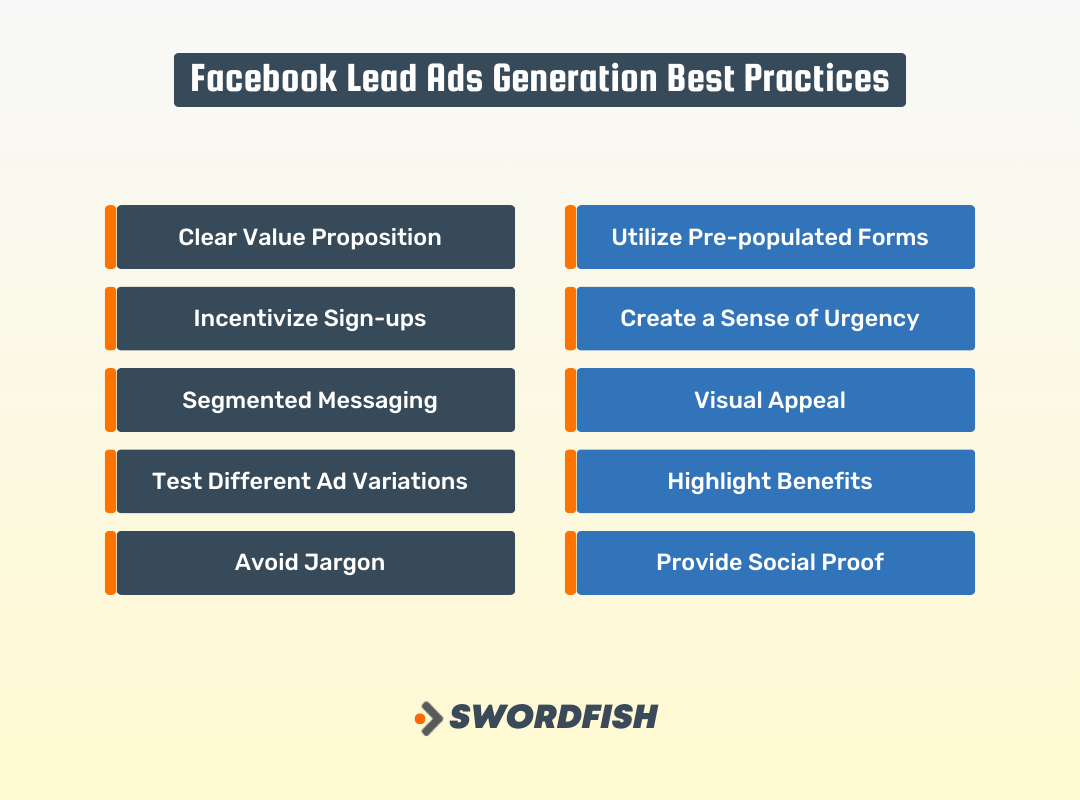
A few practices worth building into every lead ad campaign:
-
Clear Value Proposition
State plainly what someone gains by signing up. Vague copy rarely converts.
-
Utilize Pre-populated Forms
Where Instant Forms prefill information, that can reduce typing. Users should be able to review the information before submitting.
-
Incentivize Sign-ups
Discounts, exclusive offers, and giveaways can give people a reason to sign up; test whether they improve results for your campaign.
-
Create a Sense of Urgency
Use time limits only when they are genuine and clearly explained; avoid implying urgency that does not exist.
-
Segmented Messaging
Tailor copy to the specific pain points or interests of each audience segment rather than using one message for everyone.
-
Visual Appeal
Strong visuals — images, video, or graphics aligned with your brand — are often what stops the scroll in the first place.
-
Test Different Ad Variations
A/B testing formats, headlines, copy, and visuals tells you what actually resonates instead of relying on assumptions.
-
Highlight Benefits
Whether it’s a discount, exclusive access, or useful content, make the payoff obvious.
-
Avoid Jargon
Plain language converts better than technical terminology, especially with a broad consumer audience.
-
Provide Social Proof
Testimonials, reviews, and user-generated content help build the trust that gets someone to act.
Successful Examples of Facebook Lead Ads That Worked
The examples below illustrate approaches such as a clear offer, a relevant incentive, or a simple signup process. The examples alone do not establish that these approaches caused a particular result.
Boux Avenue’s Discount Code Offer
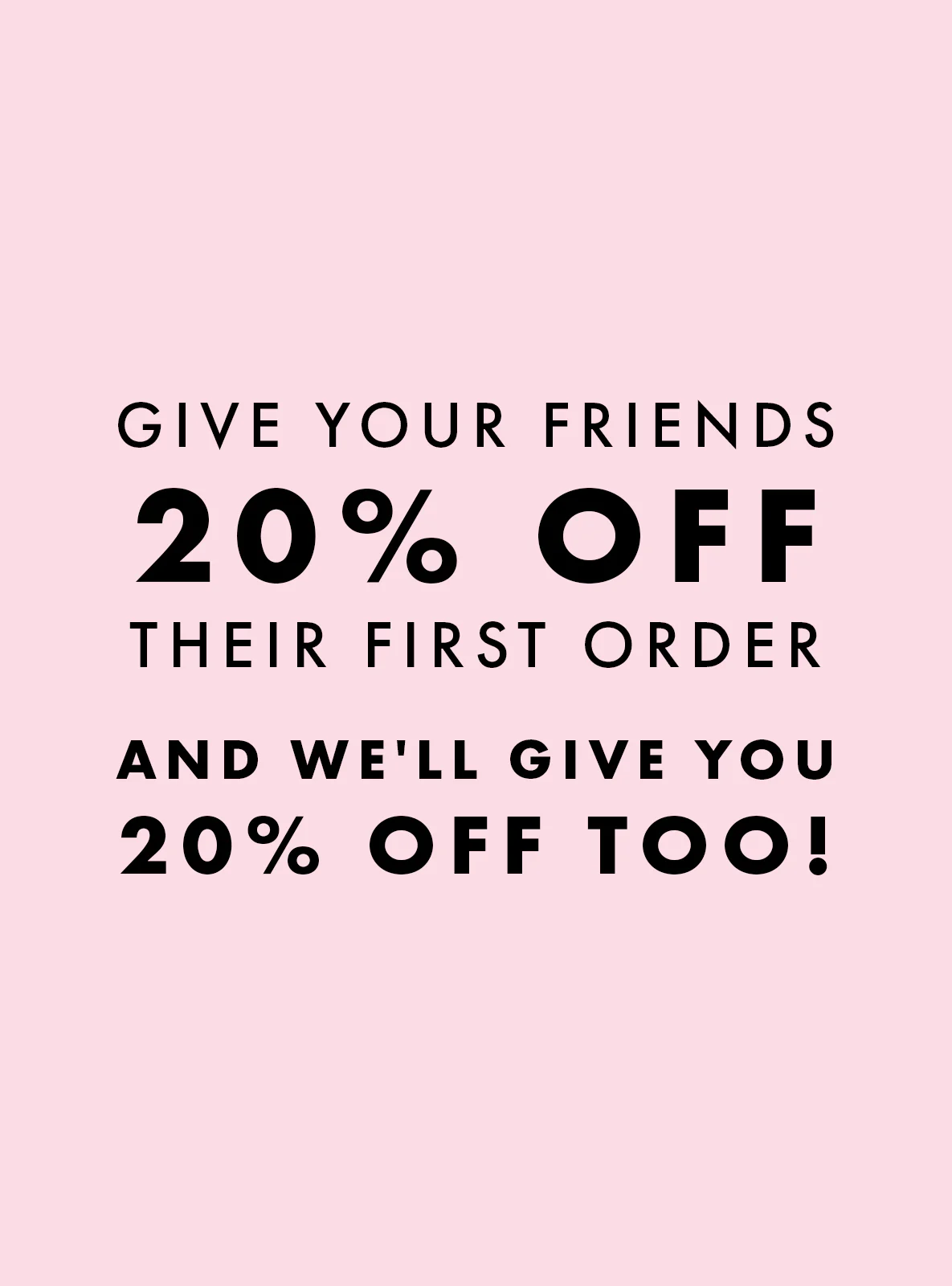
Boux Avenue, a garment retailer, offered 20% off a first order in exchange for a newsletter signup, pairing the immediate discount with an ongoing benefit.
Why it Worked:
- Clear Value Proposition: The ad clearly communicated the benefit of signing up (20% off) and receiving regular updates.
- Incentive for Action: Offering a discount code provided a strong incentive for users to take action.
- Simplicity and Convenience: The lead ad form was pre-populated, making it easy for users to sign up without leaving the platform.
Audi Denmark’s Car Test Drive Competition

Source: Audi Danmark
Audi Denmark ran a contest offering a 30-day test drive of a new car, with entry requiring a newsletter signup.
Why it Worked:
- Unique and Attractive Prize: Offering a 30-day test drive of a new car as a prize was highly appealing to Audi’s target audience.
- Relevance to Target Audience: The competition was targeted towards individuals interested in test driving cars, ensuring highly relevant leads.
- Clear Call-to-Action: The ad had a clear call-to-action prompting users to sign up for the newsletter and enter the competition.
Girlboss E-course Sign-up
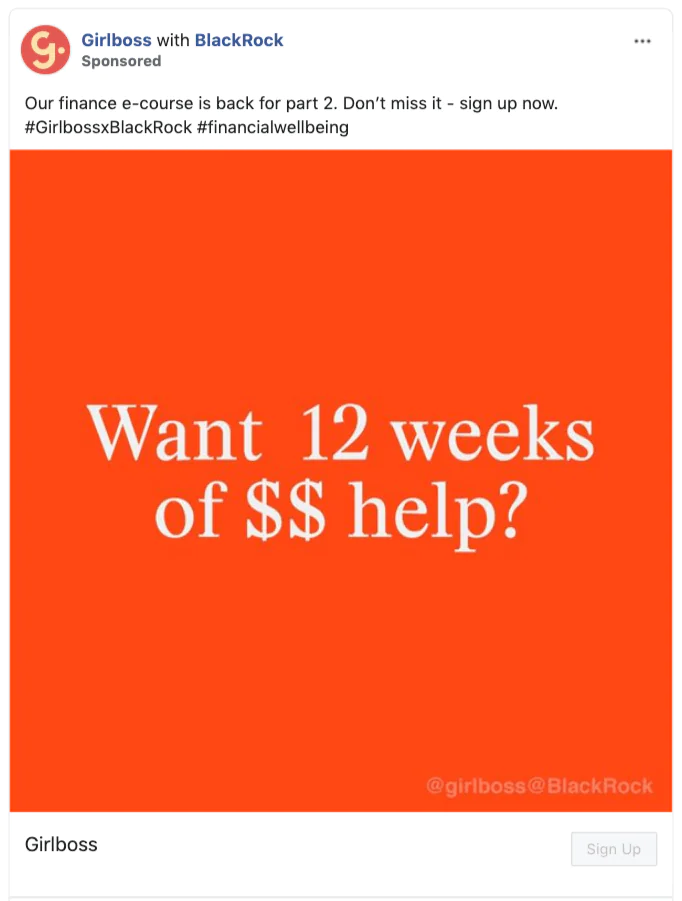
Source: Girlboss
Girlboss partnered with a finance company on an e-course and used a lead ad to drive signups directly through Facebook’s instant form.
Why it Worked:
- Relevant and Valuable Content: Offering an e-course that aligns with their target audience’s interests provides high value.
- Engaging Visual and Question: The ad used an eye-catching visual and asked a question that resonated with their target audience, drawing attention.
- Simplified Sign-up Process: The lead ad made it easy for users to sign up without leaving the platform, reducing friction.
Airbnb’s Host Guarantee Program
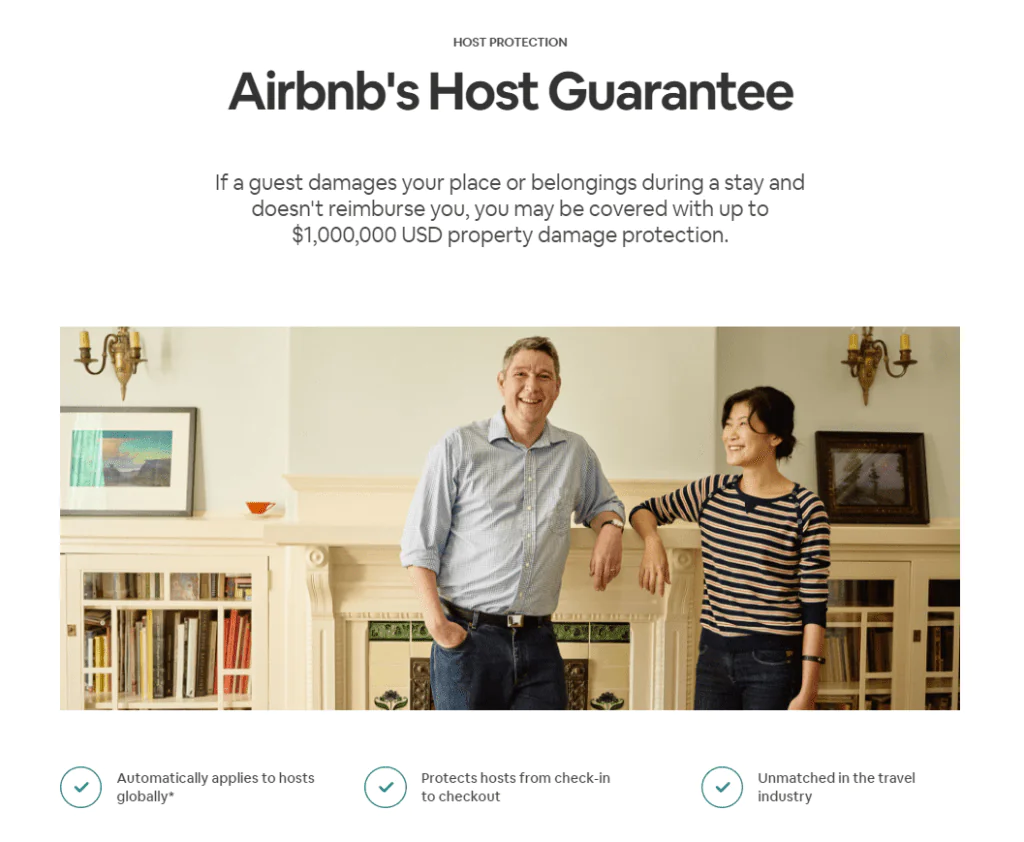
Source: Airbnb
Airbnb promoted its Host Guarantee Program, which protects hosts against property damage, with a clear call-to-action to learn more.
Why it Worked
- Clear Value Proposition: The ad effectively communicated the value of the Host Guarantee Program, providing peace of mind to potential hosts.
- Relevance to Target Audience: This lead ad targeted individuals interested in becoming Airbnb hosts, ensuring that the leads generated were highly relevant.
- Educational Content: The ad encouraged users to learn more about the program, which is an effective way to nurture leads through the sales funnel.
Shopify’s Free Trial Offer
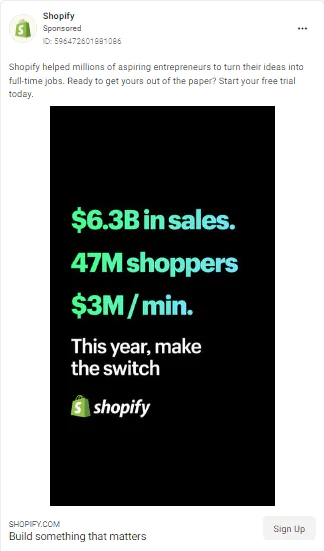
Source: Shopify
Shopify offered a free trial of its e-commerce platform, keeping the signup process simple and the value obvious.
Why it Worked:
- Valuable Incentive: Offering a free trial of their e-commerce platform provided a valuable incentive for potential users to take action.
- Simplified Sign-Up Process: The lead ad format allowed users to sign up directly on Facebook without the need for navigating to a separate website.
- Relevance to Target Audience: The ad targeted individuals interested in starting an online store, ensuring that the leads generated were likely to convert into users.
Conclusion
Getting a lead is only the first step. Follow up by delivering what you promised, answering questions clearly, and respecting the person’s preferences.
Treat follow-up as an ongoing relationship, not just a transaction. Clear, relevant communication can help build trust.
Consistent, relevant follow-up can help your team make better use of the leads it receives.
FAQs
Will other advertisers have access to my Lead Ad data?
No. Lead Ad data is provided exclusively to your Page administrators. Other advertisers running their own Lead Ads may collect similar information from the same users, but Facebook’s data policy governs how each advertiser’s submitted data is handled.
How is Lead Ad data handled by Facebook?
Lead data is confidential and managed under Facebook’s data policy. Businesses can download it in bulk within 90 days. After that window, message content is retained so both people and businesses can revisit conversations through the Pages Inbox or the Messenger API.
Who holds ownership of lead data provided in Messenger?
Data shared in Messenger falls under Facebook’s data policy. Advertisers can use that data according to their own privacy policy, as long as it complies with Facebook’s policies and applicable law.
How can I retrieve the leads data collected in Messenger?
You can download leads from Lead Ads through your Page or through a CRM partner integration. You can also continue conversations with leads via the Pages Inbox or a third-party messaging tool.
Sources retained from the original article: Meta earnings report.

