


 View Products


Key takeaways
- ContactOut offers a free tier and paid plans, but the article’s listed prices and credit limits should be confirmed with ContactOut before budgeting.
- The article describes ContactOut as a LinkedIn-oriented tool for finding work and personal emails and phone numbers.
- Sales teams, recruiters, and larger organizations may need different plan features, integrations, and credit volumes.
- Compare alternatives such as Swordfish AI, ZoomInfo, UpLead, and Lead411 against your target audience, workflow, and current pricing.
- Include any required companion tools, such as LinkedIn Sales Navigator, when estimating total cost.
Last updated: September 3, 2026

ContactOut has built its reputation on giving recruiters, sales teams, and marketers a fast path to direct contact details for professionals who are otherwise hard to reach through a company switchboard or a generic inbox.
The tool is popular because it plugs directly into LinkedIn and turns a profile into an email address or phone number in a few clicks. The real question most buyers ask isn’t whether it works, but whether the plan they need actually fits their budget.
ContactOut’s current pricing structure includes a Free Plan with very limited daily lookups, paid self-serve plans built around email and phone credits, and a custom-priced Team/API tier for larger organizations. Exact plan names, credit caps, and monthly rates have shifted more than once over the past couple of years, so treat the numbers below as a starting point rather than a locked-in quote, and confirm current figures on ContactOut’s pricing page before budgeting.
If you’re trying to figure out what ContactOut actually costs and whether it earns its place in your prospecting stack, this breakdown walks through the plans, what drives the final price, and how it stacks up against alternatives.
Key Takeaways
- Free Plan: Useful for testing the platform or covering very light, occasional lookups, but the daily caps are tight enough that it won’t support a real outreach campaign.
- Paid self-serve plans: Built around email and phone credits, these plans suit individual sales reps or recruiters who need steady volume without going through a sales call.
- Recruiters Plan: Aimed at hiring teams that need LinkedIn Recruiter and ATS integrations alongside higher search volume.
- API/Team Plan: Custom-priced and intended for larger organizations that want to build ContactOut data into their own systems.
- Budget-friendly Alternative: If you want more flexibility without the same per-seat cost, Swordfish AI is worth comparing before you commit.
What is ContactOut?
ContactOut is an email and phone number-finding tool used by professionals to connect with several hundred million people worldwide. It draws on verified data and positions itself around privacy-law compliance.
The platform is known for finding emails quickly, and it has built a loyal base among sales, marketing, and recruiting teams who value speed over deep company-level intelligence.
Its database includes personal emails, work emails, and direct-dial phone numbers, giving users several potential ways to reach a contact. ContactOut says it processes publicly available data and aligns with GDPR and CCPA requirements. Buyers, especially those in regulated industries, should confirm the vendor’s current compliance documentation directly.
The tool is designed to help you reach decision-makers without burning hours on manual research, and it has continued to add plan tiers as its feature set has grown.
Contactout Pricing Breakdown
ContactOut’s pricing runs from a Free Plan ($0) through paid plans priced by email and phone credit volume, up to custom-priced Recruiter and API/Team tiers. Plan names and rates have changed more than once, so the table below reflects the structure this article was originally built around; verify current numbers before you buy.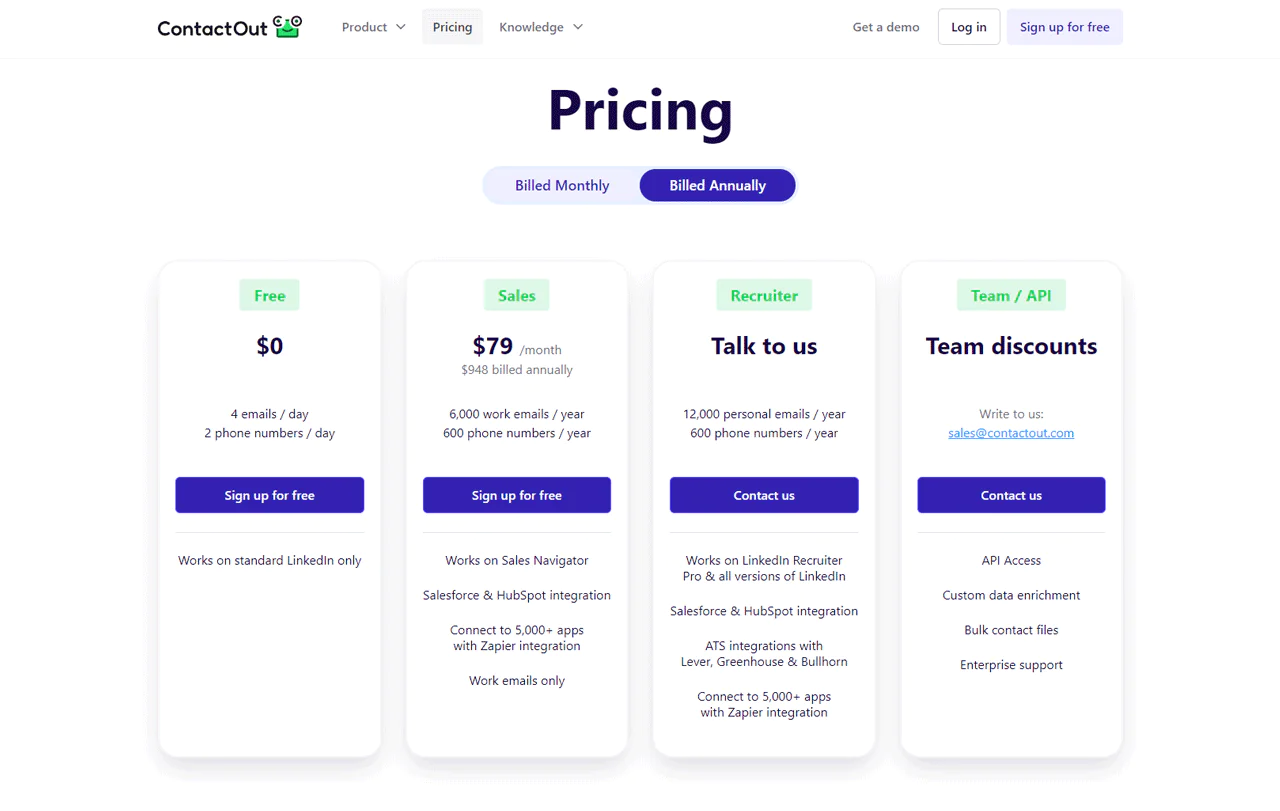
ContactOut Pricing Plans Comparison Table
This table provides a quick overview of the different pricing tiers historically offered by ContactOut –
|
Plan |
Monthly Cost | Annual Cost | Emails/day/Year | Phone Numbers/day/Year |
Key Features |
|
Free Plan |
$0 | $0 | 4/Day | 2/day | Access to standard LinkedIn profiles |
| Sales Plan | $79 | $948 | 6,000/Year | 600/Year |
Salesforce & HubSpot integration, Zapier connectivity |
|
Recruiters Plan |
Custom | Custom | 12,000/Year | 600/Year | LinkedIn Recruiter, ATS integrations |
| API/Team Plan | Custom | Custom | Custom | Custom |
API access, unlimited users, advanced integrations |
How is ContactOut Cost Calculated?
ContactOut’s pricing is primarily based on the plan you choose, usage volume, and contract length, each with its own features and limits.
Several factors can affect the overall cost:
- Plan Type: Moving from the free tier into a paid plan unlocks more features and higher limits, and the price scales accordingly.
- Usage Limits: Paid plans cap the number of emails and phone numbers you can pull, and some vendors market these caps as “unlimited” while enforcing hard limits in the fine print. Read the terms of service, not just the pricing page, before assuming a plan covers your volume.
- Contract Length: Annual billing typically comes at a discount versus paying month to month, though it also locks you into a plan before you know whether the credit allotment fits your actual usage.
Factors Influencing Final Pricing
- Volume Discounts: Larger teams or higher-volume needs may qualify for negotiated rates, meaning the per-unit cost can drop as usage grows.
- Custom Features: Integrations or workflows outside the standard plans typically require a custom quote.
- API Access and Data Enrichment: For teams needing direct API access or custom data enrichment services, cost is generally tied to the scale and complexity of what you’re building.
- Enterprise Support: Priority support for larger accounts is usually bundled into the higher-tier pricing rather than sold separately.
ContactOut Free Plan
ContactOut’s Free Plan is built for a single user exploring the basics. It caps daily lookups at a handful of email and phone searches, with no monthly or annual fee attached.
Key Features in Free Plan
- One User Access: Suitable for individual users starting with contact finding.
- A Small Daily Email Allowance: Enough to sample the platform’s email-finding accuracy.
- A Small Daily Phone Allowance: Allows initial testing of direct-dial features.
- Standard LinkedIn Profile Access: Enables basic LinkedIn outreach without cost.
- No Cost: An introductory way to experience ContactOut’s core features.
Benefits of Free Plan
- Zero cost makes it easy to test before committing budget.
- It’s a reasonable starting point for anyone new to contact-finding tools.
- Users can gauge match quality against their own target list before paying for anything.
- You still get access to a meaningful slice of ContactOut’s database, just at limited volume.
Limitations/Drawbacks of the free plan
- Daily caps are tight enough that they only support occasional, one-off lookups, not a real campaign.
- It’s built for individual use, so team collaboration isn’t possible.
- Advanced search and filtering options are locked behind paid tiers.
- There’s no CRM integration for streamlining workflow.
- Customer support is not part of the free tier.
ContactOut Paid Plan 1: Sales Plan
Historically, the Sales Plan has been priced around $79 per month (or roughly $948 billed annually), bundled with a set volume of work emails and phone numbers per year, plus Salesforce, HubSpot, and Sales Navigator integration and Zapier connectivity to thousands of apps.
This tier is aimed at sales professionals who want to widen their outreach without paying for enterprise-level features they won’t use.
It suits sales teams that lean on email and phone outreach to build relationships, work through sales pitch examples, and close deals.
The integration options make it a fairly low-friction addition to existing sales processes, and the credit allotment is generous enough to support real prospecting volume, provided your usage stays within the plan’s actual limits.
Key Features Of Sales Plan
- Annual Work Email Allotment: Supports higher-volume outreach than the free tier.
- Annual Phone Number Allotment: Facilitates direct calls to potential leads and clients.
- Sales Navigator Compatibility: Enhances targeting and prospecting on LinkedIn’s platform.
- Salesforce & HubSpot Integration: Streamlines lead management and follow-ups.
- Zapier Integration: Connects to thousands of apps for workflow automation.
Benefits of Sales Plan
- A larger annual allotment of emails and phone numbers supports broader outreach than the free tier.
- Easy integration with Salesforce and HubSpot helps keep lead management organized.
- Zapier connectivity automates workflows across a wide range of platforms.
- Optimized for users of LinkedIn’s Sales Navigator, improving targeting and prospecting.
- Focused on work emails, which keeps outreach professional and on-brand.
Limitations of the Sales plan
- Limited to work-related contacts, which may not suit every outreach strategy.
- Monthly billing costs more than annual; the best rate requires a yearly commitment.
- The phone number cap can restrict teams that rely heavily on cold calling.
- It may not scale cleanly for larger teams without multiple subscriptions.
- Full value depends on already using Sales Navigator, Salesforce, HubSpot, or Zapier.
ContactOut Recruiters Plan
The Recruiters Plan is custom-priced and built for recruitment teams, bundling a larger annual allotment of personal emails and phone numbers with LinkedIn Recruiter and Salesforce integration, plus Zapier connectivity.
It’s designed for HR teams that need a tool built around hiring workflows, particularly recruiters who lean heavily on LinkedIn Recruiter or its other paid tiers.
It also fits teams that need to connect their recruiting stack to Salesforce, HubSpot, or Applicant Tracking Systems like Lever, Greenhouse, and Bullhorn for a more streamlined process.
Key Features in Recruiters Plan
- Larger Annual Personal Email Allotment: Broadens outreach with more candidate contact options.
- Annual Phone Number Allotment: Enables direct, immediate communication with candidates.
- LinkedIn Recruiter Integration: Streamlines candidate search and engagement.
- Salesforce & HubSpot Integration: Enhances candidate pipeline management through popular CRM systems.
- ATS Integration (Lever, Greenhouse, Bullhorn): Simplifies recruitment management inside your preferred ATS.
- Zapier Connectivity: Automates workflows by linking ContactOut with thousands of other applications.
Benefits of Recruiters Plan
- A large volume of personal emails and phone numbers supports extensive candidate outreach.
- Seamless integration with LinkedIn Recruiter enhances candidate sourcing.
- CRM integrations streamline candidate engagement and follow-up.
- ATS integrations support efficient candidate tracking.
- Zapier connectivity automates repetitive tasks.
Limitations of the Recruiters Plan
- Custom pricing means you need a sales conversation before you know the real cost.
- The larger resource pool requires disciplined management to avoid waste.
- Built for larger teams or agencies, it may be more than a solo recruiter needs.
- Getting full value requires familiarity with the connected platforms.
ContacOut API/Team Plan
The API/Team Plan carries custom pricing built around team size, supporting unlimited users and integration with existing systems. It typically includes API access, advanced search, and priority support.
It’s designed for larger organizations that need to build ContactOut data directly into their CRM, ATS, or internal applications.
It’s a fit for businesses looking for scalable contact-finding solutions they can wire directly into their own software rather than working through a browser extension.
The plan is best suited to large teams that need contact data embedded in their existing systems, backed by priority customer service as usage scales.
Key Features in API/Team Plan
- API access lets teams pull ContactOut’s database directly into internal systems for automated workflows.
- The plan supports unlimited users, which suits growing teams.
- Advanced search features help teams find precise contact information faster.
- Priority customer support ensures issues get addressed quickly.
Benefits of API Plan
- Supports large-scale outreach with direct data access rather than manual exports.
- Integration flexibility fits into existing recruiting or sales software.
- CRM and ATS integrations streamline engagement and tracking.
- Zapier connectivity automates repetitive tasks.
Limitations of the API Plan
- Custom pricing can be unclear without a direct sales conversation, complicating budgeting.
- Requires technical resources to integrate and maintain API connections.
- Support issues may take longer to resolve than a self-serve plan.
- API calls can be subject to rate limits during high-usage periods.
ContactOut Pricing on Reddit
Reddit users recognize ContactOut’s utility in enhancing outreach efforts, particularly when combined with Sales Navigator. However, there are concerns about its pricing, prompting users to look for more cost-effective alternatives.
- Reddit users praise ContactOut for improving outreach efforts, especially when paired with LinkedIn’s Sales Navigator. There’s notable worry about ContactOut’s cost, which has reportedly risen to over $2,000/year per license, deemed expensive for individual users.
- The high price has led users to search for more wallet-friendly options that can still efficiently gather emails from LinkedIn. Despite its cost, many users recognize ContactOut’s potential to drive significant business growth when used effectively with Sales Navigator.
- Despite its higher price, many Reddit users acknowledge the effectiveness of ContactOut when combined with LinkedIn’s Sales Navigator, noting significant business growth when the tools are used diligently and patiently.
- There’s a continuous interest in either maximizing ContactOut’s use or finding even more effective tool combinations for outreach, showing a desire for improvement and alternatives.
- Some users express a need for tools like ContactOut but tailored for specific sectors, like crypto, highlighting a demand for specialized outreach tools in various industries.
When Should I Pay for ContactOut?
Deciding which plan to pay for comes down to where your team is in its growth. Here’s how each tier tends to map to a stage of outreach maturity.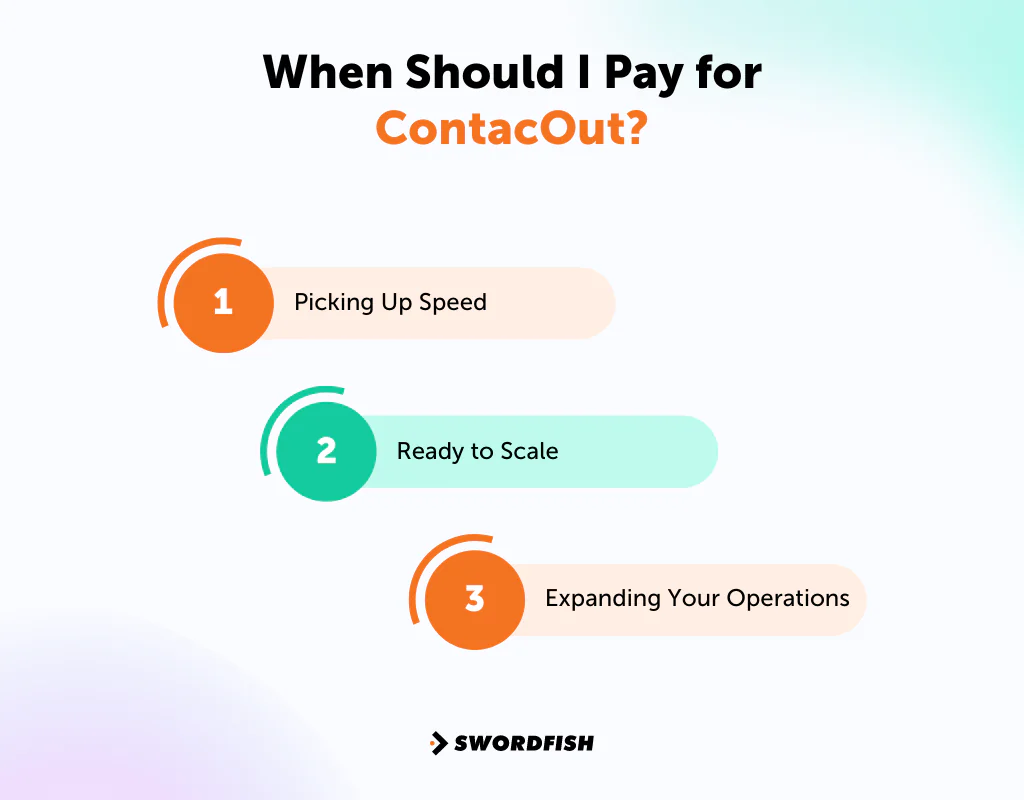
Picking Up Speed
If your team is starting to grow and needs to connect with more people than the free tier allows, the Sales Plan is the logical next step. It’s built for teams that need more than the basics without jumping to a custom quote.
Ready to Scale
If you’re in a growth phase and need deeper candidate or prospect insight, the Recruiters Plan is built for that stage. Custom pricing means you’ll need a conversation with sales, but it’s aimed at teams widening their reach with more integrations and volume.
Expanding Your Operations
When you’re ready to build ContactOut directly into your operations rather than working through a browser extension, the API/Team Plan fits.
Custom pricing accommodates the needs of large teams and enterprises, offering direct API access for bespoke applications as your operations scale.
Features of ContactOut
Here are ContactOut’s main features –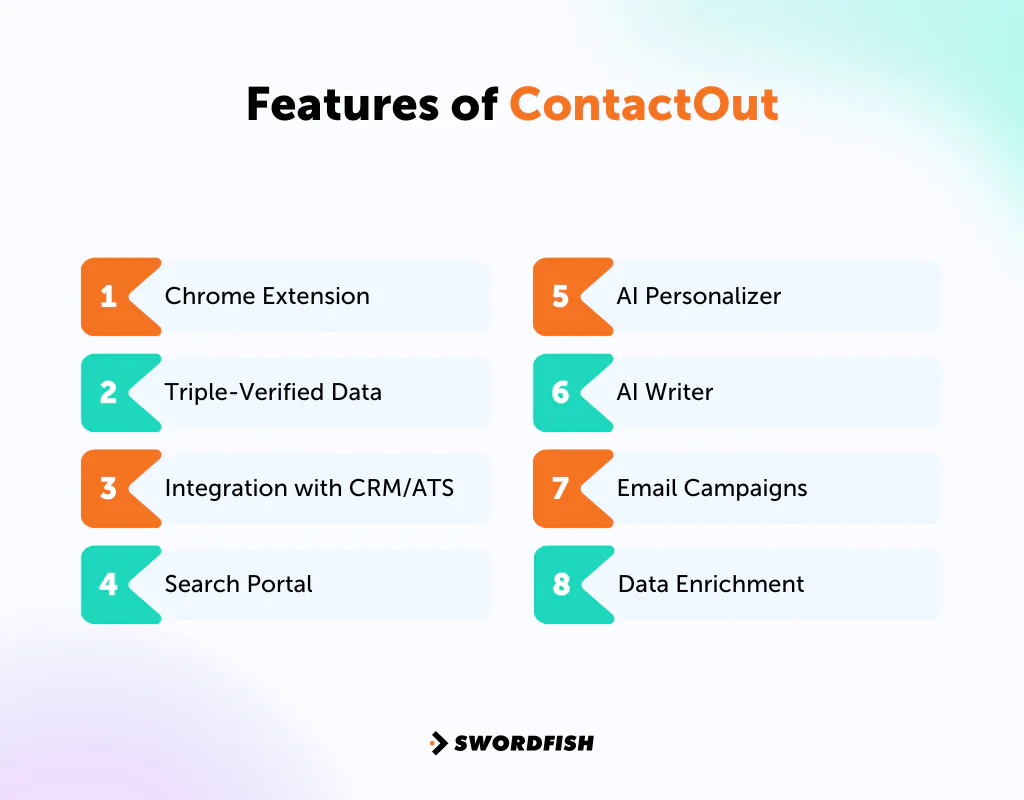
Chrome Extension
This feature lets you pull contact details without leaving a LinkedIn page, which saves time for anyone relying on LinkedIn for organizational networking and sales prospecting.
Triple-Verified Data
ContactOut runs contact details through multiple verification passes to reduce the odds of reaching an outdated or incorrect contact, which matters for the success of corporate marketing strategies that depend on accurate outreach lists.
Integration with CRM/ATS
ContactOut connects with common CRM and ATS software, letting you push new contacts into your existing database instead of managing a separate spreadsheet.
Search Portal
ContactOut’s Search Portal is a way to find prospects beyond LinkedIn, with instant access to a large database of professionals and companies, so you can reach out to more people on Linkedin and beyond it.
AI Personalizer
The AI Personalizer generates tailored email drafts with a click, cutting down the manual research time that usually goes into writing a genuinely personalized message.
AI Writer
Given a few guiding words, the AI writer drafts replies for you, which helps keep response times short without writing every message from scratch.
Email Campaigns
This feature supports multi-stage email campaigns, easy prospect imports, personalization at scale, and performance tracking to keep outreach on target.
Data Enrichment
ContactOut can supplement your CRM or ATS records with additional contact information, filling gaps in your existing data.
It adds LinkedIn profile details, verified emails, and phone numbers to prospect records so the information you need is in one place.
Is ContactOut Worth The Price?
Whether ContactOut is worth the price depends heavily on which plan you land on and how much of it you actually use. Reddit threads and third-party pricing reviews both point to a pattern: buyers who don’t map their real credit usage before signing an annual contract tend to feel the cost more acutely, especially once per-seat pricing adds up across a team.
ContactOut may be most useful to buyers who value its contact data and LinkedIn workflow. Pairing it with LinkedIn Sales Navigator can add another cost, so include that in the total budget.
If the price gives you pause, tools like Swordfish AI or Lead411 are worth comparing, since both aim to cover similar ground with different pricing structures.
ContactOut may suit teams that need its mix of LinkedIn integration and personal email discovery. Compare the cost and credit limits with your expected usage, and consider whether a flat-rate or credit-based alternative better fits your workflow.
Swordfish AI is the #1 Contactout Alternative
 Finding accurate contact information gets harder the more specialized your target audience is, and that’s especially true when you’re trying to reach clinicians, administrators, or other healthcare professionals who aren’t always easy to find through a generic LinkedIn search. That’s where Swordfish AI, one of the more established sales intelligence tools, comes in.
Swordfish AI describes its offering as a broad pool of contact profiles, including cell phone data, with a verification process. Buyers should test coverage and data quality against their own target audience.
The interface is built for quick, targeted searches using specific keywords rather than requiring a deep learning curve.
Advanced filtering lets you narrow results by factors like country and industry, which helps when you’re trying to zero in on a specific role or specialty rather than sorting through generic matches.
Swordfish offers a free trial, so you can test the fit before committing to a paid plan.
ContactOut vs Swordfish AI Comparison Table
Here’s a quick comparison table showcasing how Swordfish stands against ContactOut.
|
Feature |
Swordfish AI |
ContactOut |
|
Pricing |
Custom pricing available | Starts around $79/month |
| Free Version/Trial | Offers a free trial |
Yes, free version available |
|
Database Size |
3.5 billion profiles | 250 million professional profiles |
| Chrome Extension | LinkedIn, Dribble, Twitter, Facebook groups/profiles |
Available with LinkedIn |
|
Intent Data |
Includes Bombora® Intent Data | Not Available |
| CRM Integration | Salesloft, Salesforce, LOXO, Outreach, Zapier, Lever |
Salesforce & HubSpot integration, plus Zapier connectivity |
|
Data Accuracy |
High (45% more accurate) | Can vary in some cases |
| Integrations | Salesloft, Salesforce, LOXO, Outreach, Zapier, Lever, etc. |
One-click campaigns with Salesforce, Hubspot, LinkedIn |
Why Choose Swordfish AI over ContactOut?
Swordfish AI’s core advantage is depth on direct contact details, particularly for the harder-to-reach professionals that a generic LinkedIn scrape often misses. Here’s where it stands apart –
Get Direct Contact Info
Swordfish AI focuses on direct cell phone numbers and primary business email addresses, which matter when you need to reach someone quickly rather than waiting on a LinkedIn message to land.
Vast Database
With a database of 3.5 billion data points, Swordfish AI covers a much broader scope than ContactOut’s roughly 200 million profiles, which improves your odds of finding a specific, harder-to-reach contact.
Real-Time Verification
Swordfish AI verifies contact details in real time, citing an 82% first-call success rate and 95% data accuracy. That kind of freshness matters most when you’re working a list of contacts who change roles or numbers frequently.
Work More Efficiently
Swordfish AI’s matching approach is built to get you to decision-makers faster. If setting meetings and finding the right leads quickly is the priority, the platform is built around surfacing accurate phone numbers for exactly that.
Reach The People in Charge
Getting past gatekeepers to the actual decision-maker can be a persistent problem with LinkedIn-first tools. Swordfish AI is built to solve that by giving you the direct information needed to contact important prospects without relying solely on a LinkedIn connection request. Try Swordfish Ai
What are the Other Alternatives to Contactout?
Choosing the right ContactOut alternative means weighing pricing, database depth, and integrations against your actual workflow rather than picking based on brand recognition alone.
Here’s how ContactOut and its main alternatives stack up on pricing, features, and overall value.
|
Features |
ContactOut | ZoomInfo | UpLead | Lead411 |
| Free Trial | Yes | 4 to 14 days trial | 7 days, 5 free basic credits |
7-day free trial with 50 exports |
|
Pricing Model |
Free Plan: No cost, basic access.Sales Plan: $79/month, enhanced features.Recruiters Plan: Custom pricing, extensive access.API/Team Plan: Custom pricing, unlimited access. | Professional: $14,995 (Per year 5,000 credits)Advanced: $24,995 (Per year 10,000 credits)Elite: $34,995 (Unlimited) | Essential: $99 (170 credits)Plus: $199 (400 credits)Professional: Custom |
Basic Plus Unlimited: $99 monthly per userEnterprise Limited: Custom |
| Database Size | Not specified; extensive LinkedIn integration | 321 million professional contacts at 104 million companies | Over 155 million B2B contacts |
50 million B2B email addresses |
|
Data Accuracy |
Can vary; triple-verified data for high confidence | High accuracy with regular updates | Guarantees ≥95% email accuracy rate | Offers double-verified direct dials |
| Integration | Salesforce & HubSpot integration, Zapier connectivity | Extensive CRM integrations including Salesforce, Zoho, HubSpot | Outreach, Zapier, Salesforce, ZOHO, Copper, etc. |
Salesforce, HubSpot, Copper, Zoho, Capsule, Pipedrive, etc. |
|
Unique Feature |
Email campaigns, LinkedIn integration | Buyer intent data, technographic data, company scoops | Bulk lookup, friendly credits system | Sales engagement platform, Lead scoring, real-time data updates |
| Target Audience | Sales professionals, recruiters | Large Sales/Marketing Teams | Teams Seeking Accurate Leads |
B2B Companies |
1. ContactOut Vs ZoomInfo
 ZoomInfo is a broader B2B platform that enriches sales and marketing strategies with detailed company and professional information rather than focusing narrowly on LinkedIn contacts.
The article describes ZoomInfo as having several hundred million profiles, sourced from public records, business websites, and other methods. Compare current database coverage directly with your target market.
The platform includes ZoomInfo SalesOS and MarketingOS, which add tools for faster sales cycles and targeted marketing, along with real-time email verification, buyer intent data, and website visitor tracking.
ZoomInfo offers a broader set of data and CRM integrations than a LinkedIn-first contact-finding tool, according to the comparison in this article. It may suit teams seeking company-level insights as well as contact details; verify current features and integrations before choosing.
Comparison Table of ContactOut vs ZoomInfo
|
Features |
ContactOut | ZoomInfo |
| Free Trial | Yes, details vary |
4 to 14 days trial |
|
Pricing |
Free Plan: Limited access |
Professional: $14,995 (Annually 5,000 credits) |
|
Sales Plan: $79/month |
||
|
Recruiters Plan: Custom pricing |
Advanced: $24,995 (Annually 10,000 credits) | |
| API/Team Plan: Custom pricing |
Elite: $34,995 (Unlimited) |
|
|
Chrome Extension |
Available with LinkedIn |
|
|
Database Size |
Professional Profiles: 250M, Company Profiles: 30M | 321 million professional contacts at 104 million companies |
| Data Verification | Can vary; triple-verified data for high confidence |
Uses AI and machine learning to continually update and verify data. |
|
Integrations |
Salesforce & HubSpot integration, Zapier connectivity | Salesforce, Zoho, HubSpot, Microsoft Dynamics 365, etc. |
| Usability | User-friendly, straightforward |
Easy to use, minimal learning curve |
2. ContactOut Vs Uplead
 UpLead builds its pitch around verified accuracy, promising around a 95% accuracy rate on its contact data.
UpLead emphasizes data verification and offers more than 50 filters, according to the article. Check its current accuracy claims and filtering options against your needs.
UpLead says it checks emails when a lead is retrieved and supports bulk lookups. Confirm current export limits and CRM options before relying on it for a particular workflow.
Its Data Enrichment feature adds useful detail to lists you already have. Between clear pricing and solid filtering tools, UpLead is a reasonable pick for teams that want predictability in what they’re paying for.
Comparison Table of ContactOut vs UpLead
Here’s the comparison table for ContactOut and UpLead –
|
Features |
ContactOut |
UpLead |
|
Free Trial |
Yes, Limited access |
7 days, 5 free credits |
| Pricing | Sales Plan: $79/month |
Essential: $99/month (170 credits) |
|
Recruiters Plan: Custom pricing |
Plus: $199/month (400 credits) | |
| API/Team Plan: Custom pricing |
Professional: Custom |
|
|
Chrome Extension |
Available with LinkedIn |
|
|
Database Size |
Professional Profiles: 250M; Company Profiles: 30M |
140 million B2B contacts with email addresses |
| Data Verification | Can vary; triple-verified data for high confidence |
Employs a detailed verification process at the point of download or export |
|
Integrations |
Salesforce & HubSpot integration, Zapier connectivity | Outreach, Zapier, Salesforce, ZOHO, Copper, etc. |
| Usability | User-friendly, straightforward |
User-friendly for beginners and experts |
3. ContactOut Vs Lead411
 Lead411 gives access to several hundred million contacts, and features like Growth Intent Triggers and Bombora intent data help surface what prospects are actually interested in.
Lead411 describes its email verification process as triple verification, intended to help reduce bounce rates. Actual results can vary, so evaluate data quality using your own list.
The article characterizes ContactOut as focused on direct contact details and Lead411 as offering additional company-level insights and intent data. Check current product details and coverage when comparing them.
It scales reasonably well from small business to enterprise use.
Comparison Table of ContactOut vs Lead411
|
Features |
ContactOut |
Lead411 |
|
Pricing |
Free Plan: Limited access |
Basic Plus Unlimited: $99 monthly per user |
|
Sales Plan: $79/month |
||
|
Recruiters Plan: Custom pricing |
Enterprise Limited: Custom |
|
|
API/Team Plan: Custom pricing |
||
|
Data Enrichment |
Lead Enrichment: Verified emails, phone numbers, LinkedIn data | Offers contact enrichment to update and clean CRM data effectively. |
| Email Verification | Solid verification tools ensure email deliverability. |
Provides verified emails for reliable communication. |
|
Intent Data |
Not specified directly but offers comprehensive data for prospecting. | Bombora B2B intent data for targeted outreach. |
| Market Intelligence | Useful company information for prospecting |
Provides insights on ideal customers and sales triggers. |
|
Data Accuracy |
Auto-refreshed with accurate B2B data every 15 days | Not specified directly but offers verified emails for communication. |
| User Interface | User-friendly and intuitive, designed for efficient prospecting. |
Simple and straightforward for easy data management. |
Conclusion
Understanding ContactOut’s pricing structure can meaningfully improve how you plan a prospecting or recruiting budget. With a user-friendly interface, decent data accuracy, and a range of plan tiers, it caters to a fairly wide range of buyers.
The article highlights ContactOut’s LinkedIn-oriented workflow for finding prospects and supporting outbound messaging as a distinction from broader contact databases.
If the cost or LinkedIn-first workflow does not fit your needs, compare Swordfish AI and other alternatives using your expected volume, required data, and integrations. Verify current pricing and features before committing.
FAQs
Does ContactOut offer a free trial?
Yes. ContactOut provides a free tier that functions as a de facto trial, letting you test core features at limited daily volume before committing to a paid plan.
Is ContactOut secure?
ContactOut states that it emphasizes data security and privacy and works to comply with relevant data protection regulations. For the most current details on its security measures and certifications, it’s worth confirming directly with ContactOut rather than relying solely on marketing pages.
Does ContactOut offer discounts?
Annual billing typically grants access to your full search credit allotment upfront rather than offering a straightforward percentage discount.
Is ContactOut good for personal use?
It can be useful for individuals in roles that depend on networking, such as recruiters, sales professionals, and marketers. Its feature set and pricing, though, are built primarily around professional and business use rather than casual personal use.
Is ContactOut good for small business?
Yes, for many small teams. ContactOut can support lead generation, sales, and recruiting efforts, and its plan tiers are structured to accommodate different budgets, though it’s worth mapping your expected usage against the actual credit caps before choosing a tier.

