


 View Products


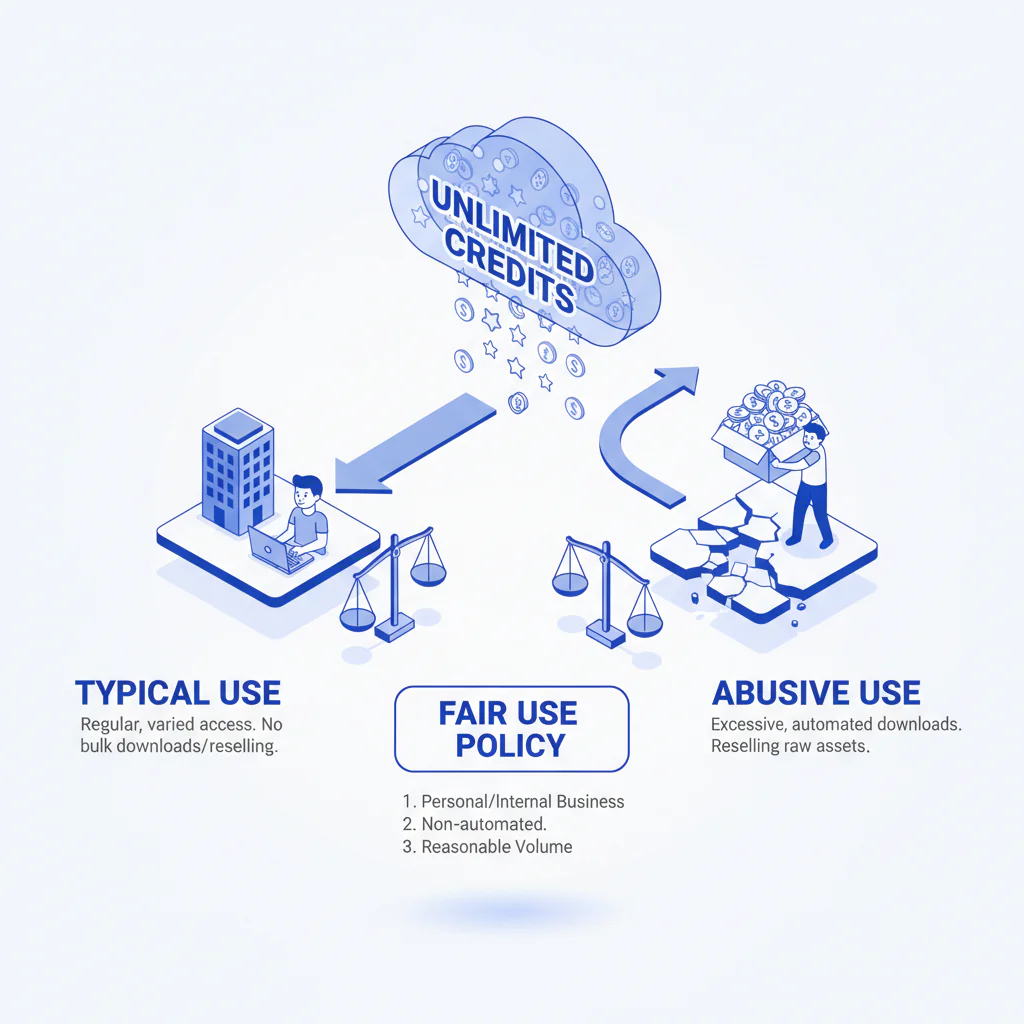
How unlimited credits work (and what “fair use” actually means)
Byline: Ben Argeband, Founder & CEO of Swordfish.AI
Who this is for
If you’re buying contact data tools and trying to compare “unlimited” plans vs credit-based pricing without getting trapped by hidden throttles, this is for you. It’s also for teams that care about adoption: reps won’t use a tool they feel they have to ration, and managers won’t trust pipeline math built on decayed data.
I’m writing this like a software buyer/auditor because that’s the reality: “unlimited” is rarely a product feature, it’s a contract interpretation problem that shows up after you integrate.
Quick verdict
- Core answer
- “Unlimited credits” should mean you can run normal prospecting and enrichment workflows (UI, extension, and documented integration API enrichment, not scraping) without counting credits; a fair use policy exists to stop abuse, not to punish legitimate teams.
- Key stat
- There is no universal “unlimited” number across vendors; variance comes from seat count, API usage, list quality, and industry. If a vendor won’t explain those drivers up front, expect throttling later.
- Ideal user
- Buyers who want true unlimited day-to-day usage with transparent limits, and who measure ROI as cost per connect (not cost per record).
When you ask “how unlimited credits work,” you’re really asking what triggers enforcement and what happens when you hit it. If the answer is vague, the enforcement will be improvised.
What Swordfish does differently
Most “unlimited” plans fail the same way: adoption rises, usage spikes, and suddenly you’re negotiating usage limits you didn’t know existed. The hidden cost is operational: reps ration lookups, refresh less often, and data decay turns into rework because nobody trusts what’s in the CRM.
Swordfish is designed so normal prospecting and enrichment doesn’t require credit budgeting. That includes prioritized access to direct dials (including mobile numbers where available) and an unlimited model governed by a fair use policy aimed at abuse patterns rather than normal work.
In practice, the browser workflow is where tools either get adopted or quietly ignored. With the contact data extension, usage is typically human-paced and session-based. If a vendor treats that as suspicious by default, you get throttles, support tickets, and rep workarounds that break process and reporting.
Decision guide
I use a procurement-grade framework called Fair Use Clarity: intent → volume → automation → resolution. It’s how you keep “unlimited” from turning into a throttling surprise after rollout.
- Intent: Are you using the tool for human prospecting and enrichment, or to build a resale dataset / scrape at scale? A fair use policy should target the latter.
- Volume: Does usage spike because you onboarded a team, ran a campaign, or enriched a CRM? That’s normal. A vendor should explain how volume interacts with seats and plan tier.
- Automation: Are you running scripts, headless browsers, or high-frequency API calls? That’s where automation limits and rate limits must be explicit because they directly affect integration reliability and engineering time.
- Resolution: If you hit a limit, what happens next? A transparent model is: notify, explain, and offer an escalation path that matches your business use.
Before you pilot, ask for the written fair use policy, documented rate limits, documented automation limits, and the escalation process. If it’s not written, it’s not enforceable in a way you can plan around.
If enforcement differs across UI vs extension vs API, it should be documented. Otherwise you’re debugging policy with production workflows.
Checklist: Feature Gap Table
| What vendors claim | What it often means in practice | Hidden cost / failure mode | What to demand (audit language) |
|---|---|---|---|
| “Unlimited credits meaning: no caps” | Unlimited for light usage; heavy users get slowed | Adoption drops; reps ration lookups; managers lose coverage | Define “normal work” in writing; publish enforcement triggers and escalation steps |
| “Fair use policy” | Catch-all clause to throttle anything expensive | Budget uncertainty; procurement rework mid-contract | Policy must separate abuse (resale/scraping) from legitimate prospecting and enrichment |
| “Usage limits” | Per-seat caps, daily caps, or export caps | Ops overhead to allocate credits; campaign planning becomes guesswork | List limits by channel: UI, extension, API; specify whether exports are limited |
| “Anti-abuse policy” | Blocks automation without telling you what’s allowed | Integration breaks; engineering time wasted on trial-and-error | Publish automation limits and rate limits with examples (human vs scripted) |
| “Bulk usage supported” | Supported, but only via add-ons or separate SKUs | Unexpected expansion cost; delays to enrichment projects | State whether bulk enrichment is included, and what triggers a plan change |
| “Transparent policy” | Policy exists, but enforcement is opaque | Surprise throttling; internal blame between Sales and CS | Commit to notification + explanation + documented escalation path |
Decision Tree: Weighted Checklist
This is weighted by standard failure points in contact data rollouts: surprise throttling, integration breakage, and data decay-driven rework. The weights are priorities, not made-up scores.
- Highest priority: Written fair use policy that distinguishes abuse from normal work, with examples tied to UI, extension, and API usage.
- Highest priority: Explicit rate limits and automation limits (what’s allowed, what’s blocked, and what triggers review). This reduces integration churn and engineering rework.
- Highest priority: Clear escalation path: notification before enforcement, reason codes, and a documented way to increase capacity without renegotiating the whole contract. Reason codes should tell you why you were limited and what to change.
- Medium priority: Bulk usage terms: whether bulk enrichment is included, and whether there are export limits that force manual workflows.
- Medium priority: Seat-based variance explained: how adding seats changes expected volume and whether enforcement is per-seat or pooled.
- Medium priority: Data quality expectations and decay handling: how stale records are handled and what your team does when a “found” number is dead. This is where rework cost hides.
- Lower priority: Admin controls and reporting: enough visibility to separate training issues from policy enforcement.
Troubleshooting Table: Conditional Decision Tree
- If your workflow is human-driven prospecting (reps using a browser tool/extension) then prioritize true unlimited day-to-day usage with transparent limits and written examples of normal work.
- If you plan CRM enrichment or list cleanup then require bulk terms in writing (what “bulk usage” means, whether there are export limits, and how enforcement works during spikes).
- If you need API-based enrichment then treat rate limits and automation limits as integration requirements; ask for documented thresholds and what errors look like when you exceed them.
- If the vendor says “fair use is flexible” but won’t define triggers then assume you’ll be throttled when adoption rises, and model the cost of switching tools mid-year.
- Stop condition: If the vendor cannot provide a written fair use policy plus a transparent escalation process (notify → explain → remedy) stop. You can’t audit what isn’t defined.
Limitations and edge cases
Unlimited models still have boundaries. The difference is whether those boundaries are disclosed and operationally reasonable.
- Legitimate spike vs abuse pattern: Onboarding a team or enriching a CRM after a list import is normal volume. Running scripted loops to harvest data continuously is not. A fair use policy should separate these so normal work doesn’t get treated like abuse.
- API throughput: High-frequency API usage can look like abuse if you don’t coordinate. If your workflow depends on API enrichment, you need published rate limits and a scaling path that doesn’t involve guesswork.
- Automation ambiguity: If a vendor can’t explain automation limits, your engineers will learn them by breaking production. That’s not a “policy” problem; it’s an integration reliability problem.
- Bulk exports: Some vendors restrict exports to prevent database replication. If your process requires exporting large lists, get export terms in writing or expect manual workarounds.
- False positives from shared networks: Remote teams on shared VPNs or shared IP ranges can trip anti-abuse systems. A transparent policy should lead to a review and resolution, not silent throttling that looks like “the tool is flaky.”
- Variance drivers: Seat count, API usage, list quality, and industry change your real usage profile. A transparent policy explains how those variables affect enforcement and support.
Evidence and trust notes
I’m the CEO of the product being described, so treat this as an operator’s explanation, not a neutral review. The way to keep it honest is to verify the policy and the behavior in a pilot, in writing, before you commit.
Ask for the artifacts that matter operationally: the written fair use policy, documented rate limits, documented automation limits, and the escalation process that explains how “transparent limits” are enforced.
- Why credits cause rationing: Credit-based systems push reps to “save” lookups. The business outcome is lower refresh frequency, more stale contacts from data decay, and more rep rework hunting for alternate paths.
- Why cost per connect is the right metric: A record that doesn’t connect is overhead. Compare tools by the cost to produce conversations, not by the cost to display a contact field.
- Variance explainer (what changes your real cost): seat count (more users, more lookups), API usage (higher throughput), list quality (dirty lists waste lookups), and industry (different decay and lookup intensity). If a vendor can’t explain these, they can’t price or enforce fairly.
- Transparent escalation beats surprise throttling: Fair use prevents abuse, not normal work. Transparent escalation beats surprise throttling because it prevents downtime and lets you plan capacity instead of reacting mid-quarter.
How to test with your own list (buyer-grade, no vendor math)
- Pick a representative list: Use a slice that matches your real world (your industry, your typical titles, and your usual data cleanliness). List quality drives wasted lookups and rework.
- Run the same workflow your reps use: Test UI and extension usage the way humans actually work, not a sanitized demo flow.
- Include a “spike” day: Simulate onboarding or a campaign push. You’re testing whether “unlimited” survives normal operational bursts.
- Test bulk usage explicitly: If you need enrichment at scale, run a bulk job and confirm whether there are export limits or workflow restrictions.
- Test API usage if you integrate: Run your intended integration pattern and observe rate-limit behavior and error responses. This is where integration headaches usually start.
- Force the escalation path: Ask support what happens when you hit a limit and request the written process. You’re testing whether enforcement is transparent or improvised.
- Measure outcomes you can defend: Track connects and time-to-contact, not “records returned.” Data decay shows up as dead ends and rework.
For deeper comparisons, start with unlimited credits vs credit-based pricing, then sanity-check plan structure on contact data pricing. If you’re evaluating outcomes, review data quality so you’re not paying for decayed records that create rework.
FAQs
What does “unlimited credits” mean in practice?
It should mean you can run normal prospecting and enrichment without counting down credits. The boundary is abuse: scripted scraping, resale, or automation patterns that create disproportionate load.
Is a fair use policy just a loophole?
It can be. A legitimate fair use policy defines what’s allowed, what’s not, and what happens if you hit a limit. A vague policy is a loophole for throttling.
What are “transparent limits” supposed to include?
At minimum: whether limits differ across UI vs extension vs API, published rate limits, published automation limits, and a written escalation process.
Will I get throttled if my team is successful?
If the vendor can’t explain variance drivers (seats, API usage, list quality, industry) and won’t put triggers in writing, assume yes. If they can, you can plan capacity like any other system.
Do unlimited plans allow bulk usage?
Sometimes, sometimes not. Bulk usage is where many vendors hide add-ons or export restrictions. Ask directly whether bulk enrichment and exports are included and what triggers a plan change.
How does the extension fit into unlimited usage?
Extension usage is typically human-paced and session-based. Under an unlimited model, that should be treated as normal work, not penalized as automation. If a vendor treats extension usage as suspicious by default, adoption will suffer.
What should I ask procurement/legal to review?
The written fair use policy, the definition of abuse, the enforcement process, and any clauses about throttling, exports, automation, and API throughput. If it’s not written, it won’t be honored consistently.
Next steps
If you’re evaluating unlimited plans, here’s a timeline that avoids the usual procurement whiplash:
- Day 1–2: Collect written policy terms: fair use, rate limits, automation limits, bulk/export terms, and escalation steps.
- Day 3–5: Map your workflows (reps, ops, API) to those terms; identify where variance will come from (seat count, API usage, list quality, industry).
- Week 2: Pilot with real usage patterns (including onboarding/campaign spikes). Track operational friction: throttles, manual workarounds, and time-to-contact.
- Week 3: Decide using cost per connect and admin overhead, not “records returned.” If you need a reference point on plan structure, review unlimited contact credits.
About the Author
Ben Argeband is the Founder and CEO of Swordfish.ai and Heartbeat.ai. With deep expertise in data and SaaS, he has built two successful platforms trusted by over 50,000 sales and recruitment professionals. Ben’s mission is to help teams find direct contact information for hard-to-reach professionals and decision-makers, providing the shortest route to their next win. Connect with Ben on LinkedIn.

