


 View Products


Key takeaways
- Confirm the person’s current role and the company’s domain before generating email patterns.
- Use publicly available examples to form a short list of plausible addresses, not an unverified guess.
- Treat verification results as signals rather than guarantees, especially for catch-all domains or domains that block probes.
- Keep a record of the data source, timestamp, verification status, and opt-out status.
- Make outreach relevant, include a clear opt-out, and apply suppression across systems that use contact records.
Last updated: September 3, 2026
Table of Content
Byline: Swordfish.ai RevOps Team
Who this is for
- SDRs and AEs who need a repeatable way to find a work email using domain patterns and verification, not guesswork.
- Recruiters and talent teams, including those sourcing clinicians and healthcare staff, who need to reach candidates without risky scraping behavior.
- RevOps leaders who want a governed enrichment workflow that protects cold email deliverability.
- Founders and business development teams doing targeted outreach who need accuracy and clear opt-out handling.
Quick Answer
- Core Answer
- To find someone’s email, confirm the person and the company domain, generate two or three domain patterns, run email verification, then use an email finder to confirm identity. Send outreach that’s role-relevant, includes an opt-out, and suppresses future sends once someone asks to stop.
- Key Insight
- Most misses trace back to one of three things: the wrong person, the wrong domain, or an unverified guess. Use LinkedIn context to confirm employer and role first, then verify before you sequence anything.
- Best For
- B2B outreach and recruiting where you can explain relevance, honor opt-out requests, and keep a defensible record of data source and verification status. This matters even more when the contact works in a regulated field like healthcare, where inbox trust and compliance expectations run higher.
Compliance & Safety
This method is for legitimate business outreach only. Always respect Do Not Call (DNC) registries and opt-out requests.
Do not scrape in ways that violate site terms. Use for legitimate outreach with opt-out and applicable consent.
A reliable process is to confirm the person and company domain, generate a short list of likely email formats, verify the address, and use a reputable provider to check the match. Keep any outreach relevant and make it easy to opt out.
Step-by-step method
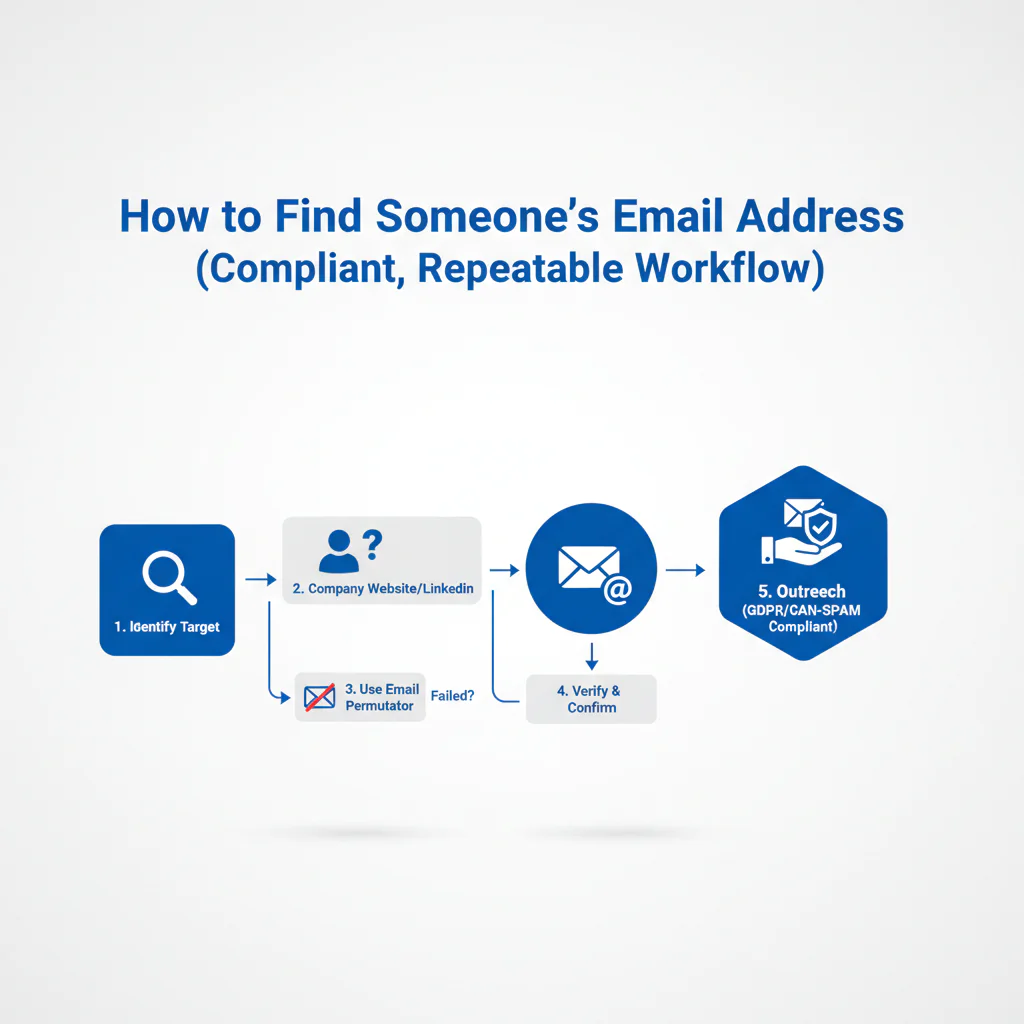
Framework: The Email Finding Ladder: Guess → Verify → Enrich → Outreach
Follow this order to make the process easier to audit and help protect sender reputation. Skipping a step can increase the chance of errors.
Step 1: Confirm identity and role using LinkedIn context
- Confirm the person is at the company today, not last year.
- Confirm the role or team so you don’t email the wrong function.
- Capture the LinkedIn profile URL in your CRM so you can audit later.
- If you don’t know the person yet, identify the role owner on LinkedIn before you guess any address.
If you’re standardizing this across a team, start with the ultimate contact finder workflow so email, mobile, and CRM fields stay consistent.
Step 2: Identify the correct company domain (and don’t assume)
- Pull the domain from the company website, not a search snippet.
- Watch for parent versus subsidiary domains and product domains.
- For multi-region organizations, confirm whether email uses a regional domain. Health systems with multiple facility brands are a common example of this.
When reps prospect from LinkedIn, a governed browser workflow matters. The Swordfish chrome extension flow helps capture the domain, LinkedIn URL, and verification status in one motion and reduces copy and paste errors.
Step 3: Generate likely domain patterns (with examples you can reuse)
Companies may use a small set of email formats. Generate a short list based on publicly available examples from the correct company domain.
- Example A: first.last@company.com
- Example B: first@company.com
- Example C: f.last@company.com
Email formats vary by organization. Some may use shorter formats like first@, while others use initials or regional domains. Test a small set of plausible patterns and use verification as a signal rather than assuming one format fits everyone.
When inferring a person’s address, exclude generic inboxes such as info@, support@, or sales@. These addresses do not identify a specific person and can complicate CRM attribution.
Step 3a: Confirm domain patterns using public pages (without scraping abuse)
If you’re stuck, public pages and documents may help you infer a domain pattern. Keep searches targeted and avoid automated collection that violates a site’s terms.
- Company site locations to check: Press, Team, About, Investor Relations, Support, and downloadable PDFs.
- site:company.com “@company.com” to find how emails appear on that site
- site:company.com “press” “@company.com” to find press contact patterns
- site:company.com filetype:pdf “@company.com” to catch emails in PDFs
- “First Last” “@company.com” to find a named mailbox example
- “@company.com” “email” to find pages that explicitly list contact details
If you find jane.doe@company.com in a PDF, that example may suggest a format to test for another person, such as john.smith@company.com. Verify the candidate address before using it.
Step 4: Run email verification before you add anything to a sequence
Treat email verification as a required gate before sequencing, not an optional cleanup step. Guessing without verification can increase bounce risk and harm sender reputation. Filtering practices vary by organization, so don’t assume an address will be accepted based on the industry alone.
Verification results vary because domains respond differently to mailbox checks. Some organizations use catch-all routing, and others block probes. Treat a result as a signal, not a guarantee of deliverability.
As a workflow safeguard, don’t sequence an address until it has passed your verification process.
If you need capture plus validation in one workflow, a chrome email extractor style process reduces missed steps.
Step 5: Enrich from reputable sources and store provenance
Once you have a likely email, contact enrichment may help check whether it matches the person and fill missing fields such as department, location, or LinkedIn URL. Use it to reduce wrong-recipient risk and maintain an audit trail.
Standardize governance with contact data compliance rules: record the data source, timestamp, and verification status. That record is what lets you debug deliverability problems and handle opt-out requests consistently across systems.
Step 6: Send compliant outreach (relevant, minimal, opt-out included)
- Lead with why this is relevant to their role.
- Make one ask.
- Include a clear opt-out and honor it fast.
- Don’t mass-send low-confidence addresses.
Two-line outreach example: “Hi [Name] — I’m reaching out because you own [area] at [Company]. If [problem] is on your 2026 list, I can share what we’re seeing across similar teams. If this isn’t relevant, reply ‘no’ and I won’t follow up.”
Common Mistake
Are you sequencing guessed emails before email verification and then blaming the tool when bounces spike?
Checklist: Weighted Checklist
Use this checklist to prioritize effort. It focuses on the failure points highlighted in this workflow: incorrect identity, incorrect domain, and skipped verification.
- High impact, low effort: Confirm current employer and title on LinkedIn before guessing domain patterns.
- High impact, low effort: Run email verification before the first send and before sequencing.
- High impact, medium effort: Validate the correct company domain (subsidiary vs parent) before generating formats.
- Medium impact, low effort: Use role and team context to avoid wrong-recipient outreach.
- Medium impact, medium effort: Use an email finder for contact enrichment and store provenance (source, timestamp, verification status) in CRM.
- Lower impact, higher effort: Manual hunting across random directories when you don’t have domain plus LinkedIn context.
Primary CTA: Get the Chrome Extension
Decision Tree: Conditional Decision Tree
- If you have full name and company domain, then generate two to three domain patterns and run email verification.
- If verification is valid and enrichment matches the same person, then add to CRM with source and timestamp and send compliant outreach with opt-out.
- If verification returns catch-all or risky, then do not sequence; use one-to-one outreach only, request an intro, or use the company contact form.
- If you only have a name and no company, then use LinkedIn to confirm current employer before you generate any domain patterns.
- Stop Condition: If you cannot confirm employer or domain, stop. Anything else increases wrong-recipient risk and compliance exposure.
Troubleshooting Table: Diagnostic Table
| Symptom | Root Cause | Fix |
|---|---|---|
| Bounces spike after adding a new source | Unverified addresses entering sequences | Gate all new emails through email verification before sequencing |
| “Not the right person” replies | Identity mismatch or stale LinkedIn employment | Reconfirm on LinkedIn; store the LinkedIn URL and role at time of capture |
| Low replies even with low bounces | Targeting mismatch (wrong role/team) or generic messaging | Use role context; rewrite the first line to explain relevance in one sentence |
| Verification shows deliverable but mail routes to a shared inbox | Alias/shared mailbox captured instead of a named mailbox | Filter out generic inboxes; regenerate domain patterns for named mailboxes |
| Complaints or opt-out failures | No suppression workflow or unclear data provenance | Implement suppression + audit trail; honor opt-out requests across systems |
How to improve results
Standardize inputs so enrichment and verification are repeatable
- Require: full name, company, company domain, LinkedIn URL.
- Store: data source, timestamp, verification outcome, opt-out status.
Protect cold email deliverability with workflow gates
- Never sequence unverified emails.
- Quarantine risky or catch-all results for one-to-one outreach only, or drop them entirely.
- Monitor sender health using your mailbox provider’s tools.
Practical references: Email sender guidelines and Google Postmaster Tools.
Use multi-channel thoughtfully (don’t turn it into a compliance problem)
Combining email with mobile may improve contact rates in some pipelines, but mobile data can be more sensitive. Take particular care when reaching healthcare providers, whose personal and professional contact channels may be subject to different expectations or requirements. If you use mobile data, keep outreach targeted, relevant, and opt-out aware.
Legal and ethical use
- Consent and lawful basis: requirements depend on jurisdiction and message type. When you’re unsure, default to conservative targeting and get counsel.
- Opt-out and suppression: include an opt-out in outreach, honor opt-out requests fast, and suppress across systems.
- Not for sensitive decisions: contact data is for communication, not for employment, housing, credit, insurance, or eligibility decisions.
- Avoid scraping abuse: do not automate collection in ways that violate site terms or create privacy risk.
- Compliance frameworks vary: teams commonly reference CAN-SPAM and GDPR, but your obligations depend on jurisdiction and use case.
- Prefer work emails for work outreach: avoid personal emails unless you have a clear, legitimate reason and consent where required.
When you use LinkedIn for identity confirmation, respect platform terms and constraints in the User Agreement.
Apply suppression across the systems used to store or act on contact records, such as your CRM and sequencer. If an enrichment tool also feeds those systems, make sure suppression status is carried through.
If you need a governance baseline across teams, use contact data compliance as the standard for training, sourcing, and auditability.
Evidence and trust notes
Last updated: Jan 2026
- This workflow targets the highest-frequency outbound failure points: wrong person, wrong domain, and skipping email verification.
- Verification is described as signal validation because catch-all domains and blocked probes create uncertainty.
- Compliance boundaries are explicit: legitimate business outreach, opt-out handling, and no scraping that violates site terms.
- Deliverability references are mailbox-provider guidance rather than vendor claims.
- Process is designed for auditability: source, timestamp, verification status, and opt-out status are first-class fields.
Implementation Notes
- Visuals to add
- Email Finding Ladder graphic (Guess → Verify → Enrich → Outreach)
- Decision-tree diagram that matches the Stop Condition logic
- Annotated example showing how to infer domain patterns from one public named email mention
- Schema notes
- FAQPage and Article JSON-LD are included in the WP bundle.
- Tracking
- Primary conversion event: Extension install
- Secondary conversion event: enrichment click
Next steps
- Day 1: Standardize required inputs (name, company, domain, LinkedIn URL) and align your process to the contact finder pillar.
- Day 3: Implement the capture workflow using the Swordfish chrome extension and require email verification before sequences.
- Day 7: Add contact enrichment governance using the ultimate contact finder flow and document suppression and opt-out handling in your CRM.
Secondary CTA: Try Contact Enrichment
FAQ
How do I find a work email address?
Confirm the company domain, generate a short list of domain patterns for the person’s name, then run email verification. Use LinkedIn to confirm they’re currently employed there so you don’t email the wrong person.
What’s the best email pattern?
There isn’t one standard. The most common are first.last@domain and first@domain, but companies vary. Generate 2–3 likely domain patterns and rely on email verification and enrichment to confirm the match.
How do I verify an email?
Email verification checks format, domain mail routing, and mailbox-level signals when available. Treat it as signal validation because some domains are catch-all or restrict verification responses.
Is it legal to find someone’s email?
It can be legal for legitimate business outreach when you follow applicable laws and platform terms. Keep messages relevant, include opt-out, honor suppression, and maintain a record of source and verification status.
Should I scrape emails?
No, not in ways that violate site terms or create privacy risk. Use a controlled process: domain patterns, email verification, and an email finder for contact enrichment, then compliant outreach with opt-out.
What is email verification?
Email verification is a process used to assess whether an email address is likely deliverable by checking format, domain configuration, and mailbox signals where supported.
How to avoid spam traps?
Avoid random lists and bulk guessing. Verify before sending, suppress bounces and opt-outs, and keep list hygiene tight so you don’t repeatedly hit dead or risky addresses.
How to stay compliant?
Use contact data for legitimate outreach, provide a clear opt-out, honor opt-out requests quickly, and avoid sourcing methods that violate site terms. Keep an audit trail: source, timestamp, and suppression status.
About the Author
Ben Argeband is the Founder and CEO of Swordfish.ai and Heartbeat.ai. With deep expertise in data and SaaS, he has built two successful platforms trusted by over 50,000 sales and recruitment professionals. Ben’s mission is to help teams find direct contact information for hard-to-reach professionals and decision-makers, providing the shortest route to their next win. Connect with Ben on LinkedIn.

