


 View Products


- Core concept
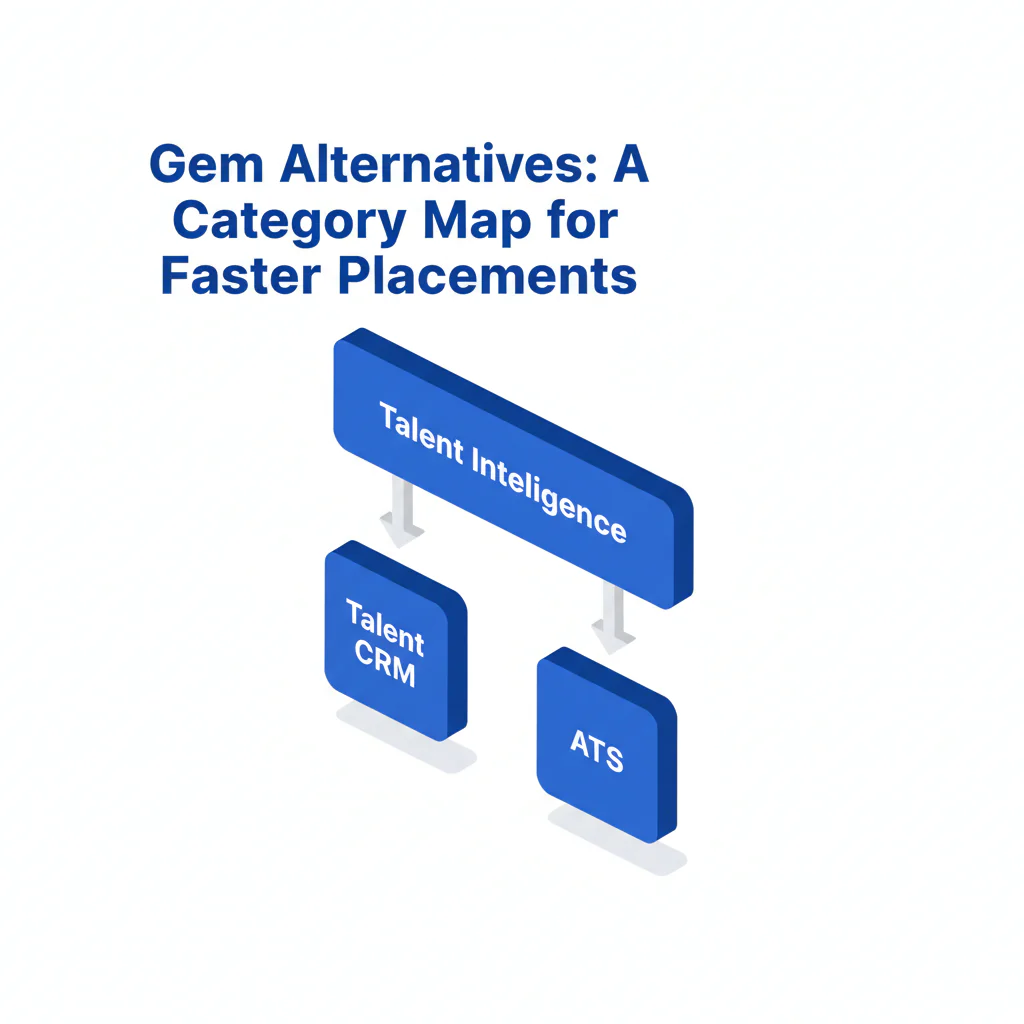
- When evaluating gem alternatives, separate tools into three categories—talent CRM, talent intelligence, and ATS—then choose based on the bottleneck that slows placements: nurture, discovery, or process control.
- Key stat
- Most response-rate problems are reachability problems. When reachability is the constraint, adding a reachability layer (verified contact data and ranked mobile numbers by answer probability) can reduce time wasted on non-working numbers and increase live conversations per recruiter-week.
- Ideal candidate profile
- Recruiting leaders comparing Gem alternatives who want a category map (not a generic list), a clear decision path for hard-to-reach roles, and guidance that protects candidate experience and compliance.
Gem Alternatives: A Category Map for Faster Placements (Talent CRM vs Talent Intelligence vs ATS)
Byline: Ben Argeband, Head of Talent Acquisition
Teams search for gem alternatives for one of three reasons: they need more replies from passive candidates, better sourcing coverage, or cleaner governance across the recruiting tech stack. Compare within the right category or you’ll buy the wrong tool and lose time to migration.
Choose the category that matches your bottleneck:
- Talent CRM alternatives if follow-up, nurture, and reporting are inconsistent and you’re not reusing silver medalists.
- Talent intelligence if list building is slow or you’re expanding into new markets and can’t find enough qualified prospects.
- ATS if approvals, auditability, and system-of-record controls are slowing offers and starts.
Who this is for
- Heads of TA and Recruiting Ops leaders comparing Gem to tools like Gem and trying to avoid a category mismatch.
- Teams hiring for hard-to-reach roles where email-only outreach underperforms.
- Organizations balancing in-house recruiting with agency recruiting and needing consistent process and suppression rules.
- Teams that want to re-engage silver medalists without duplicate outreach or messy reporting.
What recruiters are trying to accomplish
When I’m accountable for time-to-fill, I separate “tool problems” from “process problems.” Most teams are trying to fix one step of the funnel.
- Find: build qualified lists faster.
- Reach: start more real conversations per week.
- Nurture: keep warm pipelines active so reqs fill faster.
- Measure: tie outreach to responses, conversations, and screens.
- Control: enforce opt-outs, retention, and audit trails across systems.
Alternatives map (by category)
This alternatives map keeps comparisons honest. A talent CRM, a talent intelligence platform, and an ATS can all show up as “alternatives,” but they solve different constraints.
| Category | What it’s for | Choose this if… | Common failure mode (what slows placements) |
|---|---|---|---|
| Talent CRM (Gem’s primary lane) | Sequences, nurture, pipeline stages, reporting | You have sourcing coverage but follow-up and measurement are inconsistent | Reply rates stall because contact data is incomplete or outdated |
| Talent intelligence | Search, enrichment, market mapping, contact discovery | You need better prospect discovery for niche roles or new geos | Lists look strong, but connect rates are low if contact data is stale |
| ATS | Applicant processing, approvals, compliance records | Your bottleneck is governance, auditability, and offer workflow | Teams force nurture into the ATS and lose engagement controls and visibility |
If your team likes Gem’s workflow but needs more conversations per week, the lowest-risk change is often adding a reachability layer rather than migrating your CRM. A reachability layer focuses on verified contact data and ranked mobile numbers by answer probability, which reduces time spent dialing dead numbers and improves speed-to-first-conversation.
Gem alternatives by category (what to compare)
To compare recruiting CRM alternatives and adjacent tools, keep the evaluation tied to outcomes: time-to-first-response, time-to-first-conversation, and qualified screens per outreach volume.
These examples are representative, not exhaustive. Use them to anchor your evaluation inside the right category.
| Category | Representative examples to evaluate | Best for | Watch-outs that hurt candidate experience |
|---|---|---|---|
| Talent CRM | Gem (baseline), Beamery, Avature CRM, Phenom CRM, iCIMS CRM | Nurture, sequencing, pipeline visibility, re-engaging silver medalists | Weak global opt-outs, duplicate profiles, and inconsistent suppression across brands/regions |
| Talent intelligence | SeekOut, HireEZ, LinkedIn Recruiter, ZoomInfo Talent | Faster list building and enrichment for hard-to-reach roles | Stale contact data leading to repeated failed touches and higher complaint risk |
| ATS | Greenhouse, Lever, iCIMS ATS, Workday Recruiting, SmartRecruiters | Approvals, audit trails, candidate record governance | Using ATS as a CRM and losing sequence controls and response-rate visibility |
How to choose: a framework that prevents the wrong replacement
Use this framework to decide whether you need a replacement, a companion, or a data layer.
- If replies are low: validate reachability first (contact quality, deliverability, phone connect rates). Replacing the CRM rarely fixes bad data.
- If sourcing is slow: change or add talent intelligence before changing engagement tooling.
- If reporting and governance are weak: fix ATS/CRM boundaries, dedupe rules, and opt-out enforcement before swapping vendors.
If your CRM workflow is working but connect rates are the constraint, a reachability/data layer is often the smallest operational change because it improves inputs without retraining the team on a new CRM.
If you want that approach, Prospector (reachability and data layer) is designed to improve phone and email reachability so recruiters spend more time in conversations and less time hunting for working contact details.
Ethical use of phone numbers
Phone outreach can improve speed-to-hire for hard-to-reach roles, but only if you run it with guardrails that protect candidate experience and reduce compliance risk.
- Purpose limitation: use phone numbers only for recruiting contact about a relevant opportunity.
- Minimize attempts: cap call and text attempts per candidate per role; stop when the candidate opts out or indicates disinterest.
- Respect time zones and hours: contact within reasonable local hours.
- Honor opt-outs everywhere: if a candidate opts out in one system, that preference must carry across your recruiting tech stack.
- Assign an owner: Recruiting Ops should own suppression rules and ensure they apply across CRM, enrichment tools, and the ATS.
If you operate across regions, confirm your outreach rules with internal counsel so your process aligns with local requirements for calling and texting.
Sourcing workflow
This workflow supports in-house teams and stays stable when you coordinate with agency recruiting. The goal is fewer wasted touches and faster movement to screens.
- Define the target profile: must-have skills, location constraints, compensation band, and deal-breakers.
- Build the list: use talent intelligence for discovery, then dedupe against ATS/CRM to avoid re-contacting recent applicants and to prioritize silver medalists.
- Enrich for reachability: validate email and phone coverage before launching sequences.
- Segment outreach: separate passive candidates from warm leads (silver medalists, referrals, past finalists).
- Run a two-lane sequence: email + LinkedIn for broad coverage; add phone/text only for priority segments where speed matters.
- Set touch caps: for passive candidates, keep outreach to a small number of touches over a defined window and stop immediately on opt-out.
- Respond fast: set an internal SLA to respond to any positive reply within 24 business hours.
- Measure outcomes: time-to-first-response, time-to-first-conversation, and qualified screens per 100 outreaches.
- Close the loop: update ATS/CRM stages and disposition reasons so reporting reflects reality and future nurture is targeted.
Checklist: Diagnostic Table
| Symptom | Likely root cause | How to confirm in 15 minutes | Fix that improves placement speed |
|---|---|---|---|
| High opens, low replies | Message is generic or role is misaligned for the segment | Review 20 sent emails: count how many mention a specific reason the candidate fits (project, domain, location, comp) | Tighten segmentation; add 1 role-specific proof point per message to increase qualified replies |
| Low opens across the board | Deliverability issues or stale emails | Check bounce rate and compare opens by sender/domain | Clean lists; reduce volume until deliverability stabilizes |
| Replies say “wrong person / not me” | Bad matching logic or outdated titles | Sample 25 profiles: verify current role and seniority against outreach targeting | Refresh targeting filters; reduce false positives to protect brand and improve reply quality |
| LinkedIn connects but no movement to calls | Friction in scheduling or unclear next step | Audit last 10 conversations: did you ask for a specific time window and offer a calendar link? | Use one clear CTA; offer two time windows; shorten time-to-schedule |
| Phone goes to voicemail repeatedly | Non-working numbers or low reachability for the segment | Track 30 dials: % wrong numbers, % voicemail, % connects | Add a reachability layer; prioritize higher-quality numbers to increase live conversations |
| Text messages get no response | No prior context or the candidate didn’t expect texts | Check whether the candidate had prior email/LinkedIn touch before texting | Use text only after an initial touch; include opt-out language; reduce complaint risk |
| Strong replies but low show rates | Mis-set expectations or slow follow-up | Measure time from reply to scheduled screen; review confirmation/reminder steps | Respond within your SLA; confirm constraints early; add reminders to reduce no-shows |
| Agency submits candidates you already contacted | System boundaries unclear; poor dedupe and sharing rules | Compare agency submittals vs CRM outreach list for the last req | Define ownership rules; share “do-not-contact” lists; reduce duplicate outreach |
Decision Tree: Weighted Checklist
This weighted checklist prevents the most common buying mistake: replacing a talent CRM when the real issue is discovery, reachability, or governance. Weighting is based on standard failure points that slow placements: low connect rates, poor segmentation, and weak compliance controls.
| Decision factor | Weight | What “good” looks like | Why it matters (business outcome) |
|---|---|---|---|
| Reachability quality (email + phone coverage, validation, recency) | High | Consistent working contact data; clear handling of stale records | Higher connect rates reduce time-to-first-conversation for passive candidates |
| Sequence controls (frequency caps, personalization at scale, opt-outs) | High | Easy suppression, global opt-outs, and guardrails by segment | Protects candidate experience and reduces complaint risk while sustaining reply rates |
| Dedupe + system-of-record alignment (ATS vs CRM boundaries) | High | Reliable matching; clear sync rules; avoids double-contacting | Prevents duplicate outreach and keeps reporting accurate for leadership |
| Talent intelligence depth (search filters, market mapping, refresh cadence) | Medium | Fast list building for niche roles; transparent data sources | Reduces time-to-shortlist for hard-to-reach roles |
| Reporting tied to outcomes (responses, conversations, screens) | Medium | Tracks time-to-first-response and qualified screens per outreach volume | Improves placement speed by scaling what produces interviews |
| Compliance workflow (consent, retention, candidate requests, audit trail) | High | Documented controls; easy export/delete; consistent opt-out enforcement | Reduces operational risk and prevents late-stage process interruptions |
| Recruiter workflow fit (ATS/LinkedIn flow, speed) | Medium | Low clicks to add, enrich, and contact; minimal context switching | More outreach and follow-up per recruiter-week without lowering quality |
| Collaboration model (in-house + agency recruiting coordination) | Low | Clear sharing rules; prevents duplicate submissions/outreach | Reduces wasted cycles and candidate confusion |
If “Reachability quality” or “Dedupe + system-of-record alignment” is weak, fix those before switching CRMs. Those two gaps create most response-rate and reporting problems.
Outreach templates
These templates are built for speed and clarity. They work best when you segment lists (passive candidates vs silver medalists) and keep outreach volume aligned with your ability to respond quickly.
Troubleshooting Table: Outreach Templates
Template A: Passive candidate (email 1)
Subject: Quick question about [Team/Domain] work at [Company]
Hi [First Name] — I’m hiring for a [Role] on our [Team] at [Company]. I reached out because your experience with [Specific Skill/Project] looks directly relevant to [Outcome the role owns].
Are you open to a 10–15 minute call this week to see if it’s a fit? If not, is there someone you’d recommend I speak with?
— [Your Name]
[Title] | [Company]
[Calendar Link]
Template B: Passive candidate (follow-up with value)
Subject: Re: [Role] at [Company]
Hi [First Name] — two specifics so you can decide quickly:
- Scope: [1 sentence on what they’ll own]
- Constraints: [location/remote expectations + comp band if you can share]
If it’s not relevant, reply “no” and I’ll close the loop. If it is, what’s a good time: [Option 1] or [Option 2]?
Template C: Silver medalist re-engagement (email)
Subject: New role that matches what we discussed
Hi [First Name] — we spoke previously about [prior role/process]. A new [Role] opened on [Team] that lines up with what you said you wanted: [1–2 specifics].
If you’re open, I can share the updated scope and confirm comp/location in 10 minutes. Want to reconnect this week?
— [Your Name]
Template D: Text message (only after an initial touch)
Hi [First Name] — this is [Your Name] at [Company]. I emailed you about a [Role] that matches your [Skill/Domain]. If you’re open to a quick call, what time works today/tomorrow? If not interested, reply STOP and I won’t message again.
Template E: Agency coordination note (to prevent duplicate outreach)
Subject: Candidate contact + ownership check for [Req Name]
Hi [Agency Partner Name] — before you submit [Candidate Name], can you confirm whether you’ve already contacted them in the last 30 days? We’re running outreach in parallel and want to avoid duplicate contact.
If you share their last-contact date and channel, we’ll align on ownership and next steps within 24 hours.
Evidence and trust notes
Most competitor pages in the Recruiting SERP blur categories. For an operator, the only comparison that matters is whether the tool improves measurable outcomes: time-to-first-conversation, qualified screens per outreach volume, and time-to-fill for hard-to-reach roles.
Define metrics before you pilot so reporting is consistent:
- Connect rate: live answers divided by dials.
- Conversation: a two-way exchange (reply, call, or LinkedIn message) within 7 days of first touch.
- Qualified screen rate: screens that meet must-haves divided by total outreaches.
To pilot fairly, keep the role family and outreach volume constant for two weeks, then compare connect rate, conversations per recruiter-week, and qualified screens per 100 outreaches.
Use these evaluation practices to keep the process clean:
- Run a controlled pilot: same role family, same seniority band, same outreach volume, two different tool setups.
- Separate discovery from engagement: if a vendor is strong at list building but weak at nurture controls, treat it as talent intelligence, not a CRM replacement.
- Audit opt-outs and suppression: confirm global opt-outs work across sequences and sync to your ATS.
- Validate data quality: ask how contact data is sourced, refreshed, and de-duplicated.
If you’re benchmarking Gem specifically, these pages may help: Gem review and Swordfish vs Gem.
FAQs
Are Gem alternatives mostly other talent CRMs?
No. Many “alternatives” are actually talent intelligence tools or ATS platforms. If you don’t separate talent CRM vs talent intel vs ATS, you’ll compare tools that solve different problems and miss the real bottleneck.
What if we like Gem but response rates are low?
Keep Gem for workflow and fix reachability inputs first. If contact data quality is the constraint, a reachability layer is usually faster than migrating sequences, stages, and reporting to a new CRM.
How should we think about SeekOut vs Gem or HireEZ vs Gem?
Those comparisons often reflect category mismatch. SeekOut and HireEZ are commonly evaluated for discovery and enrichment; Gem is commonly evaluated for engagement and reporting. Decide whether you need better lists, better replies, or better governance.
Where do silver medalists fit in this decision?
Silver medalists are a CRM and ATS coordination problem. You need clean dedupe, stage history, and a compliant way to re-contact. If your systems can’t reliably identify and segment silver medalists, you’ll waste time re-sourcing candidates you already earned.
How do we keep candidate experience strong while increasing outreach volume?
Segment more tightly, cap touches, and respond faster. High volume with slow follow-up creates candidate frustration and lowers qualified screens.
What should we require for compliance when using contact data?
At minimum: documented data sources, retention rules, global opt-outs, and an audit trail for candidate requests. Ensure suppression is enforced across your recruiting tech stack.
Next steps
Week 1 (Diagnose): Use the diagnostic table to identify whether your bottleneck is discovery, reachability, nurture controls, or governance. Pull a sample of 30 outreaches and measure time-to-first-response and connect rate.
Week 2 (Pilot): Run a controlled pilot on one role family. Keep outreach volume constant and compare conversations per recruiter-week and qualified screens per 100 outreaches.
Week 3 (Decide): If discovery is the issue, prioritize talent intelligence. If nurture/reporting is the issue, prioritize talent CRM alternatives. If connect rates are the issue, add a reachability layer while keeping your existing workflow.
Week 4 (Rollout): Document SOPs for opt-outs, suppression, and data retention. Train recruiters on segmentation and response SLAs so candidate experience improves as volume scales.
About the Author
Ben Argeband is the Founder and CEO of Swordfish.ai and Heartbeat.ai. With deep expertise in data and SaaS, he has built two successful platforms trusted by over 50,000 sales and recruitment professionals. Ben’s mission is to help teams find direct contact information for hard-to-reach professionals and decision-makers, providing the shortest route to their next win. Connect with Ben on LinkedIn.

